
 Client area
Estimated time: 15 minutes
Difficulty: Intermediate ⭐⭐
Server type: Python
📋 Introduction
This guide explains how to host a REST API developed with Flask or FastAPI on OuiPanel. Your API will be accessible 24/7, with the option to add a custom domain name and HTTPS.
Flask vs FastAPI
| Criterion | Flask | FastAPI |
|---|---|---|
| Difficulty | Beginner | Intermediate |
| Installation | Simple (no compilation) | Heavy (Rust compilation) |
| Required disk space | ~100 MB | Minimum ~5 GB |
| Performance | Good | Excellent (async) |
| Auto documentation | No (extension) | Yes (Swagger/OpenAPI) |
| Data validation | Manual | Automatic (Pydantic) |
| Ideal for | Simple APIs, small servers | Modern APIs, large servers |
💡 Recommendation: If you have a server with limited storage (< 5 GB), use Flask.
What you need
| Prerequisites | Description |
|---|---|
| 📁 Your API code | Python files (app.py, main.py...) |
| 🐍 A Python server | Ordered on OuiHeberg |
| 🌐 A domain name | (Optional) For access via a custom URL |
💡 Don't have a Python server yet?
Order one at: https://www.ouiheberg.com/fr/hebergement-python
📁 Step 1: Prepare the API Files
File structure
Your API must have this structure:
📁 MyAPI/
├── 📄 app.py             ← Main file (or main.py)
├── 📄 requirements.txt   ← Python dependencies
├── 📄 .env               ← Environment variables (created on the server)
└── 📁 routes/            ← (Optional) Routes folder
🌶️ Option A: API with Flask
requirements.txt File (Flask)
flask==2.3.3
python-dotenv==1.0.0
werkzeug==2.3.7
| Package | Description |
|---|---|
flask | Minimalist web framework |
python-dotenv | Load variables from .env |
werkzeug | WSGI utilities (included with Flask) |
⚠️ Important: Use these exact versions to avoid compatibility issues.
Main File (app.py) - Flask
import os
from dotenv import load_dotenv

# Load environment variables from .env
load_dotenv()

from flask import Flask, jsonify, request

# Create the Flask application
app = Flask(__name__)

# ============================================
# API ROUTES
# ============================================

# Main route
@app.route('/')
def home():
    return jsonify({
        'status': 'online',
        'message': 'Welcome to my Flask API!',
        'version': '1.0.0'
    })

# Health route (health check)
@app.route('/health')
def health():
    return jsonify({
        'status': 'healthy',
        'service': 'My Flask API'
    })

# Example data (simulating a database)
items = [
    {'id': 1, 'name': 'Item 1', 'price': 10.99},
    {'id': 2, 'name': 'Item 2', 'price': 24.99},
    {'id': 3, 'name': 'Item 3', 'price': 5.49}
]

# GET all items
@app.route('/api/items', methods=['GET'])
def get_items():
    return jsonify({
        'success': True,
        'data': items,
        'count': len(items)
    })

# GET an item by ID
@app.route('/api/items/<int:item_id>', methods=['GET'])
def get_item(item_id):
    for item in items:
        if item['id'] == item_id:
            return jsonify({
                'success': True,
                'data': item
            })
    return jsonify({
        'success': False,
        'error': 'Item not found'
    }), 404

# POST create an item
@app.route('/api/items', methods=['POST'])
def create_item():
    data = request.get_json()

    if not data or 'name' not in data:
        return jsonify({
            'success': False,
            'error': 'The "name" field is required'
        }), 400

    new_id = max(item['id'] for item in items) + 1 if items else 1
    new_item = {
        'id': new_id,
        'name': data['name'],
        'price': data.get('price', 0)
    }
    items.append(new_item)

    return jsonify({
        'success': True,
        'message': 'Item created successfully',
        'data': new_item
    }), 201

# PUT update an item
@app.route('/api/items/<int:item_id>', methods=['PUT'])
def update_item(item_id):
    data = request.get_json()

    for item in items:
        if item['id'] == item_id:
            item['name'] = data.get('name', item['name'])
            item['price'] = data.get('price', item['price'])
            return jsonify({
                'success': True,
                'message': 'Item updated successfully',
                'data': item
            })

    return jsonify({
        'success': False,
        'error': 'Item not found'
    }), 404

# DELETE delete an item
@app.route('/api/items/<int:item_id>', methods=['DELETE'])
def delete_item(item_id):
    for index, item in enumerate(items):
        if item['id'] == item_id:
            items.pop(index)
            return jsonify({
                'success': True,
                'message': f'Item {item_id} deleted successfully'
            })

    return jsonify({
        'success': False,
        'error': 'Item not found'
    }), 404

# ============================================
# ERROR HANDLING
# ============================================

@app.errorhandler(404)
def not_found(error):
    return jsonify({
        'success': False,
        'error': 'Resource not found'
    }), 404

@app.errorhandler(500)
def internal_error(error):
    return jsonify({
        'success': False,
        'error': 'Internal server error'
    }), 500

# ============================================
# SERVER START
# ============================================

if __name__ == '__main__':
    # Port: use SERVER_PORT (OuiPanel) or 5000 by default
    port = int(os.getenv('SERVER_PORT', 5000))

    # IMPORTANT: Listen on 0.0.0.0 for OuiPanel
    app.run(host='0.0.0.0', port=port)
⚠️ IMPORTANT: The API must listen on
0.0.0.0and notlocalhostor127.0.0.1to be accessible from the outside.
⚡ Option B: API with FastAPI
⚠️ Attention: FastAPI requires
pydanticwhich needs to be compiled. This requires a lot of disk space (several GB) during installation. If you encounter aNo space left on deviceerror, use Flask instead or increase your server's storage.
requirements.txt File (FastAPI)
fastapi==0.104.1
uvicorn==0.24.0
python-dotenv==1.0.0
| Package | Description |
|---|---|
fastapi | Modern and fast web framework |
uvicorn | ASGI server for FastAPI |
python-dotenv | Load variables from .env |
💡 Storage Recommendation: Plan for at least 5 GB of free storage for FastAPI installation.
Main File (app.py) - FastAPI
import os
from dotenv import load_dotenv

# Load environment variables from .env
load_dotenv()

from fastapi import FastAPI, HTTPException
from pydantic import BaseModel
from typing import Optional, List

# Create FastAPI application
app = FastAPI(
    title="My FastAPI API",
    description="A modern REST API with FastAPI",
    version="1.0.0",
    docs_url="/docs",      # Swagger Documentation
    redoc_url="/redoc"     # ReDoc Documentation
)

# ============================================
# PYDANTIC MODELS (data validation)
# ============================================

class ItemCreate(BaseModel):
    name: str
    price: float = 0
    description: Optional[str] = None

class Item(BaseModel):
    id: int
    name: str
    price: float
    description: Optional[str] = None

# ============================================
# EXAMPLE DATA (simulating a database)
# ============================================

items_db = [
    {"id": 1, "name": "Item 1", "price": 10.99, "description": "First item"},
    {"id": 2, "name": "Item 2", "price": 24.99, "description": "Second item"},
    {"id": 3, "name": "Item 3", "price": 5.49, "description": "Third item"},
]

# ============================================
# API ROUTES
# ============================================

# Main route
@app.get("/", tags=["General"])
async def home():
    return {
        "status": "online",
        "message": "Welcome to my FastAPI API!",
        "version": "1.0.0",
        "docs": "/docs"
    }

# Health route (health check)
@app.get("/health", tags=["General"])
async def health():
    return {
        "status": "healthy",
        "service": "My FastAPI API"
    }

# GET all items
@app.get("/api/items", tags=["Items"])
async def get_items():
    return {
        "success": True,
        "data": items_db,
        "count": len(items_db)
    }

# GET an item by ID
@app.get("/api/items/{item_id}", tags=["Items"])
async def get_item(item_id: int):
    for item in items_db:
        if item["id"] == item_id:
            return {"success": True, "data": item}
    raise HTTPException(status_code=404, detail="Item not found")

# POST create an item
@app.post("/api/items", status_code=201, tags=["Items"])
async def create_item(item: ItemCreate):
    new_id = max(i["id"] for i in items_db) + 1 if items_db else 1
    new_item = {
        "id": new_id,
        "name": item.name,
        "price": item.price,
        "description": item.description
    }
    items_db.append(new_item)
    return {
        "success": True,
        "message": "Item created successfully",
        "data": new_item
    }

# PUT update an item
@app.put("/api/items/{item_id}", tags=["Items"])
async def update_item(item_id: int, item: ItemCreate):
    for index, existing_item in enumerate(items_db):
        if existing_item["id"] == item_id:
            updated_item = {
                "id": item_id,
                "name": item.name,
                "price": item.price,
                "description": item.description
            }
            items_db[index] = updated_item
            return {
                "success": True,
                "message": "Item updated successfully",
                "data": updated_item
            }
    raise HTTPException(status_code=404, detail="Item not found")

# DELETE delete an item
@app.delete("/api/items/{item_id}", tags=["Items"])
async def delete_item(item_id: int):
    for index, item in enumerate(items_db):
        if item["id"] == item_id:
            items_db.pop(index)
            return {"success": True, "message": f"Item {item_id} deleted"}
    raise HTTPException(status_code=404, detail="Item not found")

# ============================================
# SERVER STARTUP
# ============================================

if __name__ == "__main__":
    import uvicorn

    # Port: use SERVER_PORT (OuiPanel) or 8000 by default
    port = int(os.getenv('SERVER_PORT', 8000))

    # IMPORTANT: Listen on 0.0.0.0 for OuiPanel
    uvicorn.run(app, host="0.0.0.0", port=port)
💡 FastAPI Bonus: Interactive documentation is automatically generated!
- Swagger UI:
http://your-ip:port/docs- ReDoc:
http://your-ip:port/redoc
📤 Step 2: Upload Files to OuiPanel
Using the File Manager
- Log in to OuiPanel
- Select your Python server
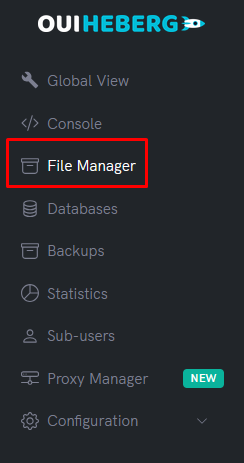
- In the side menu, click on File Manager
- Delete default files (if any)
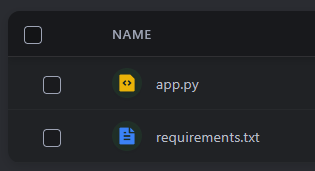
- Click on Upload
- Upload your files:
app.py(ormain.py)requirements.txt- Your folders (
routes/,models/...) if needed
⚠️ Do not upload: The
.envfile will be created directly on the server (more secure).
Using SFTP (Recommended for multiple files)
- Connect via SFTP using FileZilla
- Drag and drop all content from your API folder
- Verify that all files are successfully uploaded
📖 Check the guide "SFTP Access with FileZilla" for detailed instructions.
🔑 Step 3: Create the .env File
Create the .env file
- In the File Manager, click on New file
- Name it
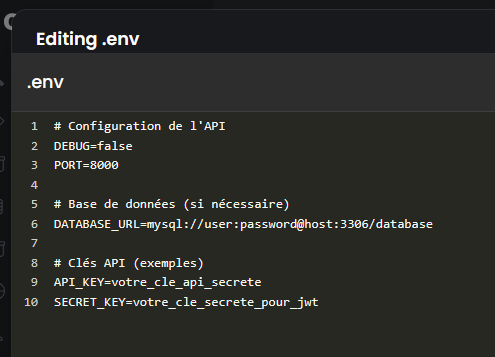
.env(with the dot in front) - Add your variables:
# API Configuration
DEBUG=false
PORT=8000

# Database (if needed)
DATABASE_URL=mysql://user:password@host:3306/database

# API Keys (examples)
API_KEY=your_secret_api_key
SECRET_KEY=your_secret_key_for_jwt
- Click on Create or Save
⚠️ Important:
- No spaces around the
=- No quotes around single values
- Never share this file
⚙️ Step 4: Configure the Startup File
OuiPanel needs to know which Python file to run at startup.
Accessing the settings
- In the side menu, click on Configuration
- Click on Server Settings
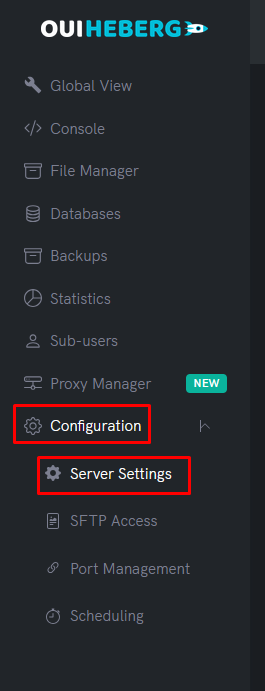
Configure the file to execute
Locate the File to Execute field (or Main File / Startup File):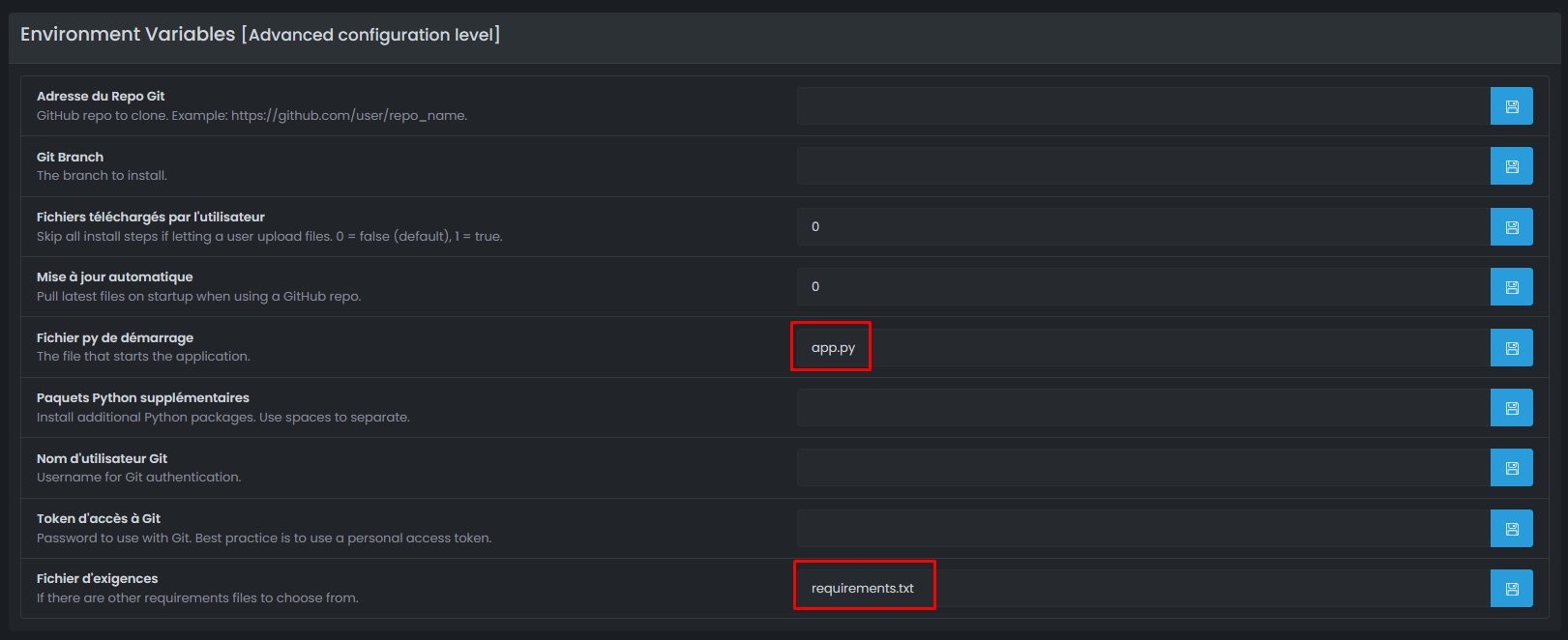
| Your main file | Value to set |
|---|---|
app.py | app.py |
main.py | main.py |
api.py | api.py |
src/app.py | src/app.py |
⚠️ Important: The name must match exactly your file (case-sensitive).
🚀 Step 5: Start the API
Launching the server
- In the side menu, click on Console
- Click on Start
Automatic installation of dependencies
On the first start, the server automatically installs the packages:
Flask:
Installing requirements from requirements.txt...
Successfully installed flask-3.0.0 python-dotenv-1.0.0 gunicorn-21.2.0

Running app.py...
 * Running on http://0.0.0.0:25639
FastAPI:
Installing requirements from requirements.txt...
Successfully installed fastapi-0.109.0 uvicorn-0.27.0 python-dotenv-1.0.0

Running app.py...
INFO:     Uvicorn running on http://0.0.0.0:25639
✅ Step 6: Test the API
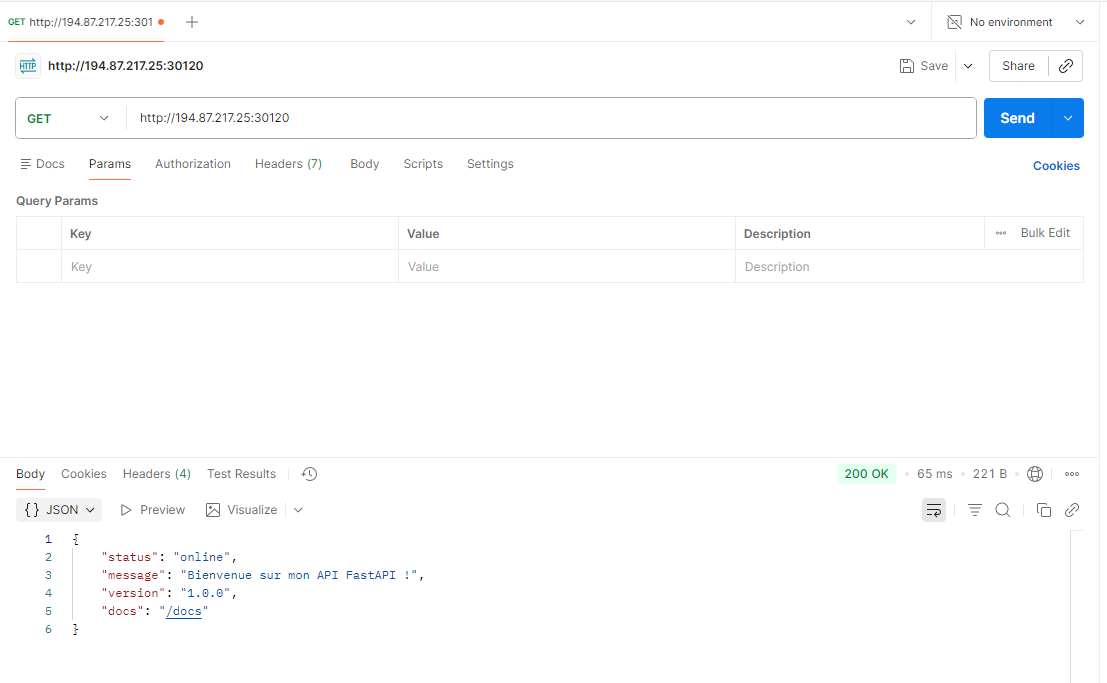
Retrieve the address
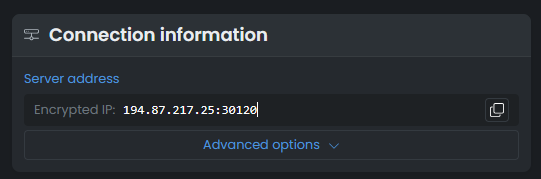
- Note the port displayed in the console (e.g.,
25639) - Retrieve the IP of your server in the Global View
- Your API address is:
http://IP:PORT
Example: http://51.77.xxx.xxx:25639
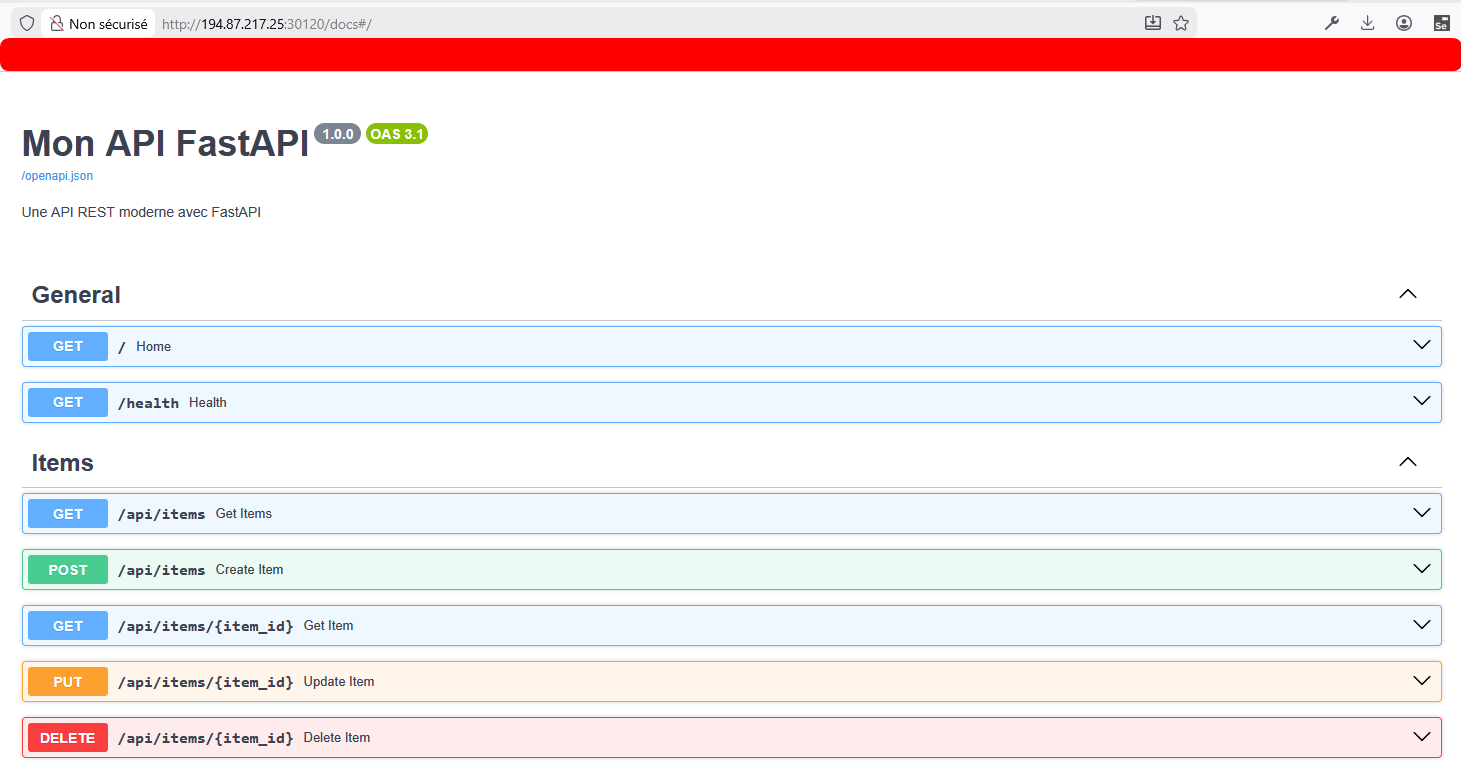
Test the endpoints
Using a browser:
- Open
http://51.77.xxx.xxx:25639/→ Should display the welcome JSON - Open
http://51.77.xxx.xxx:25639/health→ Health check - (FastAPI) Open
http://51.77.xxx.xxx:25639/docs→ Swagger Documentation
Using curl:
# GET - Home page
curl http://51.77.xxx.xxx:25639/

# GET - List of items
curl http://51.77.xxx.xxx:25639/api/items

# GET - Specific item
curl http://51.77.xxx.xxx:25639/api/items/1

# POST - Create an item
curl -X POST http://51.77.xxx.xxx:25639/api/items \
  -H "Content-Type: application/json" \
  -d '{"name": "New item", "price": 29.99}'

# PUT - Modify an item
curl -X PUT http://51.77.xxx.xxx:25639/api/items/1 \
  -H "Content-Type: application/json" \
  -d '{"name": "Modified item", "price": 39.99}'

# DELETE - Delete an item
curl -X DELETE http://51.77.xxx.xxx:25639/api/items/1
Using Postman / Insomnia:
- Import the base URL:
http://51.77.xxx.xxx:25639 - Test your different endpoints
🌐 Step 7: Configure a Domain Name (Proxy Manager)
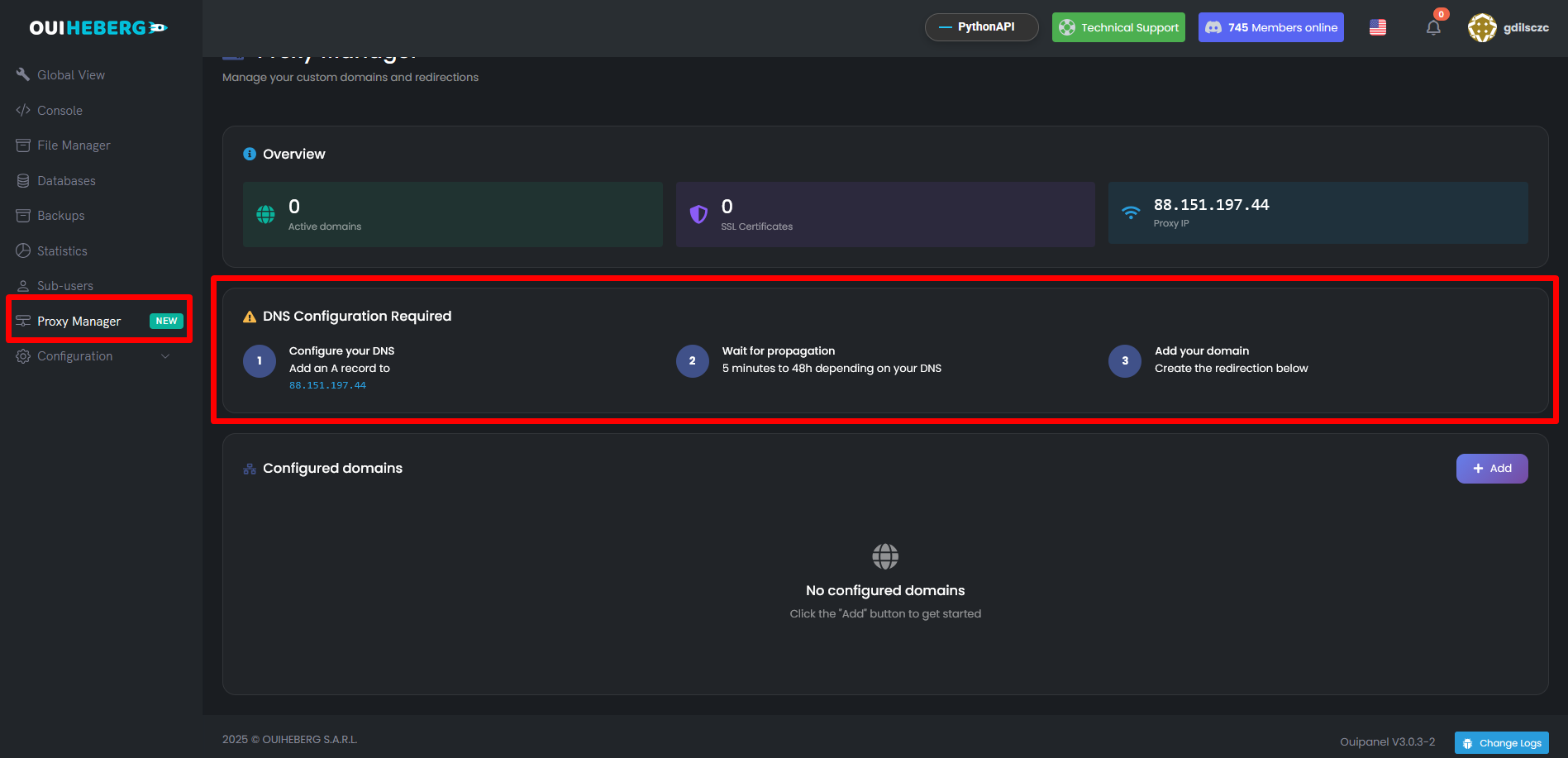
To access your API via a clean URL with HTTPS (e.g., https://api.monsite.com), use the Proxy Manager.
Configure the DNS
- In OuiPanel → Proxy Manager, note the Proxy IP
- At your registrar (OVH, Cloudflare, etc.), create a DNS record:
| Type | Name | Value |
|---|---|---|
A | api | Proxy IP |
Add the domain in OuiPanel
- In the side menu, click on Proxy Manager
- Click on Add
- Fill in:
| Field | Value |
|---|---|
| Domain Name | api.monsite.com |
| Port | Your API port (e.g., 25639) |
| SSL | ✅ Enabled |
- Click on Create redirection
Result
Your API is now accessible via:
- ✅
https://api.monsite.com(with automatic HTTPS) - ✅ Free SSL certificate (Let's Encrypt)
Example call:
curl https://api.monsite.com/api/items
📖 Check the guide "Configure a Domain Name with the Proxy Manager" for more details.
🗄️ Bonus: Connecting to a Database
MySQL with Flask (PyMySQL)
Add to requirements.txt:
pymysql==1.1.0
Connection example:
import pymysql
import os

# Connect to MySQL
connection = pymysql.connect(
    host=os.getenv('DB_HOST', 'localhost'),
    user=os.getenv('DB_USER', 'root'),
    password=os.getenv('DB_PASSWORD', ''),
    database=os.getenv('DB_NAME', 'mydb'),
    charset='utf8mb4'
)

# Example query
with connection.cursor() as cursor:
    cursor.execute("SELECT * FROM items")
    result = cursor.fetchall()
Variables to add to .env:
DB_HOST=mysql-host.ouiheberg.com
DB_USER=your_user
DB_PASSWORD=your_password
DB_NAME=your_db
📖 Check the guide "Create and Manage a MySQL Database" to create your database.
🔧 Troubleshooting
The API does not start
| ❌ Error | ✅ Solution |
|---|---|
ModuleNotFoundError: No module named 'flask' | Check requirements.txt and restart |
ModuleNotFoundError: No module named 'fastapi' | Check requirements.txt and restart |
ModuleNotFoundError: No module named 'dotenv' | Add python-dotenv to requirements.txt |
SyntaxError | Error in your Python code |
Error "No space left on device" (FastAPI)
This error occurs when pydantic-core (a FastAPI dependency) needs to be compiled with Rust:
error: No space left on device (os error 28)
ERROR: Failed building wheel for pydantic-core
| ✅ Solutions |
|---|
| 1. Use Flask instead (does not require compilation) |
| 2. Increase your server's storage (5+ GB recommended) |
| 3. Clean temporary files and try again |
💡 Recommendation: For small servers with low storage, Flask is more suitable than FastAPI.
The API starts but is not accessible
| ❌ Cause | ✅ Solution |
|---|---|
Listens on localhost | Change to 0.0.0.0 |
| Incorrect port | Use os.getenv('SERVER_PORT') |
Check your code:
# ❌ WRONG - listens only locally
app.run(host='localhost', port=5000)
app.run(host='127.0.0.1', port=5000)

# ✅ CORRECT - listens on all interfaces
app.run(host='0.0.0.0', port=port)
uvicorn.run(app, host='0.0.0.0', port=port)
502 Bad Gateway Error (Proxy Manager)
| ❌ Cause | ✅ Solution |
|---|---|
| API not started | Start the server in OuiPanel |
| Incorrect port in Proxy Manager | Check the configured port |
| API crashed | Check the Console |
The .env file is not being read
| ❌ Cause | ✅ Solution |
|---|---|
| python-dotenv not installed | Check requirements.txt |
| load_dotenv() not called | Add load_dotenv() at the beginning of the file |
| Incorrectly named file | The file must be named exactly .env |
CORS Error
If you are calling your API from a frontend (React, Vue, etc.):
| ❌ Error | ✅ Solution |
|---|---|
Access-Control-Allow-Origin | Add Flask-CORS or CORSMiddleware (see Security section) |
🔒 Security
.env File
| ✅ To Do | ❌ Not To Do |
|---|---|
Create the .env on the server | Upload the .env from your PC |
Add .env to .gitignore | Commit the .env to GitHub |
| Use variables for secrets | Place API keys in the code |
API Best Practices
- ✅ Always validate user inputs
- ✅ Use HTTPS in production (Proxy Manager)
- ✅ Do not expose detailed errors in production
- ✅ Add authentication for sensitive routes
Enable CORS (if needed)
If your API is called from a frontend (React, Vue, etc.) on a different domain:
Flask - Add flask-cors:
# requirements.txt
flask-cors==4.0.0
from flask_cors import CORS
app = Flask(__name_)
CORS(app)
FastAPI - The middleware is already available:
from fastapi.middleware.cors import CORSMiddleware

app.add_middleware(
    CORSMiddleware,
    allow_origins=["*"],
    allow_methods=["*"],
    allow_headers=["*"],
)
📂 Advanced Structure (Recommended)
For a more complex API, organize your code:
📁 MyAPI/
├── 📄 app.py               ← Entry point
├── 📄 requirements.txt
├── 📄 .env
├── 📁 routes/
│   ├── 📄 __init__.py
│   ├── 📄 items.py         ← Routes /api/items
│   └── 📄 users.py         ← Routes /api/users
├── 📁 models/
│   └── 📄 item.py          ← Item model
└── 📁 utils/
    └── 📄 helpers.py       ← Utility functions
💡 For large APIs, this structure helps better organize the code and facilitates maintenance.
📝 Summary
1. Choose the framework (Flask or FastAPI)
2. Prepare the files (app.py + requirements.txt with python-dotenv)
3. Ensure the server listens on 0.0.0.0:PORT
4. Upload the files to OuiPanel (without the .env)
5. Create the .env file on the server
6. Configure the startup file (app.py, main.py...)
7. Start the server
8. Test via http://IP:PORT
9. (Optional) Configure the Proxy Manager for HTTPS

TEST ENDPOINTS:
├── GET  /              → Home page
├── GET  /health        → Health check
├── GET  /api/items     → List of items
├── GET  /api/items/1   → An item
├── POST /api/items     → Create an item
├── PUT  /api/items/1   → Modify an item
└── DELETE /api/items/1 → Delete an item

(FastAPI) Auto documentation:
├── /docs   → Swagger UI
└── /redoc → ReDocNeed Python hosting?
Deploy your Python applications with our optimized hosting and dedicated support.