
 Client area
Introduction
This guide will help you configure your Palworld server. You will learn how to modify the most common game settings: death penalty, egg hatching time, experience rate, and many other options.
All modifications are made in a configuration file accessible via SFTP.
Prerequisites
| Item | Description |
|---|---|
| Palworld Server | Already installed and operational |
| SFTP Access | Through FileZilla or your panel's WebSFTP |
| Server Off | Required before any modification |
⚠️ Important: Always turn off your server before modifying the configuration file.
Accessing the configuration file
File location
The file to modify is located here:
/Pal/Saved/Config/LinuxServer/PalWorldSettings.ini 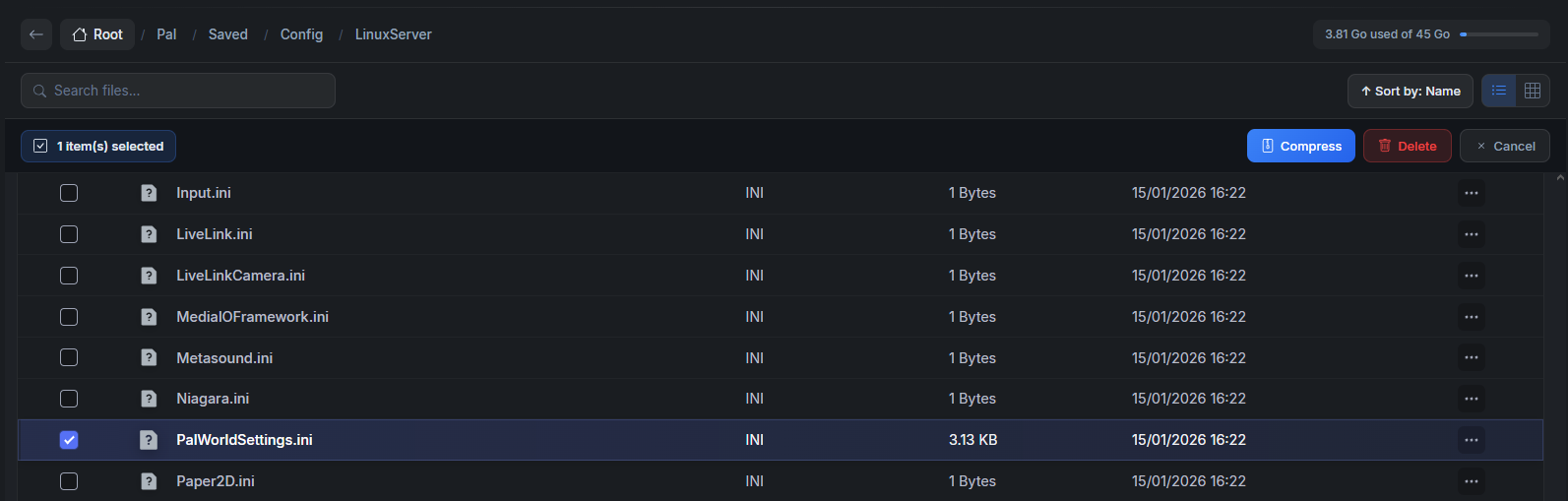 🚨 Attention: A file
 DefaultPalWorldSettings.ini exists at the root of the server. Do not modify it: changes will not take effect.
File structure
The file contains a single line of settings in the format:
[/Script/Pal.PalGameWorldSettings]
OptionSettings=(Parameter1=Value1,Parameter2=Value2,...)
To find a parameter, use Ctrl+F in your editor.
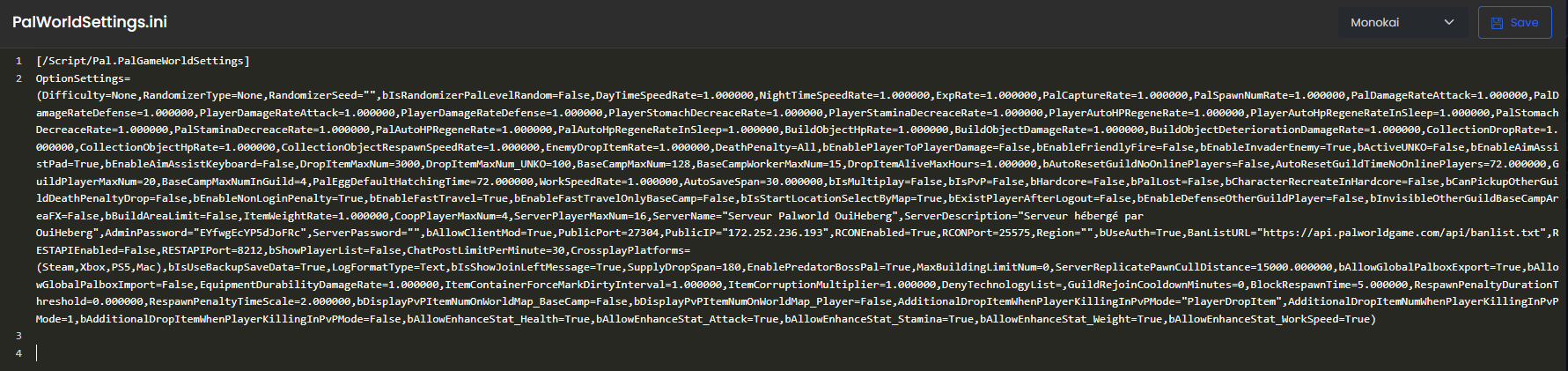
⚠️ Syntax: Strictly adhere to commas and parameter case. An error will prevent the server from starting.
Essential gameplay settings
Death Penalty
Sets what the player loses when dying.
| Value | Effect |
|---|---|
None | No loss |
Item | Item loss (keeps equipment) |
ItemAndEquipment | Item and equipment loss |
All | Total loss (items, equipment, and Pals) |
Default Value: All
DeathPenalty=NonePal Egg Hatching Time (PalEggDefaultHatchingTime)
Duration in hours to hatch a Pal egg.
| Value | Duration |
|---|---|
1.000000 | 1 hour |
6.000000 | 6 hours |
12.000000 | 12 hours |
24.000000 | 1 day |
72.000000 | 3 days (default) |
Default Value: 72.000000
PalEggDefaultHatchingTime=6.000000
📝 Format: Always keep the decimals (
.000000).
Experience and progression settings
Experience Rate (ExpRate)
Multiplier for XP gained by players and Pals.
| Value | Effect |
|---|---|
0.5 | Half reduced XP |
1.0 | Normal (default) |
2.0 | Double XP |
5.0 | 5x XP |
ExpRate=2.000000
Work Speed (WorkSpeedRate)
Affects the speed of Pals working in your base.
| Value | Effect |
|---|---|
1.0 | Normal (default) |
2.0 | 2x faster work |
0.5 | 2x slower work |
WorkSpeedRate=2.000000
Capture and spawn settings
Pal Capture Rate (PalCaptureRate)
Modifies the probability of capturing a Pal.
| Value | Effect |
|---|---|
0.5 | Harder capture |
1.0 | Normal (default) |
2.0 | Easier capture |
PalCaptureRate=1.500000
Wild Pals Quantity (PalSpawnNumRate)
Amount of Pals present in the world.
| Value | Effect |
|---|---|
0.5 | Less Pals |
1.0 | Normal (default) |
2.0 | More Pals |
PalSpawnNumRate=1.500000
Damage settings
Pal Damage
| Parameter | Description | Default |
|---|---|---|
PalDamageRateAttack | Damage inflicted by Pals | 1.0 |
PalDamageRateDefense | Damage received by Pals | 1.0 |
PalDamageRateAttack=1.500000
PalDamageRateDefense=0.800000
Player Damage
| Parameter | Description | Default |
|---|---|---|
PlayerDamageRateAttack | Damage inflicted by players | 1.0 |
PlayerDamageRateDefense | Damage received by players | 1.0 |
PlayerDamageRateAttack=1.200000
PlayerDamageRateDefense=0.800000
Survival settings
Food Consumption and Endurance
| Parameter | Description | Default |
|---|---|---|
PlayerStomachDecreaceRate | Hunger loss speed (player) | 1.0 |
PlayerStaminaDecreaceRate | Endurance loss speed (player) | 1.0 |
PalStomachDecreaceRate | Hunger loss speed (Pals) | 1.0 |
PalStaminaDecreaceRate | Endurance loss speed (Pals) | 1.0 |
💡 Tip: A value of
0.5slows consumption by half.
PlayerStomachDecreaceRate=0.500000
PlayerStaminaDecreaceRate=0.500000
Automatic Regeneration
| Parameter | Description | Default |
|---|---|---|
PlayerAutoHPRegeneRate | Player HP regeneration | 1.0 |
PlayerAutoHpRegeneRateInSleep | Player HP regeneration (sleep) | 1.0 |
PalAutoHPRegeneRate | Pal HP regeneration | 1.0 |
PalAutoHpRegeneRateInSleep | HP Regeneration for Pals (sleep) | 1.0 |
PlayerAutoHPRegeneRate=2.000000
Day/Night Cycle Settings
| Parameter | Description | Default |
|---|---|---|
DayTimeSpeedRate | Day Speed | 1.0 |
NightTimeSpeedRate | Night Speed | 1.0 |
💡 Tip: Increase
NightTimeSpeedRateto shorten nights.
DayTimeSpeedRate=1.000000
NightTimeSpeedRate=2.000000
Base and Guild Settings
| Parameter | Description | Default |
|---|---|---|
BaseCampMaxNum | Max Number of Camps | 128 |
BaseCampWorkerMaxNum | Max Pals per Camp | 15 |
BaseCampMaxNumInGuild | Max Camps per Guild | 4 |
GuildPlayerMaxNum | Max Players per Guild | 20 |
BaseCampWorkerMaxNum=20
GuildPlayerMaxNum=32
Server Settings
| Parameter | Description | Default |
|---|---|---|
ServerPlayerMaxNum | Max Players on Server | 32 |
ServerName | Server Name | "Default Palworld Server" |
ServerDescription | Server Description | "" |
ServerPassword | Password to Join | "" |
AdminPassword | Admin Password | "" |
CoopPlayerMaxNum | Max Players in Co-op | 4 |
ServerPlayerMaxNum=16
ServerName="Mon Serveur Palworld"
ServerPassword="monmotdepasse"
AdminPassword="adminpass123"
PvP and Interactions Settings
| Parameter | Description | Default |
|---|---|---|
bIsPvP | Enable PvP mode | False |
bEnablePlayerToPlayerDamage | Player-to-Player Damage | False |
bEnableFriendlyFire | Friendly Fire | False |
bEnableInvaderEnemy | Base Invasions | True |
bIsPvP=True
bEnablePlayerToPlayerDamage=True
Comfort Settings
| Parameter | Description | Default |
|---|---|---|
bEnableFastTravel | Fast Travel Enabled | True |
bEnableFastTravelOnlyBaseCamp | Fast Travel only to Camps | False |
DropItemMaxNum | Max Items on Ground | 3000 |
DropItemAliveMaxHours | Drop Lifespan (hours) | 1.0 |
ItemWeightRate | Item Weight Multiplier | 1.0 |
AutoSaveSpan | Auto Save Interval (minutes) | 30.0 |
ItemWeightRate=0.500000
AutoSaveSpan=15.000000
Structures Settings
| Parameter | Description | Default |
|---|---|---|
BuildObjectHpRate | Structure HP | 1.0 |
BuildObjectDamageRate | Damage to Structures | 1.0 |
BuildObjectDeteriorationDamageRate | Deterioration Damage | 1.0 |
MaxBuildingLimitNum | Building Limit (0 = unlimited) | 0 |
BuildObjectHpRate=2.000000
BuildObjectDeteriorationDamageRate=0.000000
Drop and Harvest Settings
| Parameter | Description | Default |
|---|---|---|
CollectionDropRate | Drop Rate on Harvest | 1.0 |
CollectionObjectHpRate | Resource HP | 1.0 |
CollectionObjectRespawnSpeedRate | Resource Respawn Speed | 1.0 |
EnemyDropItemRate | Enemy Drop Rate | 1.0 |
CollectionDropRate=2.000000
EnemyDropItemRate=1.500000
Save and Apply
- Save the modified file
- Restart your server from the panel
- Log in and verify that the settings are active
Screenshot Summary
| No. | Capture Content |
|---|---|
| 1 | SFTP Tree with path /Pal/Saved/Config/LinuxServer/PalWorldSettings.ini |
| 2 | Open PalWorldSettings.ini file in the editor |
| 3 | DeathPenalty parameter highlighted in the file |
| 4 | Save button in the editor |
| 5 | Panel interface with server restart button |
Summary
The PalWorldSettings.ini file centralizes all settings for your Palworld server. Take the time to customize the experience according to your preferences: difficulty, progression, PvP, and gameplay comfort. Remember to shut down the server before making changes and then restart it.
Need a Palworld server?
Discover our Palworld hosting plans starting from $9.98/month with instant deployment.