
 Client area
🌐 DNS Records Management on cPanel
OuiHeberg - Technical Documentation
Complete guide for creating and managing DNS records
Introduction
The DNS (Domain Name System) is the system that translates human-readable domain names (like monsite.com) into machine-readable IP addresses (like 192.168.1.1).
DNS records define how your domain should behave: which server it points to, which server handles your emails, etc.
Accessing the DNS Zone Editor
Step 1: Logging into cPanel
- Log in to your OuiHeberg client area
- Access your hosting and click on Access cPanel
- Enter your cPanel credentials if prompted
Step 2: Opening the Zone Editor
- In cPanel, look for the Domains section
- Click on Zone Editor (or Zone Editor)
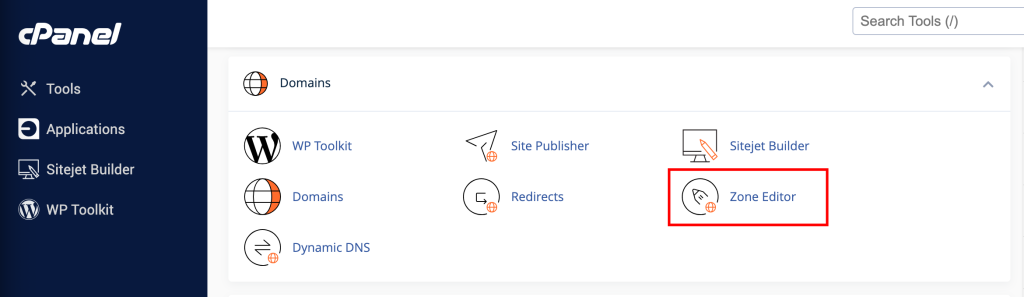
💡 Tip: Use the search bar at the top of cPanel and type "Zone" to quickly find the tool.
Creating a DNS Record
Quick Method
cPanel offers quick add buttons for the most common records:
| Button | Action |
|---|---|
+ A Record | Adds an A record |
+ CNAME Record | Adds a CNAME record |
+ MX Record | Adds an MX record |
Complete Method (all record types)
Step 1: Select the domain
Click on Manage next to the domain you want to modify.
Step 2: Add a record
- Click on the + Add Record button (top right)
- Select the desired record type from the dropdown menu
Step 3: Fill in the fields
Depending on the record type, you will need to fill in different fields:
┌─────────────────────────────────────────────────────────────┐
│  Name          │  monsite.com                                │
├─────────────────────────────────────────────────────────────┤
│  TTL          │  14400                                      │
├─────────────────────────────────────────────────────────────┤
│  Type         │  A                                          │
├─────────────────────────────────────────────────────────────┤
│  Record       │  192.168.1.100                              │
└─────────────────────────────────────────────────────────────┘
Step 4: Save
Click on Add Record to save.
⚠️ Important: DNS changes can take up to 24-48 hours to fully propagate on the Internet (DNS propagation).
DNS Record Types
📌 A Record (Address)
The most fundamental record. It links a domain name to an IPv4 address.
| Field | Description | Example |
|---|---|---|
| Name | The subdomain or @ for the root | www or @ |
| TTL | Cache duration (in seconds) | 14400 |
| Address | Destination IPv4 address | 203.0.113.50 |
Configuration Example:
; Point the root domain to a server
monsite.com.        14400   IN   A   203.0.113.50

; Point www to the same server
www.monsite.com.    14400   IN   A   203.0.113.50
Use Cases:
- Point your domain to your web server
- Create subdomains (
blog.monsite.com,app.monsite.com)
📌 AAAA Record (IPv6 Address)
Similar to the A record, but for IPv6 addresses.
| Field | Description | Example |
|---|---|---|
| Name | The subdomain or @ for the root | www |
| TTL | Cache duration | 14400 |
| Address | Destination IPv6 address | 2001:0db8:85a3::8a2e:0370:7334 |
Configuration Example:
monsite.com. 14400 IN AAAA 2001:0db8:85a3::8a2e:0370:7334
📌 CNAME Record (Canonical Name)
Creates an alias from one name to another. Useful for pointing multiple subdomains to the same destination.
| Field | Description | Example |
|---|---|---|
| Name | The subdomain to create | blog |
| TTL | Cache duration | 14400 |
| CNAME | The target domain | monsite.com |
Configuration Example:
; blog.monsite.com points to monsite.com
blog.monsite.com.   14400   IN   CNAME   monsite.com.

; Alias for an external service
shop.monsite.com.   14400   IN   CNAME   shops.myshopify.com.
⚠️ Important Limitations:
- A CNAME cannot coexist with other records on the same name
- A CNAME cannot be created on the domain root (
@)
📌 MX Record (Mail Exchange)
Defines the servers that handle emails for your domain.
| Field | Description | Example |
|---|---|---|
| Name | Usually @ (root) | @ |
| TTL | Cache duration | 14400 |
| Priority | The lower the number, the higher the priority | 10 |
| Destination | The mail server | mail.monsite.com |
Configuration Example:
; Simple mail setup
monsite.com.    14400   IN   MX   10   mail.monsite.com.

; Setup with backup server
monsite.com.    14400   IN   MX   10   mail1.monsite.com.
monsite.com.    14400   IN   MX   20   mail2.monsite.com.
Common Configurations:
| Service | MX Record |
|---|---|
| Google Workspace | ASPMX.L.GOOGLE.COM (priority 1) |
| Microsoft 365 | *.mail.protection.outlook.com (priority 0) |
| OVH Mail | mx1.mail.ovh.net (priority 1) |
📌 TXT Record (Text)
Stores arbitrary text. Commonly used for domain verification and email security.
| Field | Description | Example |
|---|---|---|
| Name | The subdomain or @ | @ |
| TTL | Cache duration | 14400 |
| Text | The textual content | v=spf1 include:_spf.google.com ~all |
Main Uses:
1. SPF (Sender Policy Framework)
Defines which servers are allowed to send emails for your domain.
monsite.com. 14400 IN TXT "v=spf1 include:_spf.google.com ~all"
2. DKIM (DomainKeys Identified Mail)
Cryptographic signature to authenticate emails.
google._domainkey.monsite.com. 14400 IN TXT "v=DKIM1; k=rsa; p=MIGfMA0GCS..."
3. DMARC (Domain-based Message Authentication)
Email handling policy for failed SPF/DKIM emails.
_dmarc.monsite.com. 14400 IN TXT "v=DMARC1; p=quarantine; rua=mailto:dmarc@monsite.com"
4. Domain Verification
To prove ownership of the domain (Google, Microsoft, etc.).
monsite.com. 14400 IN TXT "google-site-verification=abc123..."
📌 SRV Record (Service)
Defines the location of specific services (VoIP, instant messaging, etc.).
| Field | Description | Example |
|---|---|---|
| Name | Format: _service._protocol | _sip._tcp |
| TTL | Cache duration | 14400 |
| Priority | Server priority | 10 |
| Weight | Load distribution | 60 |
| Port | Service port | 5060 |
| Target | Target server | sipserver.monsite.com |
Configuration Example:
_sip._tcp.monsite.com. 14400 IN SRV 10 60 5060 sipserver.monsite.com.
Full Format: _service._proto.name TTL class SRV priority weight port target
📌 CAA Record (Certification Authority Authorization)
Specifies which certification authorities are allowed to issue SSL certificates for your domain.
| Field | Description | Example |
|---|---|---|
| Name | The domain | @ |
| TTL | Cache duration | 14400 |
| Flag | Usually 0 | 0 |
| Tag | issue, issuewild, or iodef | issue |
| Value | The authorized authority | letsencrypt.org |
Configuration Example:
; Allow only Let's Encrypt
monsite.com.    14400   IN   CAA   0 issue "letsencrypt.org"

; Allow Let's Encrypt for wildcards
monsite.com.    14400   IN   CAA   0 issuewild "letsencrypt.org"

; Notification email in case of violation
monsite.com.    14400   IN   CAA   0 iodef "mailto:ssl@monsite.com"
📌 NS Record (Name Server)
Defines the authoritative DNS servers for your domain.
monsite.com.    14400   IN   NS   ns1.ouiheberg.com.
monsite.com.    14400   IN   NS   ns2.ouiheberg.com.
⚠️ Caution: Only modify these records if you know what you are doing. Incorrect configuration can make your domain inaccessible.
📌 PTR Record (Pointer)
Used for reverse DNS (resolving an IP to a name). Typically managed by your hosting provider.
50.113.0.203.in-addr.arpa. 14400 IN PTR monsite.com.
Practical Examples
🔧 Complete Configuration for a Website + Emails
; === BASIC RECORDS ===
; Root domain
monsite.com.            14400   IN   A       203.0.113.50
monsite.com.            14400   IN   AAAA    2001:db8::50

; www Subdomain
www.monsite.com.        14400   IN   CNAME   monsite.com.

; === EMAIL CONFIGURATION ===
; Mail server
monsite.com.            14400   IN   MX      10 mail.monsite.com.
mail.monsite.com.       14400   IN   A       203.0.113.51

; Email security
monsite.com.            14400   IN   TXT     "v=spf1 mx a ~all"
_dmar Clear your local DNS cache : Windows : ipconfig /flushdns
 macOS : sudo dscacheutil -flushcache; sudo killall -HUP mDNSResponder
 Linux : sudo systemd-resolve --flush-caches
  ❓ How to test my DNS records? Use the dig command (Linux/macOS) or nslookup (Windows) : # Test an A record
dig mysite.com A

# Test an MX record
dig mysite.com MX

# Test a TXT record
dig mysite.com TXT

# Use a specific DNS server (Google)
dig @8.8.8.8 mysite.com A
 ❓ Error "CNAME and other data" This error occurs when trying to create a CNAME on a name that already has other records. First remove the other records or use a different name.  📚 Summary of record types    Type Main Use Example Value     A Point to an IPv4 192.168.1.1   AAAA Point to an IPv6 2001:db8::1   CNAME Create an alias mysite.com   MX Configure emails 10 mail.mysite.com   TXT Verification, SPF, DKIM v=spf1 mx ~all   SRV Locate services 10 60 5060 sip.mysite.com   CAA Authorize SSL CAs 0 issue "letsencrypt.org"   NS Authoritative DNS servers ns1.yeshosting.com   PTR Reverse DNS mysite.com