
 Client area
Estimated time: 15 minutes
Difficulty: Intermediate ⭐⭐
Compatible servers: FiveM
📋 Introduction
The server.cfg file is the main configuration file for your FiveM server. It allows you to define the server name, number of players, resources to load, permissions, and much more.
What you can configure
| Category | Examples |
|---|---|
| 🏷️ Identity | Server name, description, tags |
| 🔑 License | Cfx.re license key (mandatory) |
| 👥 Players | Max slots, OneSync |
| 📦 Resources | Scripts, maps, vehicles |
| 🔒 Permissions | ACE/ACL, admins, groups |
| ⚙️ Network | Ports, RCON |
🔑 Prerequisites: Obtain a License Key
Before configuring your server, you need to obtain a free license key on Cfx.re.
Create a Cfx.re account
- Go to Cfx.re
- Click on Sign Up (or log in if you already have an account)
- Create your account with email or Discord
Generate the license key
- Log in to Cfx.re Keymaster
- Click on Register a new server
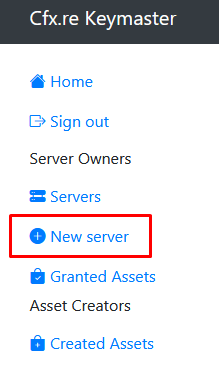
- Fill out the form:

- Click on Generate
- Copy the generated key (format:
xxxxxxxxxxxxxxxxxxxxxxxxxxxxx)

⚠️ Important :
- One key = one server
- Keep this key secret
- You can generate multiple keys for multiple servers
📁 Access the server.cfg File
Using the File Manager
- Log in to OuiPanel
- Select your FiveM server
- In the side menu, click on File Manager
- Open the
server.cfgfile at the root
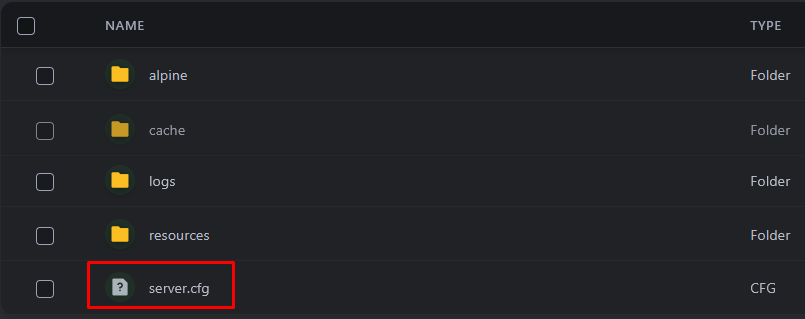
- Click on the file to Edit it
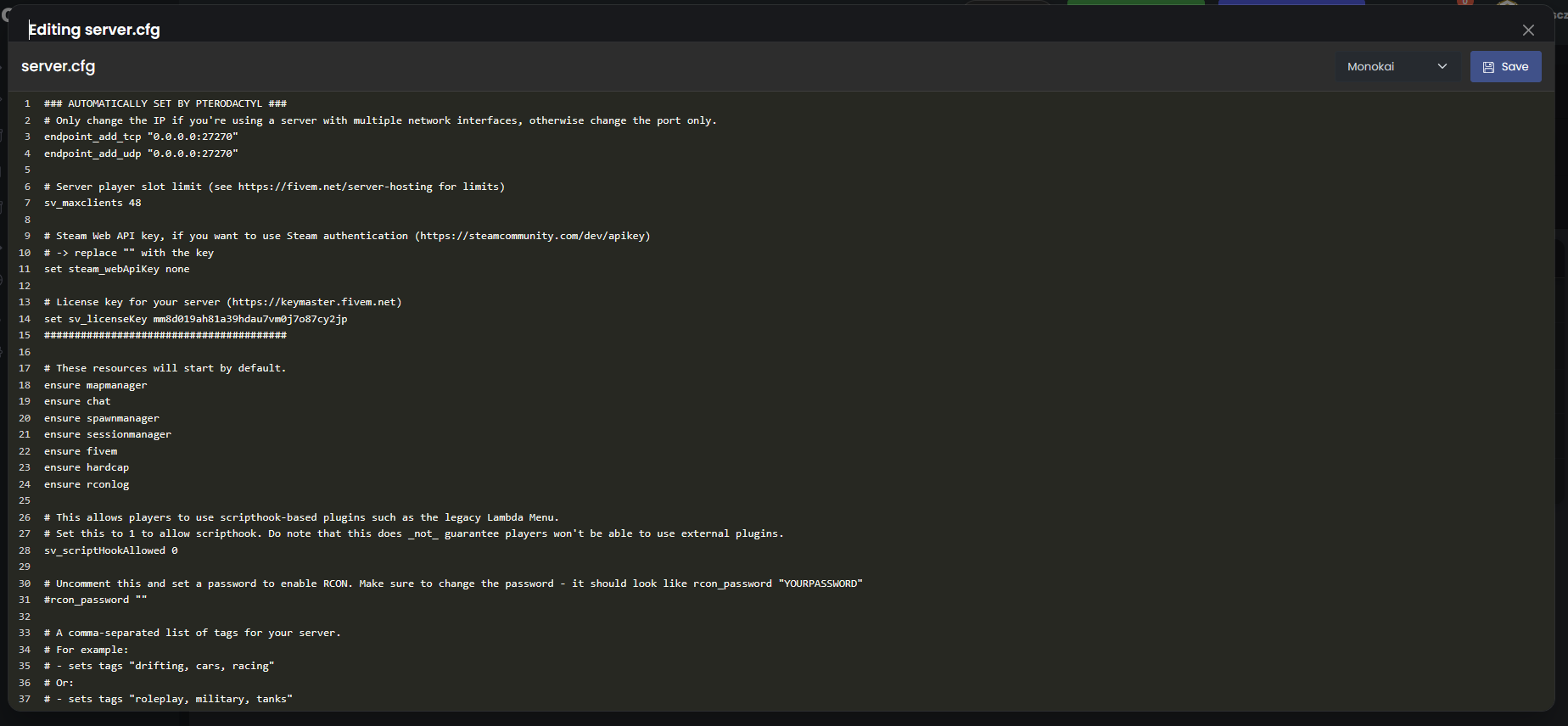
⚠️ Important : Stop your server before editing this file, then restart it to apply the changes.
🏷️ Basic Configuration
License Key (Mandatory)
sv_licenseKey "your_license_key_here"
Replace with the key obtained on Keymaster.
⚠️ Without a valid license key, your server will not start.
Server Name
sv_hostname "My FiveM Server | French Roleplay"
This is the name displayed in the FiveM server list.
Name tips:
- ✅ Short and memorable
- ✅ Include the type (RP, Freeroam, Drift...)
- ✅ Include the language (FR, EN...)
- ✅ Use emojis moderately
Examples:
sv_hostname "🇫🇷 Revolution RP | Serious Roleplay"
sv_hostname "Los Santos Life | French RP"
sv_hostname "Drift Paradise | Racing & Tuning"
Server Description
sv_projectDesc "French roleplay server with realistic economy, diverse jobs, and active community."
Description displayed in the server details. Maximum 200 characters recommended.
Project Name
sv_projectName "Revolution RP"
Short project name (displayed in certain menus).
Server Tags
sets tags "roleplay, french, serious, economy, jobs"
Tags for SEO in the server list. Separate with commas.
Popular tags:
roleplay,rp,serious,semi-seriousfrench,francais,freconomy,jobs,police,emscustom-cars,drift,racingesx,qbcore,vrp
Server Image/Banner
load_server_icon server_icon.png
Displays an icon in the server list.
Specifications:
- Format: PNG
- Size: 96x96 pixels
- Name:
server_icon.png - Location: server root
👥 Player Configuration
Maximum Slots Number
sv_maxclients 32
| Value | Recommendation |
|---|---|
32 | Small server / Testing |
64 | Medium server |
128 | Large server |
256+ | Very large server (OneSync required) |
⚠️ More players = more resources required (RAM, CPU).
Enable OneSync
OneSync allows managing more than 32 players and improves synchronization.
set onesync on
| Mode | Description |
|---|---|
off | Disabled (32 players limit) |
on | Enabled (recommended) |
legacy | Legacy mode |
Advanced OneSync configuration:
set onesync on
set onesync_population true

# Distance de culling (entity view distance)
set onesync_distanceCullVehicles false
set onesync_distanceCull 500
Spawn Configuration
spawnpoint 0 -269.4 -955.3 31.2
Default spawn coordinates (X, Y, Z). Most frameworks (ESX, QBCore) handle the spawn themselves.
📦 Resource Configuration
Start a Resource
ensure resource_name
Or:
start resource_name
💡
ensureis recommended as it restarts the resource if it crashes.
Load Order
The order of ensure is important! Some resources depend on others.
Recommended order:
# 1. FiveM Basic Resources
ensure mapmanager
ensure chat
ensure spawnmanager
ensure sessionmanager
ensure hardcap
ensure rconlog

# 2. Database
ensure oxmysql

# 3. Framework (ESX or QBCore)
ensure es_extended

# 4. Common Dependencies
ensure esx_menu_default
ensure esx_menu_dialog
ensure esx_menu_list

# 5. Essential Scripts
ensure esx_identity
ensure esx_society
ensure esx_billing
ensure esx_banking

# 6. Jobs / Careers
ensure esx_policejob
ensure esx_ambulancejob
ensure esx_mechanicjob

# 7. Other Scripts
ensure esx_vehicleshop
ensure esx_property
ensure esx_skin

# 8. Custom Scripts
ensure my_custom_script
Stopping a Resource
To disable a resource, comment out the line with #:
# ensure disabled_resource
🗄️ Database Configuration
MySQL Connection
set mysql_connection_string "mysql://user:password@host:3306/database?charset=utf8mb4"
Replace:
user: MySQL usernamepassword: MySQL passwordhost: MySQL server address3306: MySQL portdatabase: Database name
📖 Check the guide "Create and Manage a MySQL Database" to create your database.
Example with OuiHeberg:
set mysql_connection_string "mysql://s123_db:[email protected]:3306/s123_db?charset=utf8mb4"
Alternative MySQL Configuration
JDBC Format (old):
set mysql_connection_string "server=mysql-1.ouiheberg.com;uid=s123_db;password=Password123;database=s123_db"
🔒 Permissions Configuration (ACE/ACL)
ACE System
The ACE (Access Control Entry) system manages permissions on FiveM.
Add an Administrator
By Steam ID (recommended):
add_ace identifier.steam:110000xxxxxxxxx group.admin allow
add_principal identifier.steam:110000xxxxxxxxx group.admin
By Discord ID:
add_ace identifier.discord:123456789012345678 group.admin allow
add_principal identifier.discord:123456789012345678 group.admin
By License ID:
add_ace identifier.license:xxxxxxxxxxxxxxxxxxxxx group.admin allow
add_principal identifier.license:xxxxxxxxxxxxxxxxxxxxx group.admin
💡 To find your Steam ID: SteamID.io
Create Permission Groups
# Create the admin group with all permissions
add_ace group.admin command allow
add_ace group.admin command.quit deny

# Create the moderator group
add_ace group.moderator command.kick allow
add_ace group.moderator command.ban allow

# Inherit permissions
add_principal group.admin group.moderator
Common Permissions
# Allow the admin group to use all commands
add_ace group.admin command allow

# Specific permissions
add_ace group.admin command.restart allow
add_ace group.admin command.stop allow
add_ace group.admin command.start allow
add_ace group.admin command.refresh allow

# vMenu permissions
add_ace group.admin vMenu.everything allow
add_ace group.moderator vMenu.kick allow
add_ace group.moderator vMenu.ban allow
Assign a Player to a Group
add_principal identifier.steam:110000xxxxxxxxx group.admin
add_principal identifier.discord:123456789012345678 group.moderator
⚙️ Network Configuration
Server Port
endpoint_add_tcp "0.0.0.0:30120"
endpoint_add_udp "0.0.0.0:30120"
⚠️ On OuiHeberg, the port is managed automatically. Use the port assigned to your server.
RCON (Remote Console)
rcon_password "VerySecureRconPassword"
Allows remote control of the server. Use a strong password!
💡 Leave blank to disable RCON:
rcon_password ""
Steam Configuration
set steam_webApiKey "XXXXXXXXXXXXXXXXXXXXXXXXXXXXXXXXXX"
Steam API Key (optional, for certain features). Get it at: Steam Web API Key
🎮 Gameplay Configuration
Enable/Disable Features
# Disable automatic passive mode
sv_disablePassive false

# Enable PvP
sv_enablePVP true

# Disable time synchronization
sv_disableTimeSync true

# Show the FiveM logo on loading
sv_showFiveMBanner true
Hardcore/Serious Mode
# Disable automatic radar
sv_disableRadar true

# Disable native notifications
sv_disableClientNotify true

# Serious RP mode
set sv_enforceGameBuild 2944
Game Build
sv_enforceGameBuild 2944
Forces a specific version of GTA V. Useful for resource compatibility.
| Build | GTA V Version |
|---|---|
2060 | Los Santos Summer Special |
2189 | Cayo Perico |
2372 | Los Santos Tuners |
2545 | The Contract |
2699 | Criminal Enterprises |
2944 | San Andreas Mercenaries |
3095 | Chop Shop |
📜 Useful Convars Variables
Set Variables
set my_variable "value"
setr my_replicated_variable "value"
sets my_serverinfo_variable "value"
| Command | Visibility |
|---|---|
set | Server only |
setr | Replicated to clients |
sets | Visible in server info |
ESX Framework Variables
set es_enableCustomData 1
set es_startingCash 50000
set es_startingBank 100000
set es_startingBlackMoney 0
QBCore Framework Variables
set qb_locale "fr"
set qb_starterMoney 5000
set qb_starterBank 10000
📄 Complete server.cfg File (Example)
Here is an example of a complete and functional server.cfg:
# ============================================
# FIVEM SERVER CONFIGURATION
# ============================================

# === LICENSE ===
sv_licenseKey "your_license_key_here"

# === SERVER IDENTITY ===
sv_hostname "🇫🇷 My RP Server | Serious Roleplay"
sv_projectName "My RP Server"
sv_projectDesc "French roleplay server with realistic economy and active community."
sets tags "roleplay, french, serious, esx, economy"
load_server_icon server_icon.png

# === PLAYERS ===
sv_maxclients 64
set onesync on

# === NETWORK ===
endpoint_add_tcp "0.0.0.0:30120"
endpoint_add_udp "0.0.0.0:30120"

# === RCON ===
rcon_password ""

# === DATABASE ===
set mysql_connection_string "mysql://user:password@host:3306/database?charset=utf8mb4"

# === STEAM (Optional) ===
# set steam_webApiKey "XXXXXXXXXXXXXXXXXXXXXXXXXX"

# === GAMEPLAY ===
sv_enforceGameBuild 2944

# ============================================
# ACE/ACL PERMISSIONS
# ============================================

# Admin Group
add_ace group.admin command allow
add_ace group.admin command.quit deny

# Administrators (replace with your identifiers)
# add_principal identifier.steam:110000xxxxxxxxx group.admin
# add_principal identifier.discord:123456789012345678 group.admin

# ============================================
# RESOURCES
# ============================================

# === Base FiveM ===
ensure mapmanager
ensure chat
ensure spawnmanager
ensure sessionmanager
ensure hardcap
ensure rconlog

# === Database ===
ensure oxmysql

# === ESX Framework ===
ensure es_extended
ensure esx_menu_default
ensure esx_menu_dialog
ensure esx_menu_list

# === ESX Scripts ===
ensure esx_identity
ensure esx_society
ensure esx_billing
ensure esx_banking
ensure esx_skin

# === Jobs ===
ensure esx_policejob
ensure esx_ambulancejob
ensure esx_mechanicjob

# === Other Scripts ===
ensure esx_vehicleshop
ensure esx_property

# === Custom Scripts ===
# ensure my_script
🔧 Troubleshooting
The server doesn't start
| ❌ Error | ✅ Solution |
|---|---|
Invalid license key | Check your key on Keymaster |
License key not set | Add sv_licenseKey in server.cfg |
Could not find resource | Ensure the resource exists in the resources folder |
MySQL connection failed | Check the MySQL connection string |
The server doesn't appear in the list
| ❌ Cause | ✅ Solution |
|---|---|
| Invalid license key | Regenerate a key on Keymaster |
| Port blocked | Ensure TCP/UDP ports are open |
| Server starting up | Wait a few minutes |
Resource not loading
| ❌ Cause | ✅ Solution |
|---|---|
| Missing dependency | Check required dependencies |
| Error in script | Check console (F8 in-game) |
| Incorrect loading order | Reorganize ensure |
fxmanifest.lua missing | Ensure the file exists |
Database error
| ❌ Error | ✅ Solution |
|---|---|
Access denied | Check MySQL user/password |
Unknown database | Create the database |
Connection refused | Check host and port |
Unapplied ACE permissions
| ❌ Cause | ✅ Solution |
|---|---|
| Incorrect identifier | Check format (steam:, discord:, license:) |
| Server not restarted | Restart after modification |
| Typo | Check syntax |
📝 Useful Console Commands
| Command | Description |
|---|---|
restart [resource] | Restart a resource |
stop [resource] | Stop a resource |
start [resource] | Start a resource |
refresh | Refresh the resource list |
status | Show connected players |
quit | Stop the server |
📝 Summary
1. Obtain a license key on Keymaster (Cfx.re)
2. Stop the server
3. File manager → server.cfg → Edit
4. Configure:
   - sv_licenseKey (mandatory)
   - sv_hostname (server name)
   - sv_maxclients (slots)
   - mysql_connection_string (database)
   - Resources (ensure)
   - ACE Permissions (admins)
5. Save the file
6. Restart the server
7. Check in the FiveM server list
A clean server.cfg deserves reliable hardware: our FiveM host deploys your server with txAdmin in minutes.
Need a GTA/FiveM server?
Discover our GTA V / FiveM hosting plans starting from $9.98/month with instant deployment.