
 Client area
Keymaster FiveM: Complete Guide
Every FiveM server needs a license key to operate. Without it, the server refuses to start. The FiveM keymaster (also written as key master fivem) is the official portal from Cfx.re where you generate, manage, and monitor this key. This guide covers account creation, key generation, license management, and configuration on OuiPanel in 2026, step by step.
What is Keymaster?
Keymaster is the server key management portal operated by Cfx.re, the creators of FiveM. Accessible at keymaster.fivem.net, it centralizes several essential functions for server owners.
The license key is a unique identifier that authenticates your server with the FiveM network. It allows players to find and join your server via the FiveM list. Each server requires its own key: using the same key on two simultaneous servers causes authentication conflicts and may lead to a ban.
The Keymaster FiveM portal consists of three main sections. The Servers section lists all your registered keys with their name, associated IP, and creation date. The Asset Grants section lists the resources (scripts, vehicles, maps) purchased from the official Cfx.re/Tebex store and linked to your account. The Subscription section manages your Cfx.re subscription (formerly Patreon), which unlocks benefits like OneSync Infinity, custom banners, and higher key limits.
The license key is free, without expiration, and without time limit. Free accounts can create multiple keys, but there is a cap. If you reach this limit, delete unused keys or subscribe to a Cfx.re plan for a higher quota.
Creating a Keymaster Account
Before generating a key, you must have a Cfx.re account. Here’s how to proceed.
1. Go to forum.cfx.re and click on "Sign Up" at the top right. Fill out the form: username, valid email address, and password.
2. Check your inbox and click on the confirmation link sent by Cfx.re. Check the spam/promotions folders if the email does not appear in the main inbox. Without confirmation, the account remains inactive.
3. Once the account is confirmed, log in to keymaster.fivem.net with the same credentials. The Keymaster portal uses Cfx.re forum authentication: one account for both.
Tip: use an email address that you have permanent access to. This address is used for account recovery and important notifications (policy changes, security alerts).
Obtaining a FiveM Server Key
From the FiveM keymaster portal, generating a key takes less than two minutes.
1. Click on "New Server" in the navigation menu at the top of the page.
2. Fill out the form with the following information:
-
Display Name: the identification name of your server. This name is only visible in your Keymaster dashboard (not in the public FiveM list). Choose a descriptive name if you manage multiple servers, for example, "Main RP" or "Test Server".
-
Initial Server IP Address: the public IP address of your server. Do not include the port (no
:30120at the end). If you are hosted by OuiHeberg, the IP is displayed in OuiPanel on the main page of your server. To find the IP of a VPS or personal machine, check a site like whatismyipaddress.com. -
Server Type: select "VPS" from the dropdown menu if you are using a host (OuiHeberg, VPS, or dedicated). Select "Other / Home hosted" only if the server is running on your own machine.
-
Which server provider are you using?: this field is informational and has no technical impact. Indicate "OuiHeberg" or any other text.
3. Click on "Generate". Your key will appear immediately on the screen as a long string of alphanumeric characters (example: cfxk_xxxxxxxxxxxxxxxxxxxx_xxxxxx).
4. Copy the key immediately and keep it in a secure place. You can always find it in your Keymaster dashboard, but it is better not to rely solely on the portal.
⚠️ Never share your key publicly. Anyone with your key could use it on another server, causing a conflict with yours. If you suspect a leak, use the "Re-Activate" option in Keymaster to regenerate the key without creating a new record.
Managing and Transferring Your License
The Keymaster FiveM dashboard offers several management options for your existing keys.
Modify the associated IP. If your server changes its IP address (host migration, plan change), you need to update the IP in Keymaster. Access the relevant key in the "Servers" section, modify the IP field, and save. The change is immediate.
Reactivating a key (Re-Activate). If your server refuses to start with the error "License key is not valid" or "License key already in use", use the "Re-Activate" button on the relevant key. This action regenerates the key while keeping the same server record. Useful in case of key leaks or conflicts.
Delete a record. If you no longer manage a server, delete the record to free up a slot in your key quota. Deletion is permanent.
Assets and Tebex resources. Scripts and vehicles purchased from the official store are linked to your Cfx.re account. The "Asset Grants" section displays all your resources. Transferring assets to another account is possible in certain cases (check eligibility in the dedicated section), but the server keys themselves are not transferable between accounts. If you sell an RP project, the new owner will need to generate their own key.
Cfx.re Subscription. Subscriptions (formerly managed via Patreon, now on the Cfx.re portal) unlock OneSync Infinity (up to 2,048 players), server banner customization, higher key limits, and priority support. The subscription is optional: a free server works perfectly with standard OneSync (up to 64 players by default, 128 with certain configurations).
Configuring the Key on OuiPanel
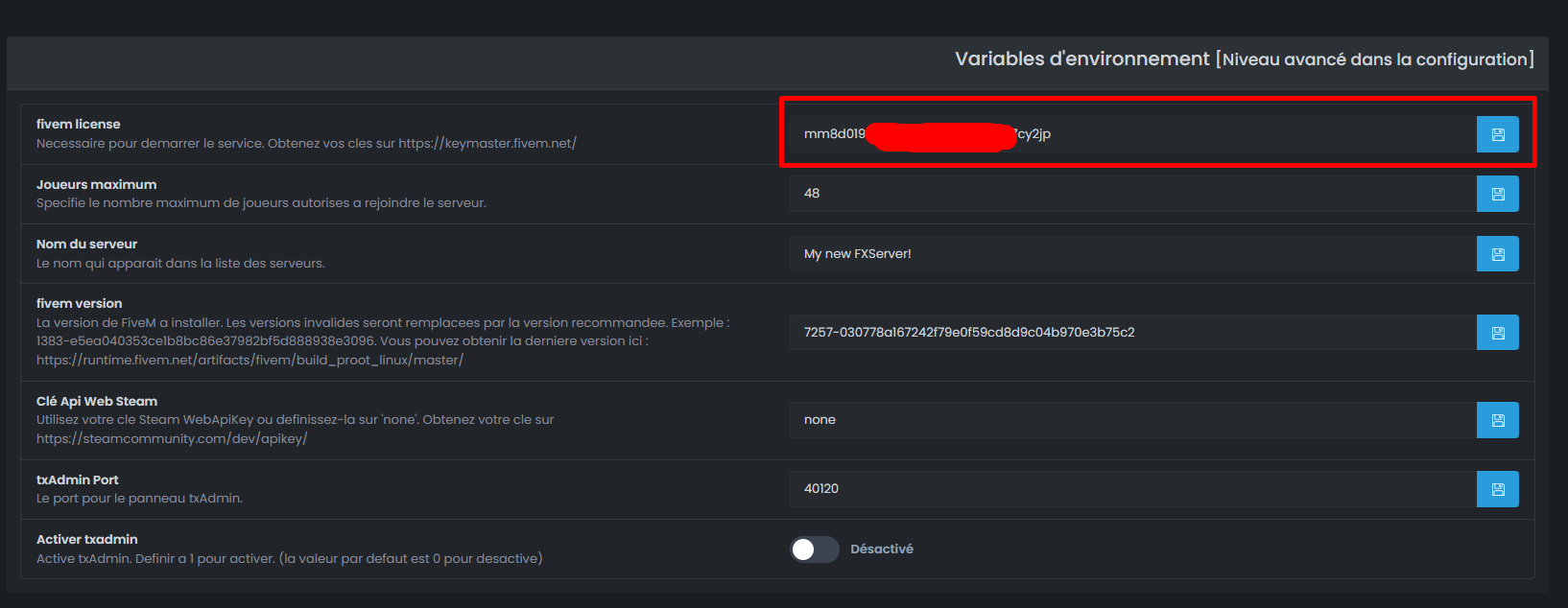
Once your key is generated on the FiveM keymaster portal, it needs to be injected into your server configuration. On a FiveM server hosting by OuiHeberg, two methods are available.
Method 1: via the OuiPanel field (recommended).
- Log in to dash.ouipanel.com and select your FiveM server.
- Go to Configuration (left sidebar menu).
- Locate the "FIVEM LICENSE" (or "License Key") field.
- Paste your Keymaster key into this field.
- Press Enter to save.
- Restart your server to apply the change.
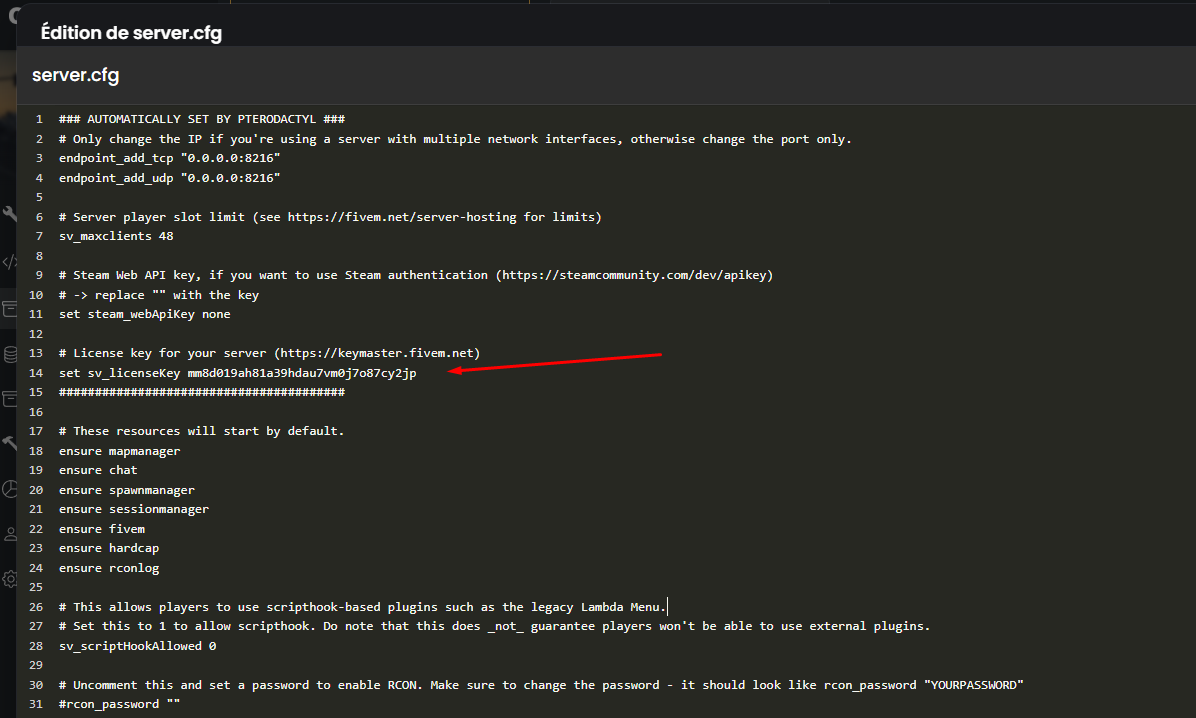
Method 2: via server.cfg (advanced).
- In OuiPanel, open the File Manager.
- Navigate to the server.cfg file at the root of your server.
- Click "Edit" to open the editor.
- Locate the line
sv_licenseKeyand replace the existing value with your key:
sv_licenseKey "cfxk_xxxxxxxxxxxxxxxxxxxx_xxxxxx"
- Save the file and restart the server.
If your server starts correctly and appears in the FiveM server list, the key is validated. In case of an error, check that the key is copied correctly (without spaces before/after), that the IP in Keymaster matches the IP of your OuiHeberg server, and that the key is not used on another server.
Once the license is in place, you can update the FiveM artifact to enjoy the latest features, and then configure your FiveM SQL configuration with oxmysql to connect your database.
Keymaster FAQ
Is the Keymaster key paid?
No. Generating server keys on keymaster.fivem.net is completely free. Only Cfx.re subscriptions (for OneSync Infinity and additional benefits) are paid.
Can the same key be used on two servers?
No. Each FiveM server must have its own unique key. Using a key on two servers simultaneously causes an authentication error and prevents players from connecting.
My key is not working, what should I do?
Check three points in this order: the key is copied correctly without spaces or extra characters, the IP in Keymaster exactly matches the public IP of your server (without the port), and the key is not already active on another server. If the problem persists, use "Re-Activate" in Keymaster to regenerate the key.
Do keys expire?
No. Standard FiveM server keys do not have an expiration date. They remain valid as long as your Cfx.re account exists and the key is not manually deleted.
How many keys can be created with a free account?
The exact number varies, but free accounts have a limited quota (usually sufficient for 2-3 servers). If you manage more servers, delete unused keys or opt for a Cfx.re subscription that increases the quota.
How to transfer a FiveM server to someone else?
Keys cannot be transferred between accounts. The new owner must create their own Cfx.re account, generate a new key, and configure it in their server.cfg. Assets purchased on Tebex can sometimes be transferred via the "Asset Grants" section of the portal.
Need a GTA/FiveM server?
Discover our GTA V / FiveM hosting plans starting from $9.98/month with instant deployment.