
 Client area
If you are uncomfortable with spiders, Hytale includes a native accessibility option to modify their appearance or disable them. Here's how to do it.
⚙️ Steps to follow
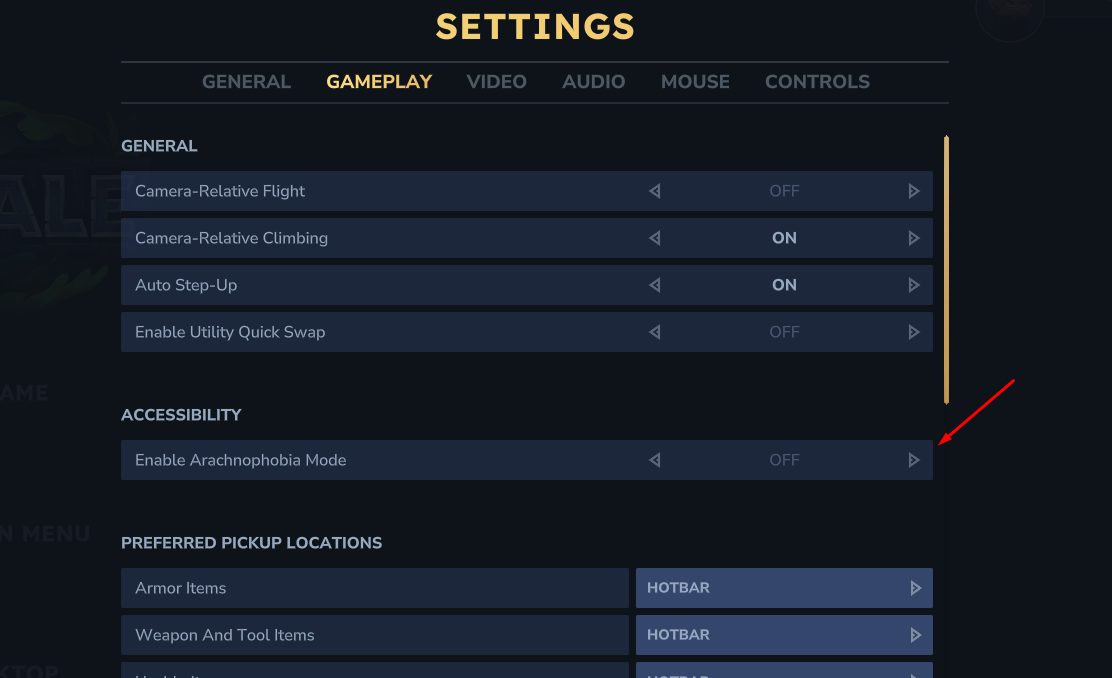
- Launch the game and go to the Settings of the game.
- Go to the Gameplay section.
- Look for the category named ACCESSIBILITY.
- You will find the following setting: Enable Arachnophobia Mode.
- Simply switch this option to ON.
ℹ️ Note: Once activated, this mode changes the appearance of spiders to make them less scary (often by changing their model to simple shapes or less realistic creatures).
Need a Hytale server?
Hytale server hosting from $3.46/month, with CurseForge mods installed from the panel and DDoS protection included.