
 Client area
Installing Mods on a Hytale Server
To enjoy mods with friends, they must be installed directly on the server. Here's how to proceed, whether you are using a hosting provider with a management panel or doing a manual installation.
🚀 Method 1: Via OuiHeberg (OuiPanel)
The quickest method for OuiHeberg users.
If you have a server with OuiHeberg, the installation is simplified thanks to the tools integrated in the OuiPanel.
- Login: Log in to your management interface OuiPanel.
- Access to the manager: In your server's menu, go to the Mods Manager tab.
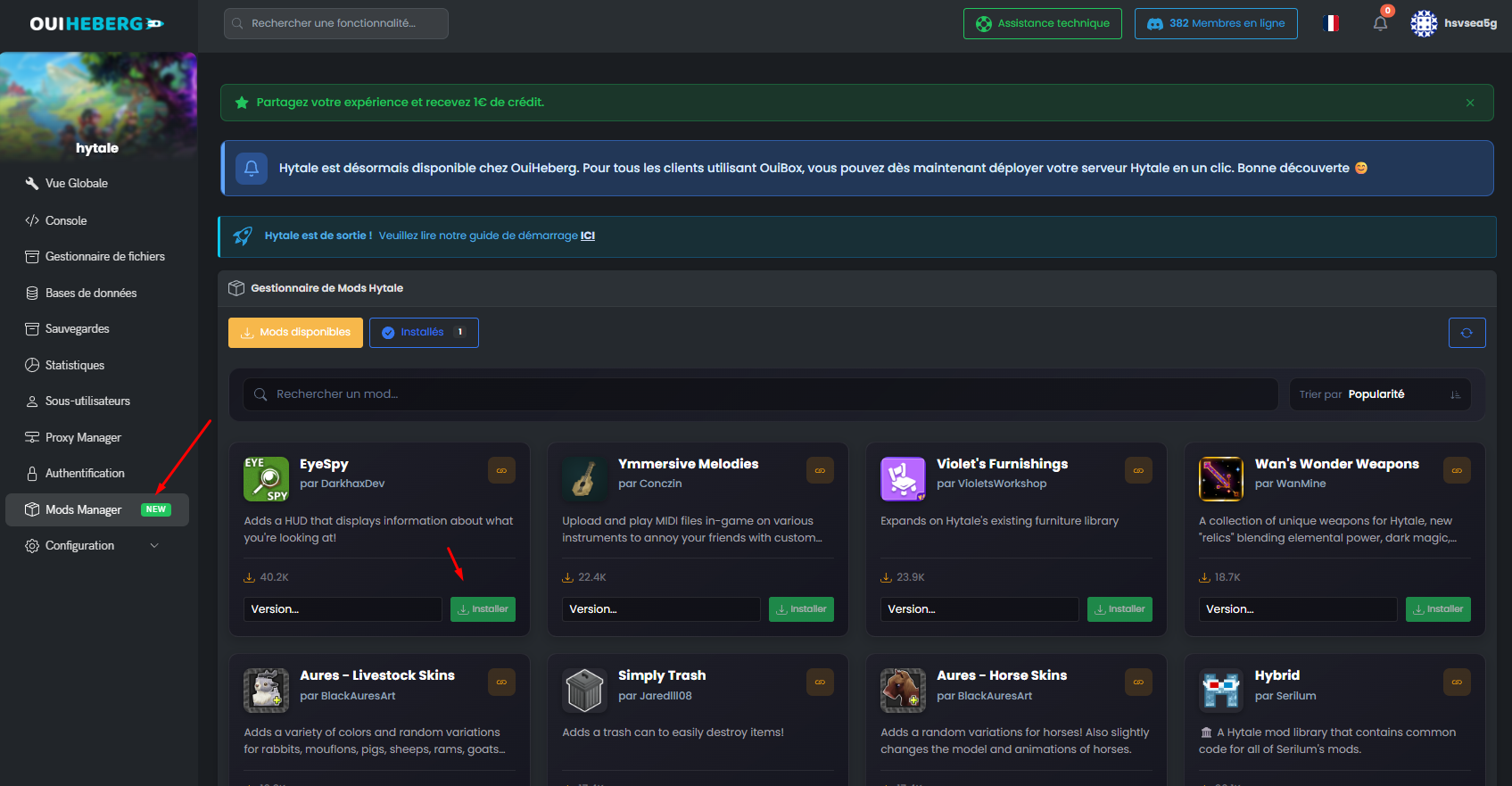
- Selection: Browse the list of available mods.
- Installation: Click on the mod you want to add, then simply click on the Install button.
- Restart: Once the installation is complete, restart your server to apply the changes.
📂 Method 2: Manual Installation (FTP/SFTP)
For dedicated servers or other types of hosting.
This method requires accessing the root files of your server using an FTP client (such as FileZilla) or the integrated file manager.
- Server Connection: Connect to your server files.
- Locate the folder: Look for the folder named
mods(usually located at the root or in theuser_datafolder). - Transfer: Drag and drop your mod files (often in
.jaror.zipformat) directly into this mods folder. - Synchronization: Ensure that players also have the same mods in their own game (in single-player mode) to avoid connection errors.
- Restart: Restart the server to load the new files.
⚠️ Important Reminders
- Game Version: The server and players must use the same version of the mods.
- Backup: Before adding an important mod to an existing server, always backup your world.
- Performance: Too many mods can slow down your server. Check the RAM usage on your OuiPanel after installation.
Need a Hytale server?
Hytale server hosting from $3.46/month, with CurseForge mods installed from the panel and DDoS protection included.