
 Client area
Introduction
Hytale was released in Early Access with English as the only official language. Thanks to language packs created by the community, you can enjoy the game entirely in French: menus, interface, and system texts translated.
This guide explains how to install the French Translation mod to play Hytale in the language of Molière.
Prerequisites
| Element | Description |
|---|---|
| Hytale | Installed and functional game |
| Language Pack | Downloaded from CurseForge |
| Access to the folder | Write permissions on the Hytale directory |
Method 1: Manual Installation (Recommended)
Step 1: Download the language pack
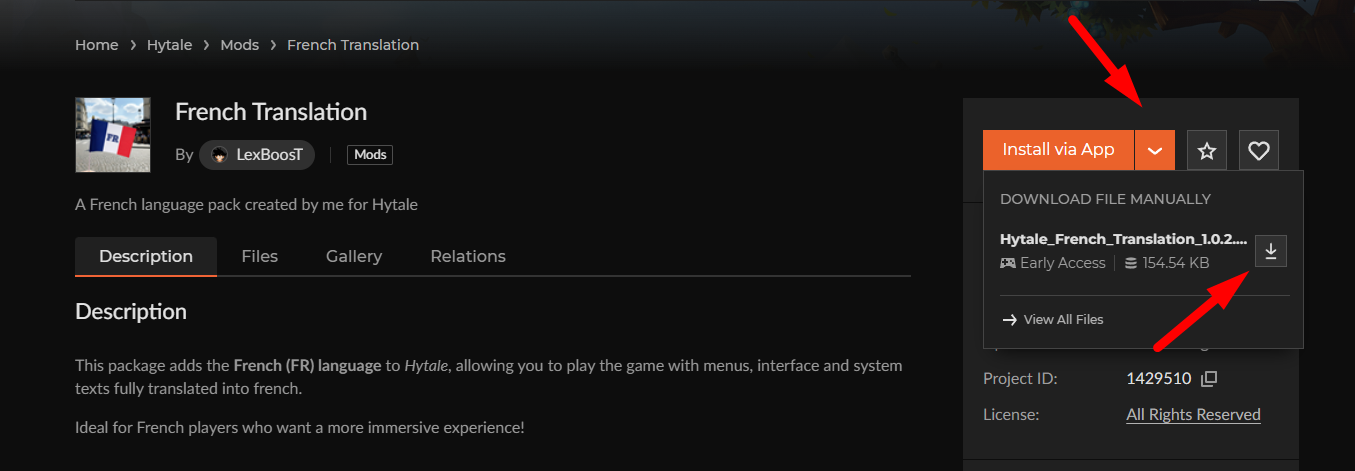
- Go to CurseForge:
https://www.curseforge.com/hytale/mods/french-translation - Click on the Download button to retrieve the ZIP archive
Step 2: Locate the Hytale folder
Open Windows Explorer and access the installation directory:
Quick method:
- Press
Windows + R - Type
%appdata%\Hytale - Press Enter
Alternative method via the launcher:
- Open the Hytale launcher
- Click on the settings (gear icon in the top left)
- Click on Open Directory
| System | Folder Path |
|---|---|
| Windows | %appdata%\Hytale |
| macOS | ~/Library/Application Support/Hytale |
| Linux | ~/.local/share/Hytale |
Step 3: Extract and copy the files
- Open the downloaded ZIP archive
- Locate the
installfolder inside - Copy this
installfolder - Paste it into the Hytale directory (
%appdata%\Hytale) - Confirm overwriting existing files if prompted
⚠️ Important: You must overwrite the existing files for the translation to work.
Step 4: Activate the French language
- Launch Hytale
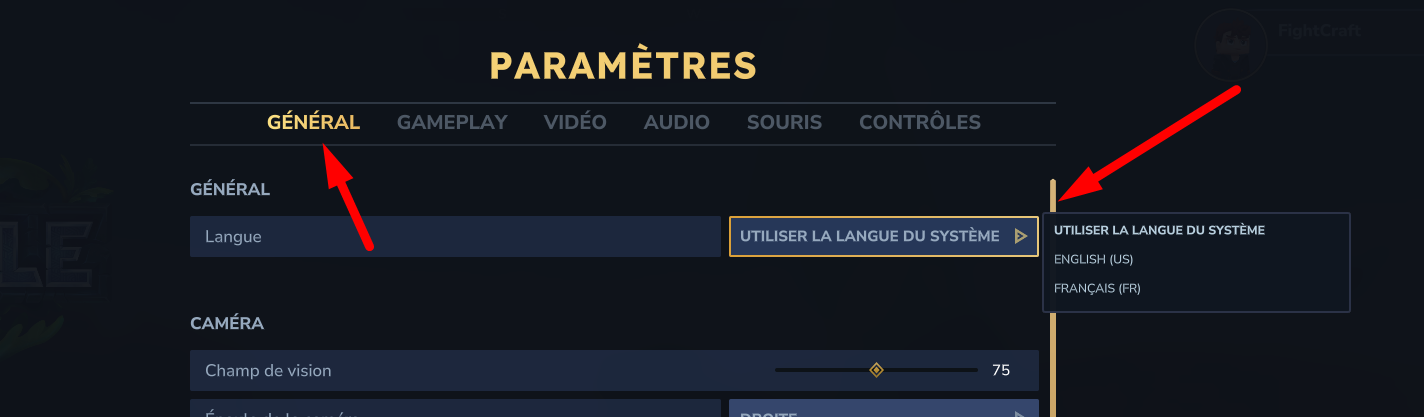
- Go to Settings
- Click on Language
- Select Français (FR)
The game is now in French!
Method 2: Installation via CurseForge App
If you prefer to use the CurseForge application to manage your mods:
Step 1: Install CurseForge
- Download the application from
https://www.curseforge.com/download/app - Install and launch CurseForge
- Hytale should be automatically detected
Step 2: Install the mod
- In CurseForge, select Hytale
- Click on Browse to browse mods
- Search for "French Translation"
- Click on Install
Step 3: Copy the language files
Even with CurseForge, manual manipulation is still required:
- In CurseForge, click on the three dots (⋮) in the top right
- Select Open mods folder
- The path will be:
%appdata%\Hytale\UserData\Mods - Open the French Translation mod folder
- Copy the
installfolder to%appdata%\Hytale - Overwrite existing files
Step 4: Activate the language
- Launch Hytale
- Go to Settings → Language
- Select Français (FR)
Language Files Structure
For the curious, here is where the translation files are located:
%appdata%\Hytale\
└── install\
    └── release\
        └── package\
            └── game\
                └── latest\
                    └── Client\
                        └── Data\
                            └── Shared\
                                └── Language\
                                    └── fr-FR\
                                        ├── client.json
                                        ├── meta.json
                                        └── server.json
| File | Content |
|---|---|
client.json | Client interface texts |
meta.json | Language metadata |
server.json | Server-side texts |
Troubleshooting
French language does not appear in the options
| Possible Cause | Solution |
|---|---|
| Files misplaced | Ensure that the install folder is at the root of %appdata%\Hytale |
| Files not overwritten | Retry by confirming the overwrite |
| Game cache | Completely restart Hytale |
Translation disappeared after an update
After each Hytale update, language files may be reset. Simply:
- Redownload the latest version of the language pack
- Reinstall following the above steps
💡 Tip: Keep the ZIP archive of the language pack to quickly reinstall it after updates.
Some texts remain in English
The mod is created by the community and may not cover 100% of the texts, especially:
- New content added by recent updates
- Some technical or debugging texts
- Elements added by other mods
Available Alternatives
Several French language packs are available on CurseForge:
| Mod | Author | Feature |
|---|---|---|
| French Translation | LexBoosT | Simple and lightweight pack |
| French Translation - Complete | saoriyuki | Complete translation with all items |
| Traduction en Français | Tiitoune | Alternative pack |
| Language Pack | IceMMB | Multi-language pack including French |
📝 Note: These translations are community-driven and temporary. Hypixel Studios plans to provide official translations via Crowdin in the future.
Summary of Screenshots
| No. | Content of the screenshot |
|---|---|
| 1 | CurseForge page of the mod with Download button |
| 2 | Hytale Launcher - Settings menu with "Open Directory" |
| 3 | Windows dialog for file overwrite confirmation |
| 4 | Settings Menu > Language with "French (FR)" selected |
| 5 | CurseForge application with Hytale in the list of games |
| 6 | Search for "French Translation" in CurseForge with Install button |
Summary
Installing the French language pack on Hytale only takes a few minutes. Download the mod from CurseForge, copy the install folder into the game directory, and activate French in the settings. Remember to reinstall the pack after each game update.
Need a Hytale server?
Hytale server hosting from $3.46/month, with CurseForge mods installed from the panel and DDoS protection included.