
 Client area
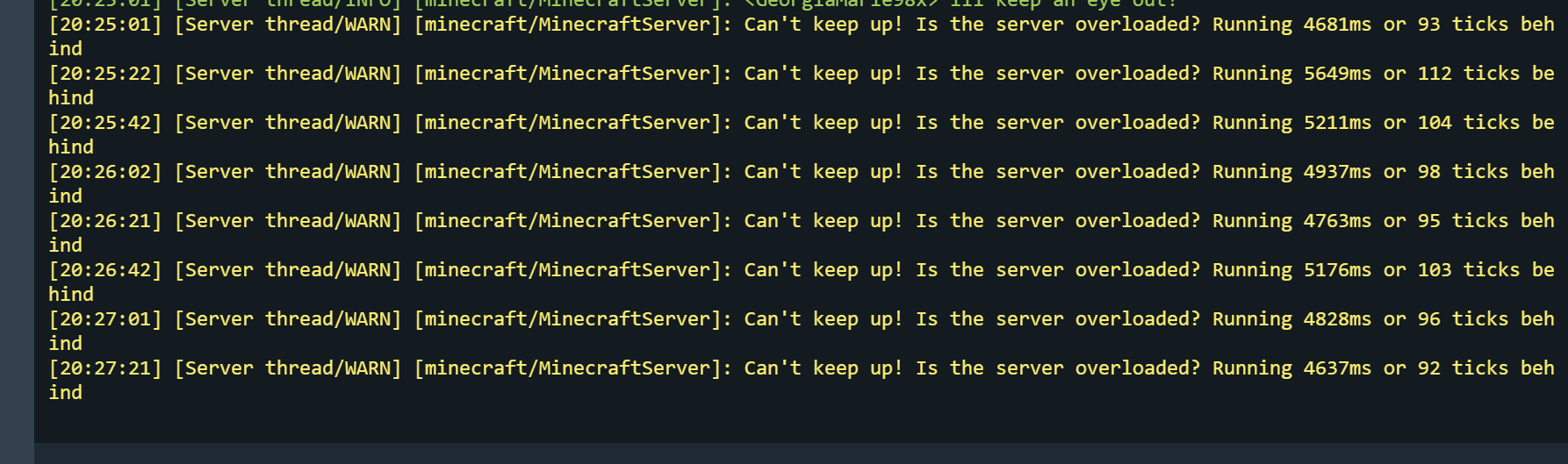
Your Minecraft server is lagging and the console displays a nice "Can't keep up!" in a loop? Before touching anything, there are two concepts to understand: ticks and the main thread. These dictate the rhythm of everything happening in the game on the server side.
This guide explains how Minecraft divides time, why not everything can run in parallel, and when TPS starts to drop. The idea is to give you the keys to understand what happens under the hood and quickly identify where the problem lies.
What exactly are ticks?
Minecraft runs on a continuously repeating loop. Each cycle of this loop is called a tick. At each tick, the server recalculates everything happening in the world.
Specifically, at each tick the server must:
- Read and process player actions (movements, clicks, blocks placed or broken)
- Update the positions of all entities
- Send this information back to each connected player
- Manage mob spawning, their AI, and their movements
- Calculate redstone
- And a whole bunch of other game mechanics
A server running normally aims for 20 ticks per second, which means one tick every 50 milliseconds. This cadence ensures smooth gameplay.
For a deeper technical definition, the Tick page on the Minecraft Wiki is a good resource.
The main thread: why a single core does all the work
This is the point that surprises many people. The vast majority of gameplay calculations in Minecraft go through a single execution thread: the main thread. In practice, this means that a single CPU core handles most of the work at any given moment.
Take a simple example: for a zombie to attack a player, the server must check the zombie's position, calculate the distance, find a path, check the line of sight, apply damage… and all of this must be done in order, on the same thread. As long as these calculations are not completed, the tick cannot advance.
This is why a CPU with good single-core performance makes a huge difference on a Minecraft server, much more than the total number of cores. Especially when you have many entities or redstone.
When everything is fine: the server breathes
In normal operation, each tick is calculated in less than 50 ms. If the server finishes a tick early, it simply waits for the next one to keep the rhythm.
For example, if a tick takes only 15 ms, there are 35 ms of margin before the next one. The result: players feel no delay, mobs react instantly, redstone activates immediately, and TPS remains stable at 20.
When it lags: the tick exceeds 50 ms
The problem starts as soon as a tick takes more than 50 ms to calculate. Since ticks do not execute in parallel, the next one is delayed. And if this repeats, the backlog accumulates.
From the player's perspective, this translates into very recognizable symptoms: mobs teleport, broken blocks reappear before disappearing, redstone reacts slowly, interactions have a visible delay.
The famous message "Can't keep up!" appears when the server accumulates more than 2000 ms of delay in processing ticks. And if the blockage lasts too long (usually more than 60 seconds), the watchdog considers that the server has crashed and stops the process.
Note: A server can technically "run" while being unplayable. Players feel the lag long before a real crash occurs.
Why ticks become too long
The number one cause is an overload of the main thread. Too many things to calculate in too little time. And since everything must be recalculated 20 times per second, even the slightest source of load multiplies very quickly.
The classic culprits:
- Too many active entities: 500 zombies in an area means 500 times the calculations for AI, pathfinding, and collision at each tick
- Poorly designed mob farms: a farm that accumulates hundreds of entities in a small space generates a colossal load
- Intensive redstone: a complex circuit running in a loop can monopolize the main thread by itself
- Chunks loaded continuously: via hoppers, chunk loaders, or AFK players in dense areas
- Mass collisions: 50 chickens in a 2x2 space may seem trivial, but on the server side, it's a nightmare of collision calculations at each tick
Tip: If the lag only appears when players are in a specific area, check first for a farm, a heavy redstone circuit, or an abnormal concentration of entities in that location.
TPS: the server's health in one number
TPS (Ticks Per Second) measures how many ticks the server manages to produce each second. At 20 TPS, everything runs smoothly. As soon as the server falls behind, TPS drops and the game slows down.
A simple formula to visualize the impact:
(1000 - delay in ms) / 50 = TPS
Concrete example: if your server accumulates 250 ms of delay in one second, you get (1000 - 250) / 50 = 15 TPS. In-game, 15 TPS is already very noticeable. Below 10, it's nearly unplayable.
Finding the cause with Spark
Knowing that the server is lagging is one thing, finding out exactly why is another. The most effective tool for this is Spark. It allows you to profile the main thread and see precisely what consumes time at each tick.
Spark shows you which plugin, which entity, or which game mechanic takes the most time. This is often the first step to solving a lag problem in a targeted manner instead of fumbling around.
Good to know: If you are with OuiHeberg, Spark can be installed in a few seconds from the panel. A profile of a few minutes is usually enough to identify the culprit.
In summary
Ticks are the metronome of your Minecraft server, and the main thread is the only route through which most calculations must pass. As soon as a tick exceeds 50 ms, TPS drops and lag sets in. The most common causes are mass entities, intensive redstone, and overloaded areas.
Understanding this mechanism is the foundation for diagnosing and resolving performance issues. And with a tool like Spark, you can go from "it's lagging" to "here's exactly why" in just a few minutes.
Need a Minecraft server with good single-core performance to keep your TPS maxed out? OuiHeberg offers hosting plans optimized for Minecraft, designed to handle the load even on the most ambitious servers.
Need a Minecraft server?
Discover our Minecraft hosting plans starting from $9.98/month with automatic mod installation.