
 Client area
The OuiHeberg affiliate program pays you a commission when someone who came through your link becomes a customer. Everything is handled in the client area at dash.ouiheberg.com: your link, your statistics, your referrals and your payouts. The commission goes up to 15%, depending on how many paying referrals you have.
For an overview of the program, see the affiliate program page on our website.
Activate your affiliate account
Log in at dash.ouiheberg.com.
In the left menu, under Finance, click Affiliate.
If your affiliate account is not active yet, click Activate my affiliate account.
The affiliate program is reserved for the account holder, so a team member (sub-user) cannot activate it. Your profile must also be complete. If something is missing, add it under My profile, in the account menu at the top right.
💡 Were you already an affiliate in the old client area? You keep the same affiliate account, with the same balance, the same referrals and the same history. There is nothing to redo.
Read the Affiliate Program page
Four counters sit at the top of the page. Visitors counts the visits that came through your links. Paid Referrals counts the customers who have already earned you a commission. Commissions shows the amount of your commissions. Affiliate balance shows what you will be able to withdraw, and how much is still missing until you reach the minimum payout.
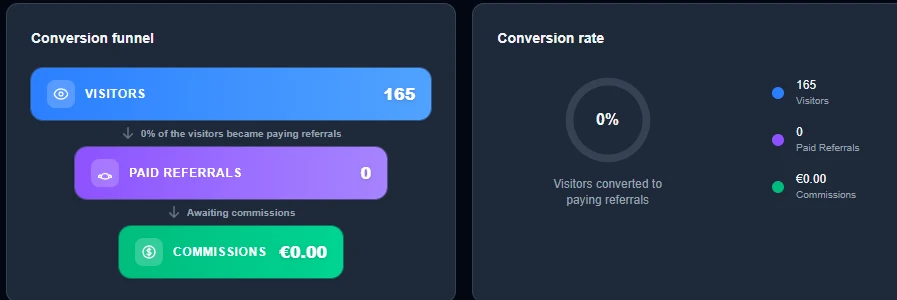
Below, the Conversion funnel and Conversion rate show the share of your visitors who became paying referrals.
The Your commission card shows your current rate, your tier and your progress toward the next tier. Its Info button opens the How does the affiliate program work? window, which sums up the rules and shows the current tier grid.
Create and share your link
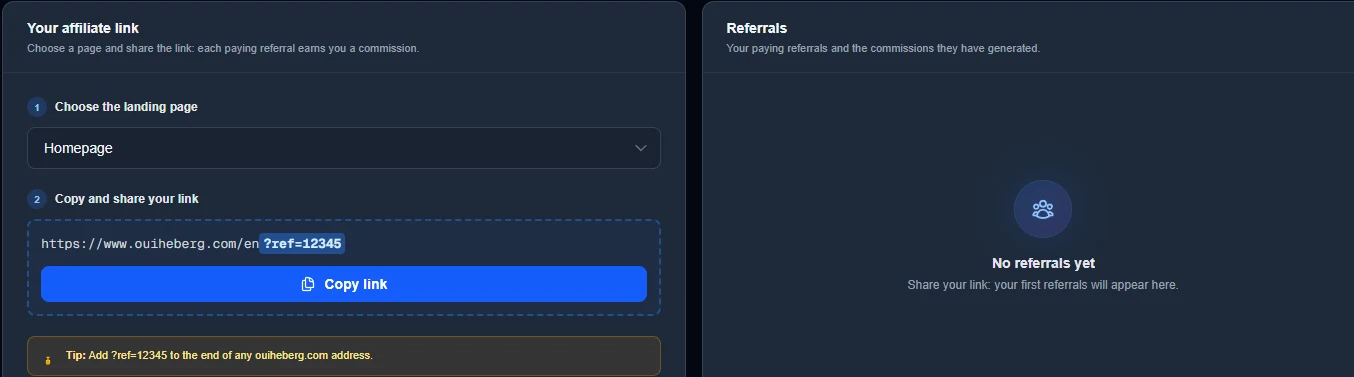
In the Your affiliate link block, at the Choose the landing page step, pick the page your visitors will land on. Twelve pages are available, from the Homepage to Domain Name, including web hosting, Minecraft, VPS and dedicated servers.
Click Copy link. The link ends with
?ref=followed by your affiliate ID, for example?ref=12345.Share it on your website, your social networks or with your contacts.
💡 The
?ref=parameter followed by your ID works at the end of any ouiheberg.com address, and on the dash.ouiheberg.com client area too. You can point people to a specific plan or a blog post.
One link per channel with custom links
To see where your visitors come from, create one short link per channel, such as a video channel, a blog or a Discord server. In the Custom Links block, enter a Link name, choose the Destination page, then click Create link. Each link counts its own visits. You can create up to 20 of them.
A deleted link no longer redirects to your page. The visits it already counted stay credited.
How commissions are calculated
How a referral is tied to you
A visitor who arrives through your link stays tied to you for 90 days. The first link clicked is the one that counts. If the same person later clicks another affiliate's link, you remain their referrer as long as your 90 days are not over.
The referral is recorded on the referred customer's first order. The services in that first order earn you a commission on every payment, renewals included, for as long as the service exists.
What earns no commission
Domain names.
Adding credit to an account.
Your own orders, even placed through your link.
Some products earn no commission, or only once.
Commissions start as pending
A new commission stays pending until its release date. You can only withdraw it after that date.
Tiers
Your rate depends on your number of paying referrals, meaning distinct customers who have already earned you a commission. You do not count yourself.
| Tier | Paying referrals | Commission |
|---|---|---|
| Starter | 0 to 4 | 5% |
| Bronze | 5 to 14 | 10% |
| Silver | 15 or more | 15% |
When you cross a threshold, the new rate applies from the following night. It never goes down afterwards. The grid may change: the Info window on the page always shows the current one.
Track your referrals
The Referrals block lists your paying referrals and the commissions they have generated. Until you have one, it shows "No referrals yet".
Withdraw your earnings
You can withdraw once your Affiliate balance reaches €15. Until then, the card shows the amount still missing and the Withdrawals block stays empty. There are two payout methods.
Credit to my account. The amount is added to your OuiHeberg credit right away, and you can use it for orders and invoices. This choice is final. An amount converted to credit can no longer be paid out via PayPal.
PayPal payout. A ticket is opened with the sales department, which arranges the payout with you. You can add your PayPal address (optional). The ticket includes your affiliate ID and the available amount. You can follow it in Tickets.
Your payouts then appear in the Withdrawals block. Credit you receive shows up in My Balance.
Need help?
A question about a commission or a payout? Open a ticket from Tickets › Open a Ticket (dash.ouiheberg.com/tickets/new). You can also reach us on the OuiHeberg Discord.