
 Client area
A reseller account lets you resell our VPS, dedicated servers and domain names to your own customers, then manage them from a dedicated area. This guide shows where the section is in the client area at dash.ouiheberg.com and what it displays.
Open the Reseller account section
Click your name at the top right, then My profile. The Account Settings page opens.
In the left-hand menu of the page, choose Reseller account.
The direct link is dash.ouiheberg.com/settings?section=reseller.
What the section shows
Reseller area
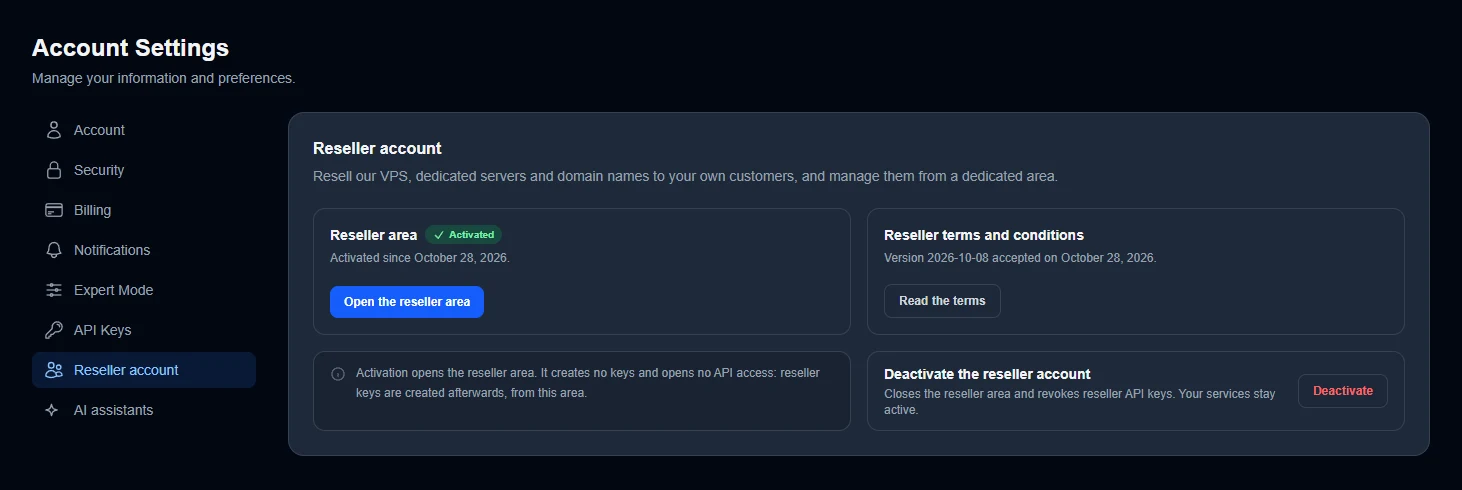
This card shows the account status. The Activated badge and the activation date confirm that the area is open. The Open the reseller area button takes you there. The dash side menu also has a Reseller area entry, under ACCOUNT.
Reseller terms and conditions
This card shows which version of the terms you accepted, and when. The Read the terms button displays them. When a new version comes into effect, dash asks you to read and accept it to continue reselling.
Reseller API keys
The box at the bottom makes it clear. Activation opens the reseller area, but it creates no keys and opens no API access. Reseller keys are created afterwards, from the reseller area.
Activate the reseller account
On an account that is not a reseller yet, the same section shows the account status. Activation requires reading and accepting the reseller terms and conditions. Take the time to read them before going further.
Any question about your reselling project? Ask the SUPPORT COMMERCIAL department (sales) before activating.
Deactivate the reseller account
The Deactivate the reseller account card closes the reseller area and revokes your reseller API keys. Your services stay active. The red Deactivate button sits on the right of the card.
A revoked key no longer works. If a tool or a website uses a reseller key, plan for it before deactivating.
Need help?
For a question about reselling, open a ticket with the SUPPORT COMMERCIAL department (sales) from Tickets › Open a Ticket (dash.ouiheberg.com/tickets/new). You can also ask your question on the OuiHeberg Discord.