
 Client area
Estimated time: 10 minutes
Difficulty: Beginner ⭐
Compatible servers: Rust on OuiPanel
📋 Introduction
A wipe resets your Rust server so every player starts again on equal terms. There are two kinds:
| Wipe | What gets erased | Files |
|---|---|---|
| Map | Buildings, dropped items, inventories, the map | proceduralmap.*.map and proceduralmap.*.sav (with .sav.1, .sav.2…) |
| Blueprints | Blueprints learned by players | player.blueprints.*.db |
On the first Thursday of the month, Facepunch releases an update that forces a map wipe on every server. Between updates, you pick the pace: weekly, every two weeks or monthly.
📣 Step 1: warn players and back up
Announce the wipe from the OuiPanel console:
say "Wipe in 10 minutes, new map tonight"
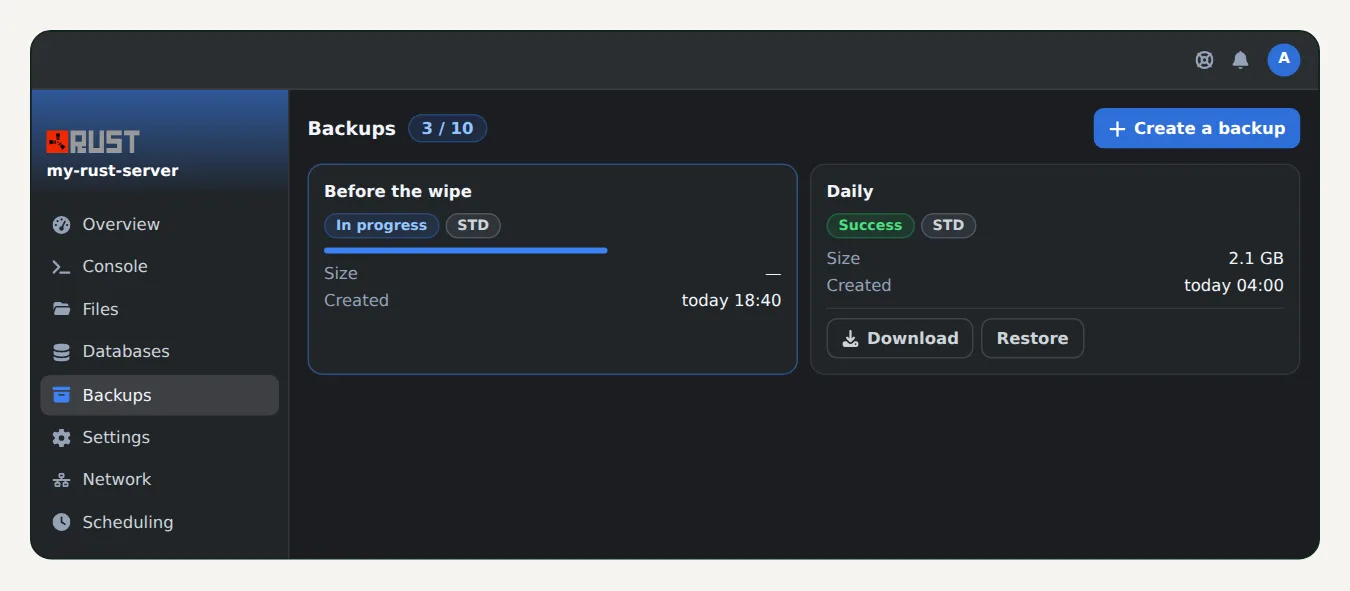
Then open Backups and click Create backup. Name it "Before the wipe", for example. If anything goes wrong, you restore the old map in one click.
⏹️ Step 2: stop the server
In the Console, click Stop. Wait until the server is fully off before touching the files.
🗑️ Step 3: delete the files
- Open the File Manager, then the
server/rustfolder. - For a map wipe, select the
proceduralmap.….mapandproceduralmap.….savfiles, with their.sav.1,.sav.2… copies. - For a blueprint wipe, add
player.blueprints.….db. - Delete the selection.
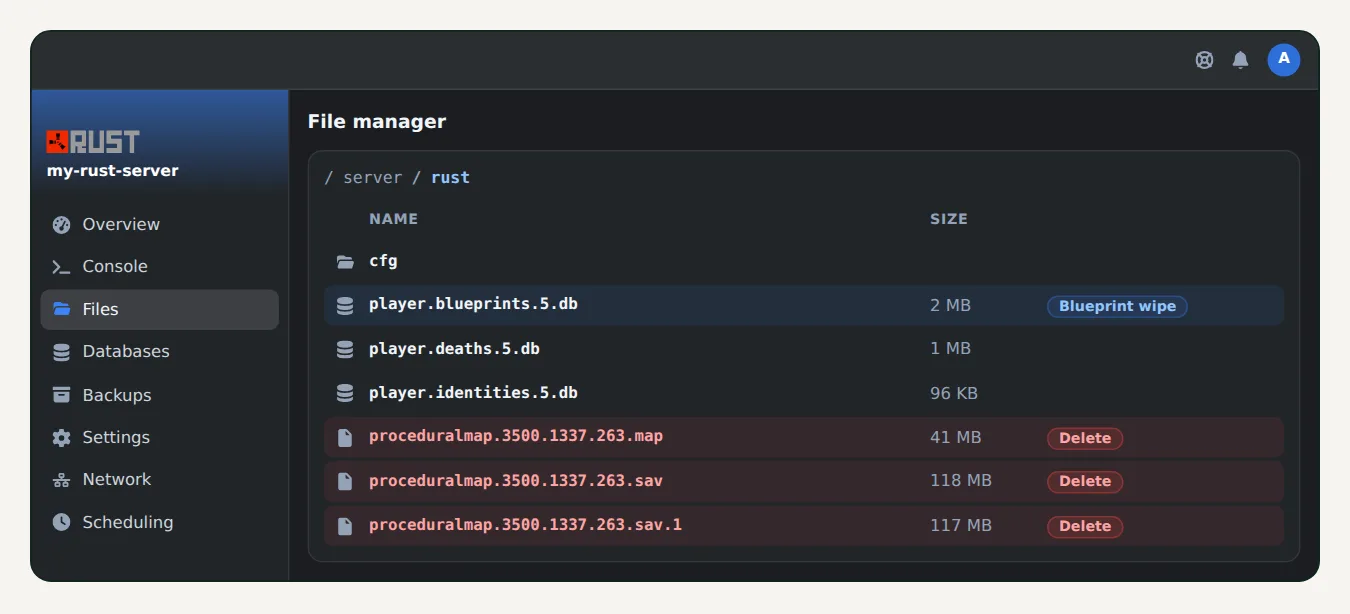
💡 Don't delete the
cfgfolder: it holds your admin list and settings. Keepplayer.identitiestoo if you want to keep the names the server knows.
🗺️ Step 4: change the map (optional)
With no other change, the server rebuilds the same map, empty. For a different map, open Configuration, then Server Settings, and change:
- WORLD_SEED: any number, each value gives a different map;
- WORLD_SIZE: the size, from 1000 to 6000. The bigger the map, the more memory the server needs.
▶️ Step 5: start the server
Start the server. Generating a new map takes a few minutes. The server is ready when the console shows Server startup complete.
📅 The first-Thursday wipe
With automatic updates on restart, you only need to restart the server once the Facepunch update is out, usually in the evening, European time. The server updates and starts on a fresh map.
To avoid doing it by hand, create a task in Scheduling: a say command to warn players, a backup, then a restart.
🧩 If you use Oxide or Carbon
Some plugins keep data from one map to the next in oxide/data or carbon/data: teleports, kit cooldowns, leaderboards. Each plugin's page says what to clear on wipe. See also our guide How to install Oxide or Carbon on your Rust server.
🚀 No server yet?
Our Rust server hosting gets you a server ready in a few minutes, with backups, scheduled tasks and automatic updates on restart.
Need a Rust server?
Discover our Rust server hosting from $6.92/month, with Oxide or Carbon in one click and your server ready in a few minutes.