
 Client area
Estimated time: 15 minutes
Difficulty: Intermediate ⭐⭐
Compatible servers: Garry's Mod on OuiPanel
📋 Introduction
DarkRP is a roleplay (RP) game mode for Garry's Mod. This guide installs it on your OuiPanel server, gives you the superadmin rank, then connects a MySQL database if you need one.
💾 Take a backup
Before changing the game mode, open Backups in OuiPanel and click Create backup. You can roll back if needed.
📥 Install DarkRP
Choose one of the two methods.
From the Workshop
Add DarkRP (ID 248302805) to your collection. Our guide GMod server Workshop collection and gamemode setup explains how to link a collection to the server.
From the files
- Download DarkRP from its official repository, github.com/FPtje/DarkRP.
- Rename the folder to
darkrp. The GitHub archive names itDarkRP-master. - Upload it to
garrysmod/gamemodesover SFTP, with the credentials from Configuration › SFTP Access. Not toaddons, where it doesn't work.
🛠️ Add darkrpmodification
The DarkRP authors ask you never to edit its files, or it can no longer be updated. Settings go through the darkrpmodification addon.
- Download it from github.com/FPtje/darkrpmodification.
- Put its contents in a folder inside
garrysmod/addons, for examplegarrysmod/addons/darkrpmodification. - The main settings are in
lua/darkrp_config/settings.lua, inside this addon.
⚙️ Start the server in DarkRP
- In Configuration › Server Settings, Environment Variables card, enter
darkrpin Gamemode. - In Map, put an RP map from your collection, for example
rp_downtown_v4c_v2. - Save each field with its check mark, then restart the server from the Console.
👑 Become superadmin with ULX
ULX is an admin mod that needs ULib. Install both, either from the Workshop (ULib 557962238, ULX 557962280) or by uploading their folders to garrysmod/addons from the TeamUlysses/ulib and TeamUlysses/ulx GitHub repositories. Then fully restart the server. A map change is not enough.
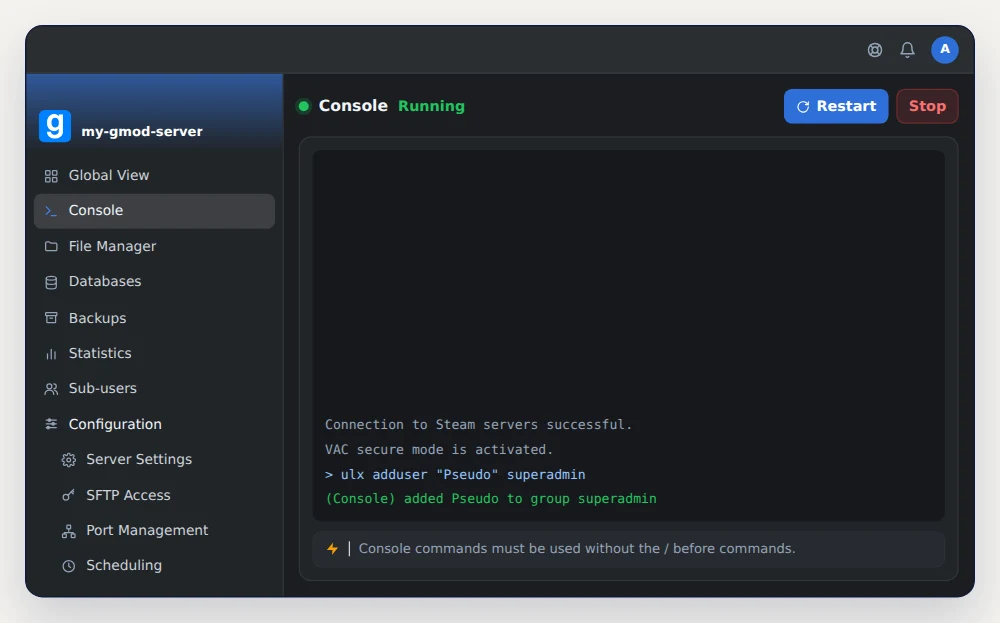
Join the server with Garry's Mod. Then, in the OuiPanel Console, type this command without a slash, with your in-game name.
ulx adduser "Pseudo" superadmin
The console replies (Console) added Pseudo to group superadmin.
If you aren't connected, use your SteamID, in the STEAM_0:X:Y format. A site such as steamid.io gives it from your Steam profile address.
ulx adduserid "STEAM_0:1:12345678" superadmin
In game, the ulx menu command in the console opens the ULX menu.
📝 Without an admin mod
Garry's Mod also reads ranks from garrysmod/settings/users.txt. Open this file in the File Manager and add your line to the superadmin section.
"Users"
{
	"superadmin"
	{
		"Pseudo"	"STEAM_0:1:12345678"
	}
}
The file is read on startup. Restart the server, then join it. The game confirms your rank in the chat.
🗄️ Switch DarkRP to MySQL (optional)
By default, DarkRP stores its data, such as player money, in the game's built-in SQLite database (garrysmod/sv.db). There is nothing to set up. For a MySQL database, follow these steps.
- In OuiPanel, open Databases and click Create database. The page then shows the host, port, name, username and password. The Access PhpMyAdmin button lets you browse the database.
- Install the MySQLOO module by following the instructions in its repository, github.com/FredyH/MySQLOO. Its file goes in
garrysmod/lua/bin. Pick the version that matches the server's system, which this command shows in the Console.
lua_run print(jit.os, jit.arch)
- In darkrpmodification, open
lua/darkrp_config/mysql.luaand copy in the database credentials.
RP_MySQLConfig.EnableMySQL = true
RP_MySQLConfig.Host = "203.0.113.20"           -- Host
RP_MySQLConfig.Username = "u123_AbCdEfGh"      -- Username
RP_MySQLConfig.Password = "xxxxxxxxxxxx"       -- Password
RP_MySQLConfig.Database_name = "s123_darkrp"   -- Name
RP_MySQLConfig.Database_port = 3306            -- Port
Restart the server. If it fails, DarkRP writes the error to garrysmod/data/DarkRP_logs/, on a line starting with MySQL Error:.
❓ Common issues
The server doesn't start in DarkRP
Check that the folder is named darkrp and sits in garrysmod/gamemodes. Read the console during startup too.
The ulx command isn't recognized
ULX or ULib is missing, or the server hasn't been restarted since you installed them.
➡️ What's next
To rank your DarkRP server well in the public list, add a Steam token with our guide GMod Steam token (GSLT): get your server on the public list.
🚀 No server yet?
Our GMod server hosting gets you a server ready in a few minutes, with MySQL databases you can browse in phpMyAdmin, SFTP access and on-demand or scheduled backups.
Need a Garry's Mod server?
GMod server hosting from $3.46/month, with the gamemode, Workshop collection and Steam token set from the panel, and DDoS protection included.