
 Client area
Estimated time: 10 minutes
Difficulty: Beginner ⭐
Compatible servers: Garry's Mod on OuiPanel
📋 Introduction
A Garry's Mod server gets its addons, maps and game mode (gamemode) from the Steam Workshop. The easiest way is to group them in a collection, which the server downloads every time it starts. This guide shows how to create one, link it to your server, then choose the gamemode and the map.
🧩 Create the collection on the Workshop
- In Steam, open the Garry's Mod Workshop and create a collection.
- Add your addons, your maps and, if it comes from the Workshop, your gamemode.
- Set its visibility to public or unlisted. Otherwise the server can't access it.
- Find its ID. It's the number after
?id=in the collection's address.
https://steamcommunity.com/sharedfiles/filedetails/?id=123456789
Here, the ID is 123456789. A collection can contain other collections, and the server downloads those too.
⚙️ Link the collection to the server
- In OuiPanel, go to Configuration › Server Settings, Environment Variables card.
- Paste the ID into Workshop ID. The field only accepts digits.
- Click the check mark to the right of the field (Save).
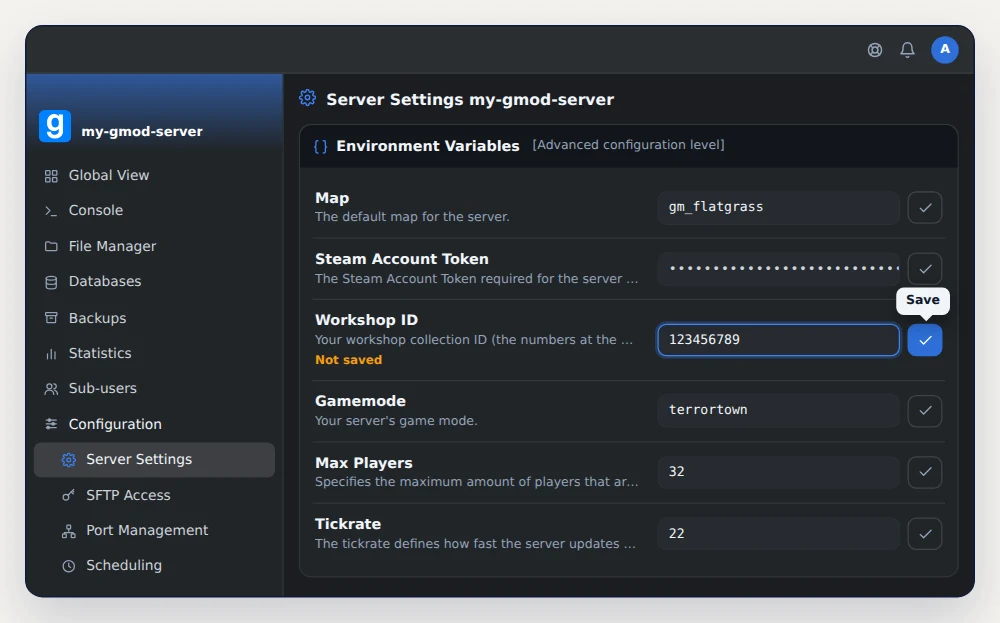
On the next start, the server downloads the collection and loads its addons.
🎮 Choose the gamemode
The Gamemode field expects the game mode's folder name, not its title.
| Game mode | Gamemode value | Source |
|---|---|---|
| Sandbox | sandbox | Ships with the game, default value |
| Trouble in Terrorist Town (TTT) | terrortown | Ships with the game |
| DarkRP | darkrp | Workshop or GitHub |
| Prop Hunt | prop_hunt | Workshop |
| Murder | murder | Workshop |
A gamemode that doesn't ship with the game can be added in two ways. Put it in your collection, or upload its folder to garrysmod/gamemodes over SFTP. Then enter its folder name in Gamemode.
🗺️ Choose the map
The Map field sets the map loaded on startup. The default is gm_flatgrass, which ships with the game like gm_construct. For a map from your collection, enter its exact name without the .bsp extension. Maps made for TTT usually start with ttt_.
Save each field you changed, then restart the server from the Console. If something goes wrong, read the console during startup. Loading errors show up there.
📦 Send the content to players
The collection installs the addons on the server, but players don't get everything. According to the Facepunch wiki, the current map and the collection's gamemode are sent to them automatically. Other addons that bring models, sounds or textures must be declared with resource.AddWorkshop.
Open or create garrysmod/lua/autorun/server/workshop.lua, then add one line per addon.
-- Workshop ID of an addon (not a collection)
resource.AddWorkshop("111111111")
resource.AddWorkshop("222222222")
Addons that only contain Lua don't belong in this list. Lua goes through a separate system.
❓ Common issues
The server doesn't download the collection
Check that the collection is public or unlisted, and that Workshop ID holds the collection's ID, not an addon's.
The gamemode doesn't start
The Gamemode value must match the folder name exactly. Also check that the gamemode is in the collection or in garrysmod/gamemodes.
Players see ERROR models or purple and black textures
They're missing an addon's content. Add its ID to workshop.lua with resource.AddWorkshop, then restart.
➡️ What's next
To rank well in the public list, add a Steam token with our guide GMod Steam token (GSLT): get your server on the public list. To build an RP server, follow Install DarkRP and become superadmin on a GMod server.
🚀 No server yet?
With our GMod server hosting, the Workshop collection, gamemode and map are set in the server settings. Your server is ready in a few minutes, with anti-DDoS and SFTP access.
Need a Garry's Mod server?
GMod server hosting from $3.46/month, with the gamemode, Workshop collection and Steam token set from the panel, and DDoS protection included.