
 Client area
Estimated time: 5 minutes
Difficulty: Beginner ⭐
Compatible servers: Garry's Mod on OuiPanel
📋 Introduction
A Garry's Mod server identifies itself to Steam with a Game Server Login Token (GSLT). According to the Facepunch wiki, a server without a token gets a severe ranking penalty in the public server list. Players then have a hard time finding it.
This guide shows how to create the token, add it in OuiPanel, then set the server name and password.
🔑 Create the token on Steam
The Steam account that creates the token must own Garry's Mod, because Steam checks the purchase.
- Open steamcommunity.com/dev/managegameservers and sign in.
- In App ID of the base game, enter
4000, the Garry's Mod ID. Don't use4020. That number is the dedicated server and is only used by SteamCMD. - In Memo, write anything that helps you recognize the server, such as its name.
- Confirm, then copy the token shown (32 characters).
💡 Each server needs its own token.
⚙️ Add the token in OuiPanel
- Open your GMod server in OuiPanel.
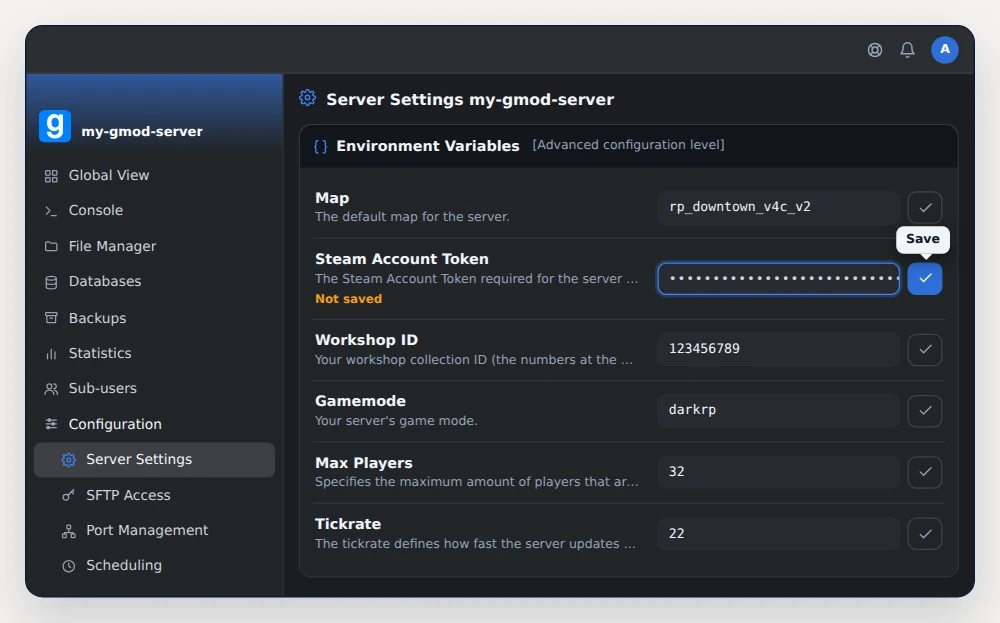
- Go to Configuration › Server Settings, then scroll down to the Environment Variables card.
- Paste the token into Steam Account Token.
- Click the check mark to the right of the field (Save) to store it.
- In Console, click Restart. The token is read on startup.
🏷️ Set the server name and password
The name shown in the list and the password are set in garrysmod/cfg/server.cfg. Open this file in the File Manager, or over SFTP with the credentials from Configuration › SFTP Access. If it doesn't exist, create it with Create file.
Edit or add these two lines.
hostname "GMod Sandbox"    // name shown in the server list
sv_password ""             // leave empty for a server open to everyone
With a password, every player has to type it to join. Save, then restart the server.
🔎 Check the server in game
Launch Garry's Mod and look for your server name in the game's server browser.
You can also join directly. Copy the Main address shown in OuiPanel's Global View, open the game console, then type connect followed by the address.
connect 203.0.113.10:27015
If the console doesn't open, turn on the developer console in the game options.
❓ Common issues
The server won't start after adding the token
An invalid or expired token stops the server from starting. Copy it again in full from the Steam page, or create a new one.
All my tokens stopped working
Changing the Steam account password invalidates all its tokens. Create them again, then paste the new token into Steam Account Token.
The console shows Steam error code 6
The full message is Connection to Steam servers lost. (Steam error code 6). It usually means the same token is used on two servers. Give each server its own.
➡️ What's next
Add your addons and pick a game mode with our guide GMod server Workshop collection and gamemode setup. For an RP server, follow Install DarkRP and become superadmin on a GMod server.
🚀 No server yet?
Our GMod server hosting sets up your Garry's Mod server in a few minutes, with anti-DDoS, SFTP access and on-demand or scheduled backups.
Need a Garry's Mod server?
GMod server hosting from $3.46/month, with the gamemode, Workshop collection and Steam token set from the panel, and DDoS protection included.