
 Client area
Every invoice you pay at OuiHeberg earns you loyalty points. These points raise your tier. From the Silver tier upwards, part of every paid invoice comes back to your balance as cashback. This guide shows where to follow your points, how you earn them and what each tier gives you.
Open the loyalty program
Log in at dash.ouiheberg.com.
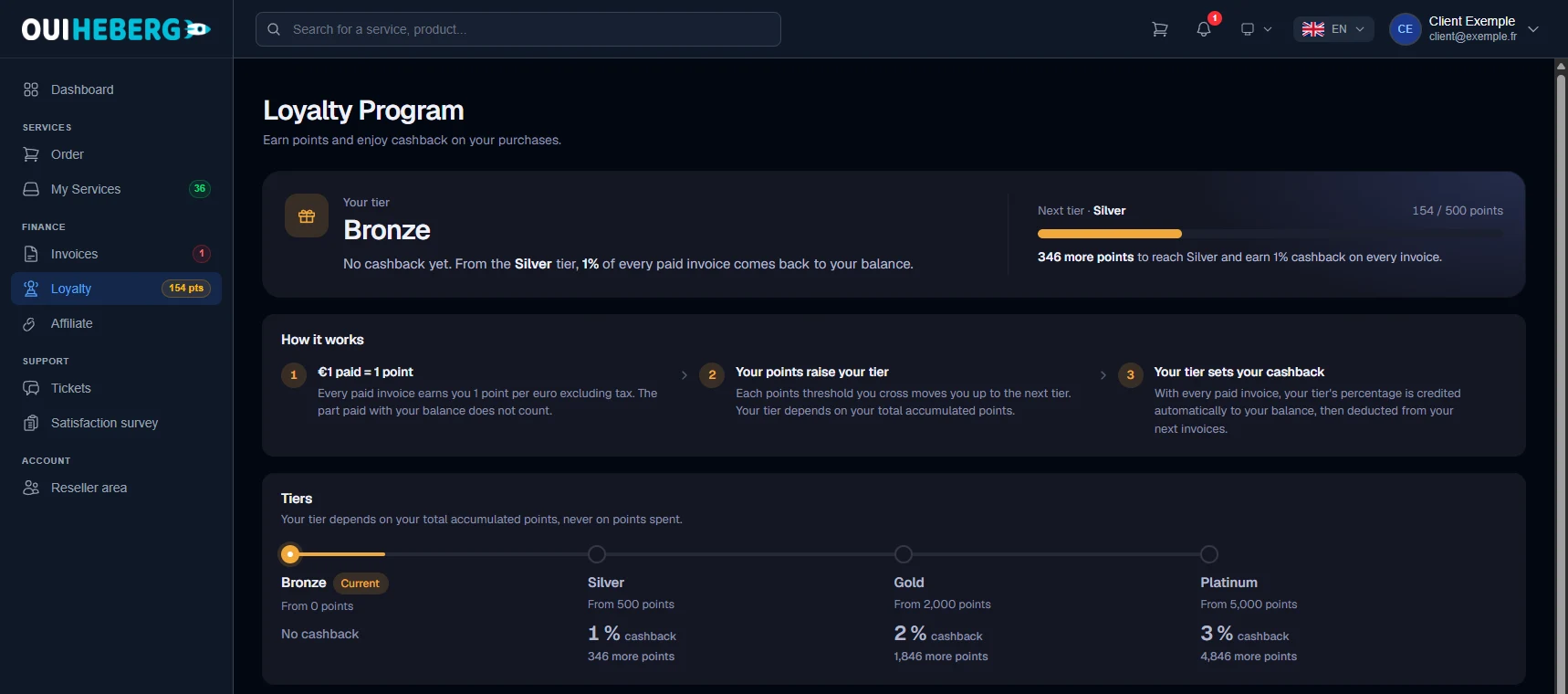
In the left menu, under Finance, click Loyalty. The menu already shows your points total. You can also go through the account menu at the top right, then Loyalty program.
The Loyalty Program page opens (dash.ouiheberg.com/loyalty). The Your tier card shows your level and what it earns you. On the right, Next tier compares your points with the next threshold and shows how many you still need.
How you earn points
The rule fits in one line: €1 paid = 1 point. Every paid invoice earns you 1 point per euro, excluding tax.
The part of an invoice paid with your account balance earns no points.
If an invoice is refunded or cancelled, its points and its cashback are taken back.
Tiers and cashback
Each threshold you cross moves you up to the next tier. Your tier depends on the total points you have accumulated, never on points spent. The page shows the following tiers.
| Tier | Threshold | Cashback |
|---|---|---|
| Bronze | From 0 points | No cashback |
| Silver | From 500 points | 1% |
| Gold | From 2,000 points | 2% |
| Platinum | From 5,000 points | 3% |
With every paid invoice, your tier's percentage is credited automatically to your balance. That credit is then deducted from your next invoices. There is nothing to request.
The Cashback received card, further down the page, adds up what you have already received. You can check your balance under My Balance.
Points expiry
The Points expiry card gives the date on which your points expire. Each paid invoice, whatever the payment method, pushes this date back by 12 months. If the date passes with no new paid invoice, your points reset to zero and your tier returns to the first level.
Until you have paid an invoice, no date appears, as there is nothing to expire yet.
💡 One paid invoice at least every 12 months, such as a service renewal, is enough to keep your points.
Points history
The Points History table at the bottom of the page lists each movement with its date, its label (for example "Invoice #… paid") and the points earned or removed.
Need help?
Missing points or a question about your tier? Open a ticket from Tickets › Open a Ticket (dash.ouiheberg.com/tickets/new), or reach us on the OuiHeberg Discord.