
 Client area
Estimated time: 10 minutes
Difficulty: Intermediate ⭐⭐
Compatible servers: RuneScape: Dragonwilds on OuiPanel
📋 Introduction
Did you start a world solo or on a friend's machine? You can carry on with it on your RuneScape: Dragonwilds dedicated server. The procedure comes from the official Jagex guide. On startup, the server loads the most recent .sav file in its worlds folder. So all you have to do is drop yours in.
💾 Find your world file
On a Windows PC, local worlds are stored in this folder.
C:\Users\your_name\AppData\Local\RSDragonwilds\Saved\SaveGames
The easiest way is to type %LOCALAPPDATA%\RSDragonwilds\Saved\SaveGames in the File Explorer address bar. Each world is a .sav file there. Spot yours, for example by its modified date, and copy it elsewhere to be safe.
🔌 Connect over SFTP
The credentials (address, port, user) are in Configuration › SFTP Access in OuiPanel. Use them in a client such as FileZilla or WinSCP. For a single file, OuiPanel's File Manager works too.
📥 Import the world
- In Console, click Stop. The server must stay stopped during the whole operation.
- In Backups, create a backup. It keeps the server's current world in case you want to go back.
- Open the
RSDragonwilds/Saved/Savegamesfolder and empty it, without deleting the folder itself. - Upload your
.savfile to this folder, without changing its name. - Start the server. It loads the most recent world in the folder, which is yours.
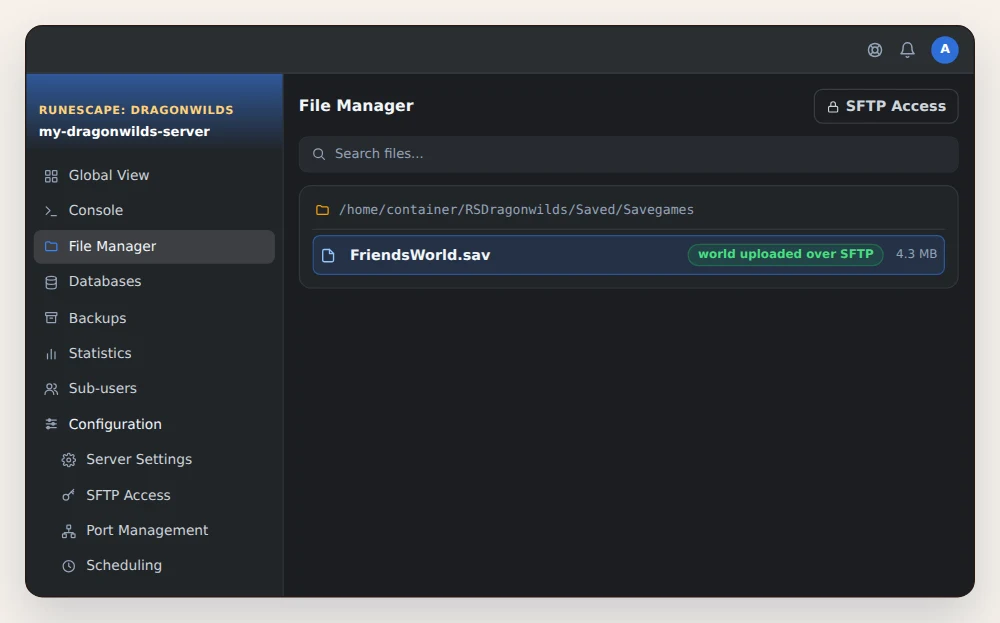
⚠️ Don't rename the file. According to the game's official wiki, a server started with a renamed file loses the progress.
🗺️ Upload a custom world
To start from a custom world rather than the default one, create it in the game first. Enter the world and wait until the textures around your character have loaded, about 1 to 2 minutes, then quit. Its .sav file is then imported as above.
❓ Common issues
The server created a new world
On startup, the server didn't find your file and created a default world. Check that the file sits directly in RSDragonwilds/Saved/Savegames, not in a subfolder, then restart.
The progress is gone
The file was most likely renamed. Restore the backup made before the import from Backups, then start over with the original file name.
My friends can't find the world
They must search for the exact name of the loaded world, capitals included, in the Public tab of the Worlds screen. The server and their game must also run the same version.
💡 Make a backup before every game update, as the official wiki advises. If anything goes wrong, you restore it in a moment from OuiPanel.
➡️ What's next
Set the Owner ID, the world name and the passwords with our guide Dragonwilds dedicated server setup: Owner ID and passwords. To invite friends on console, read Dragonwilds crossplay on a server: PC and consoles.
🚀 No server yet?
Our RuneScape: Dragonwilds server hosting sets up your dedicated server in a few minutes, with anti-DDoS, SFTP access and on-demand or scheduled backups.
Need a RuneScape: Dragonwilds server?
RuneScape: Dragonwilds dedicated server hosting from $3.46/month, with crossplay on PC and consoles, Owner ID and passwords set from the panel, world import over SFTP and DDoS protection included.