
 Client area
Estimated time: 15 minutes
Difficulty: Beginner ⭐
Compatible servers: DayZ on OuiPanel
📋 Introduction
This guide shows how to set up your DayZ server in OuiPanel. You start with your Steam account, which downloads the game. Then you set the server name, the passwords and the player count. The rest covers Steam Workshop mods, changing the map and getting your players in.
Almost everything is set in the server variables in OuiPanel. The map is chosen in the serverDZ.cfg file.
🔑 Enter your Steam account
The DayZ server downloads from Steam with your Steam account. You enter it in two server variables, [Host] Steam Username and [Host] Steam Password. Three things to know before you start.
- Steam Guard must be turned off on this account. With Steam Guard on, the Steam login fails and the game does not download.
- For Steam Workshop mods, this account must own DayZ.
- The password is stored in the server settings. Sub-users with access to these settings can see it.
- Open your DayZ server in OuiPanel.
- Go to Configuration › Server Settings, then scroll down to the Environment Variables card.
- Type your Steam username in [Host] Steam Username and your password in [Host] Steam Password. Click the check mark to the right of each field to save it.
- On the same page, click Reinstall server, then confirm. The reinstall downloads the game with your account and writes the
serverDZ.cfgfile. Do it before you play, as it wipes the server data. - Wait for the installation to finish, then start the server from the Console.
![Environment Variables card of a DayZ server in OuiPanel, with [Host] Steam Username filled in, a Steam password typed in and ready to save, Server Name set to My DayZ server, Admin Password filled in and Additional Mods with two Steam Workshop mods](https://www.ouiheberg.com/assets/img/dayz/guides/configurer-serveur-dayz-compte-steam-mods-carte-variables-en.webp)
💡 A plain start is not enough the first time. Without a reinstall, the game is not installed and the console says the server file cannot be found (
Specified DayZ server binary could not be found).
⚙️ Name, passwords and players
These settings are variables too, on the same Environment Variables card. Save each value, then restart the server from the Console.
| Variable | What it does |
|---|---|
| Server Name | The server name in the server list, DayZ Server by default. |
| Max Players | The maximum number of players, 64 by default. You can change it. |
| Server Password | The password to join the server. Empty by default, which leaves the server open to everyone. |
| Admin Password | Choose your admin password in this variable. You use it to log in as admin in the game. |
Set these values in the variables rather than in serverDZ.cfg. At every startup, the server rewrites these lines of the file with the variable values.
👑 Log in as admin
Choose your admin password in the Admin Password variable, save, then restart the server. Then join the server, open the game chat and type #login <admin password>, replacing the part in angle brackets with your password. This is the command given in Bohemia Interactive's documentation.
Keep this password to yourself. It gives admin rights on the server.
🧩 Add Steam Workshop mods
The server loads Steam Workshop mods in one of two ways. Either way, it downloads them and picks up their updates at every startup. For this, the server's Steam account must own DayZ.
With the DayZ Launcher list
- In the DayZ Launcher, export your mod list. You get a
modlist.htmlfile. - Upload this file to the server folder, next to
serverDZ.cfg, with the OuiPanel File Manager or over SFTP, as our guide How to connect via SFTP with FileZilla explains. - The file must have the name set in the Modlist File (Exported from DayZ Launcher) variable,
modlist.htmlby default. - Restart the server.
With the Additional Mods variable
- Open the mod page in the Steam Workshop. Its number is the figure after
id=in the address. - In the Additional Mods variable, type
@followed by this number. Separate mods with a semicolon, without spaces. - Save, then restart the server.
Example with two mods, CF and Community Online Tools.
@1559212036;@1564026768
A mod that runs only on the server goes in the [Advanced] Server-Side Only Mods variable, in the same form.
The server copies the mods' .bikey keys to the keys folder on its own. Your players need the same mods, which they get from the Steam Workshop.
💡 Mods come without support from us.
🗺️ Change the map
The server starts on Chernarus. To change the map, edit the template line of the serverDZ.cfg file.
- Stop the server from the Console.
- Open the File Manager, then click
serverDZ.cfg. - In the
class Missionsblock, replace thetemplatevalue with the one for the map you want (see the table below). - Click Save, then start the server.
class Missions
{
    class DayZ
    {
        template="dayzOffline.chernarusplus";
    };
}; | Map | template value |
|---|---|
| Chernarus | dayzOffline.chernarusplus |
| Livonia | dayzOffline.enoch |
| Sakhal | dayzOffline.sakhal |
| Nasdara | dayzOffline.nasdara |
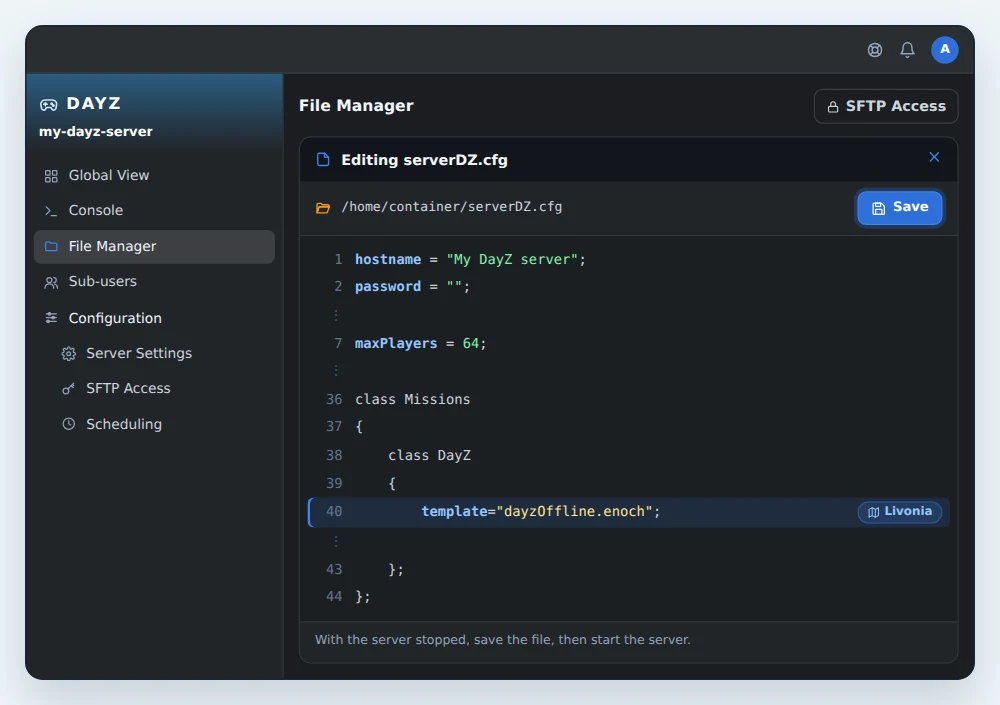
All four maps reach the server with a Steam account that owns DayZ. Each map keeps its own world, in the storage_1 folder of its mission, such as mpmissions/dayzOffline.enoch/storage_1 for Livonia. When you go back to a map, you find its world again.
Sakhal requires the Frostline DLC and Nasdara the Badlands DLC. Check that your players own the DLC before switching to one of these two maps.
Game settings worth knowing
Other variables shape the game. Disable Third Person locks players in first-person view. Persistent Time keeps the in-game time from one startup to the next. Time Multiplier speeds up in-game time (12 by default, so a day lasts two hours). Night Multiplier speeds up or slows down nights on top of that.
🌍 Join the server
- Note the server's IP address and port, shown in the OuiPanel Global View.
- Open the DayZ Launcher. Find your server by name in the server list, or add it as a direct connection with this IP address and port.
- If the server has a password, type the one from the Server Password variable.
PlayStation and Xbox players cannot join this server. For the player side in detail, read our article How to join a DayZ server.
🔄 Updates
With Automatic Updates on, as it is by default, the server updates the game and mods at every startup. To apply them without thinking about it, schedule a restart every night in Configuration › Scheduling.
💡 A game update can rewrite the original mission files, in
mpmissions. Keep a copy of the files you edit, for example on your computer over SFTP.
📊 Variables at a glance
| Variable | What it does |
|---|---|
| [Host] Steam Username | The username of the Steam account that downloads the game and mods. |
| [Host] Steam Password | The password of this account. Steam Guard must be turned off. |
| Server Name | The server name in the list, DayZ Server by default. |
| Max Players | The maximum number of players, 64 by default. |
| Server Password | The password to join. Empty, the server is open to everyone. |
| Admin Password | Your admin password, for the #login command. |
| Automatic Updates | On by default. Updates the game and mods at every startup. |
| Modlist File (Exported from DayZ Launcher) | The name of the mod file exported from the DayZ Launcher, modlist.html by default. |
| Additional Mods | Workshop mods in @number form, separated by a semicolon. |
| Disable Third Person | When on, players stay in first-person view. |
| Persistent Time | When on, the in-game time is kept from one startup to the next. |
| Time Multiplier | The speed of in-game time, 12 by default. |
| Night Multiplier | Speeds up or slows down nights, 1 by default. |
| [Advanced] Server-Side Only Mods | Mods loaded by the server only. |
❓ Common issues
The server does not start
If the console shows Specified DayZ server binary could not be found, the game is not installed. Check the Steam username and password, turn off Steam Guard on this account, then click Reinstall server again.
A mod does not download
The server's Steam account must own DayZ. Also check what you typed in Additional Mods, with @ before each number and a semicolon between two mods. Then restart the server.
My server name keeps reverting
The name, the passwords and the player count come from the variables. The server rewrites them in serverDZ.cfg at every startup. Change them in the variables, not in the file.
My players cannot find the server
Give them the IP address and port shown in the OuiPanel Global View, for a direct connection from the DayZ Launcher. A player on PlayStation or Xbox cannot join the server.
🚀 No server yet?
With our DayZ server hosting, you get Steam Workshop mods, SFTP access and DDoS protection.
Need a DayZ server?
DayZ server hosting from $6.92/mo, with Steam Workshop mods, the four official maps, SFTP access and DDoS protection included.