
 Client area
How to link your domain name to your Hytale server
This guide explains how to configure your domain name to associate it with your Hytale server hosted at OuiHeberg.
Prerequisites
- Have a domain name
- Access to the DNS management of your domain
- Have an active Hytale server at OuiHeberg
- Know the IP address and port of your server
Current Limitation of Hytale
⚠️ Important: Currently, the Hytale server version does not support SRV records. This means that your players will need to add the port after your domain name to connect.
Connection Example:
yourdomain.com:12345
This limitation may be lifted in a future game update.
Configuration Steps
1. Retrieve your server information
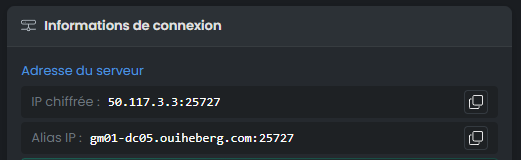
Log in to your OuiHeberg client area and access the management page of your Hytale server (ouipanel). Note the following information:
- IP Address: example
145.239.XXX.XXX - Port: example
12345
2. Access the DNS management of your domain
Go to your registrar's management interface (OVH, Cloudflare, Gandi, OuiHeberg, etc.) and access the DNS zone of your domain.
3. Create an A type DNS record
Add a new record with the following settings:
| Field | Value |
|---|---|
| Type | A |
| Name / Subdomain | @ (or play, hytale, according to your choice) |
| Value / Target | Your server's IP address |
| TTL | 3600 (or default value) |
Examples:
- To use
yourdomain.com→ Name:@ - To use
play.yourdomain.com→ Name:play - To use
hytale.yourdomain.com→ Name:hytale

4. Wait for DNS propagation
DNS propagation can take from a few minutes to 24 hours depending on registrars. Generally, allow between 15 minutes and 2 hours.
5. Test the connection
Once the propagation is done, your players can join your server using:
your-domain.com:PORT
Concrete Example: play.yourserver.com:12345
Summary
| Step | Action |
|---|---|
| 1 | Retrieve the server's IP and port |
| 2 | Create an A type DNS record |
| 3 | Wait for propagation (15 min to 24h) |
| 4 | Connect with domain.com:port |
FAQ
Why do I need to add the port after my domain?
Hytale does not yet support SRV records that allow hiding the port. This is a current limitation of the game that may be corrected in a future version.
Can I use a subdomain?
Yes, you can create an A record on a subdomain like play.yourdomain.com or hytale.yourdomain.com.
Is the propagation taking long, is it normal?
Yes, DNS propagation can vary depending on your registrar. You can check the propagation status on tools like dnschecker.org.
How can I have a domain without having to specify the port?
To allow your players to connect simply with yourdomain.com without specifying the port, you must:
- Have a dedicated IP for your Hytale server
- Configure your server on port 5520 (default port for Hytale)
With this configuration, your players can connect directly via your domain name without adding the port, as the game will automatically use the default port 5520.
💡 Tip: Contact OuiHeberg support to get a dedicated IP if you don't have one yet.
Need help?
If you encounter difficulties, contact our technical support via your OuiHeberg client area.
Need a Hytale server?
Discover our Hytale hosting plans starting from $9.98/month with instant deployment.