
 Client area
Discord code: extend your OuiHeberg free server by 30 days
OuiHeberg's free Minecraft server runs until an end date. To keep it, you extend it with a code from our Discord, and each code adds 30 days. This guide shows where to check the time left, how to get a code and how to redeem it in the client area.
Check the time left
Log in to dash.ouiheberg.com.
In the left-hand menu, click My Services, then your free Minecraft server.
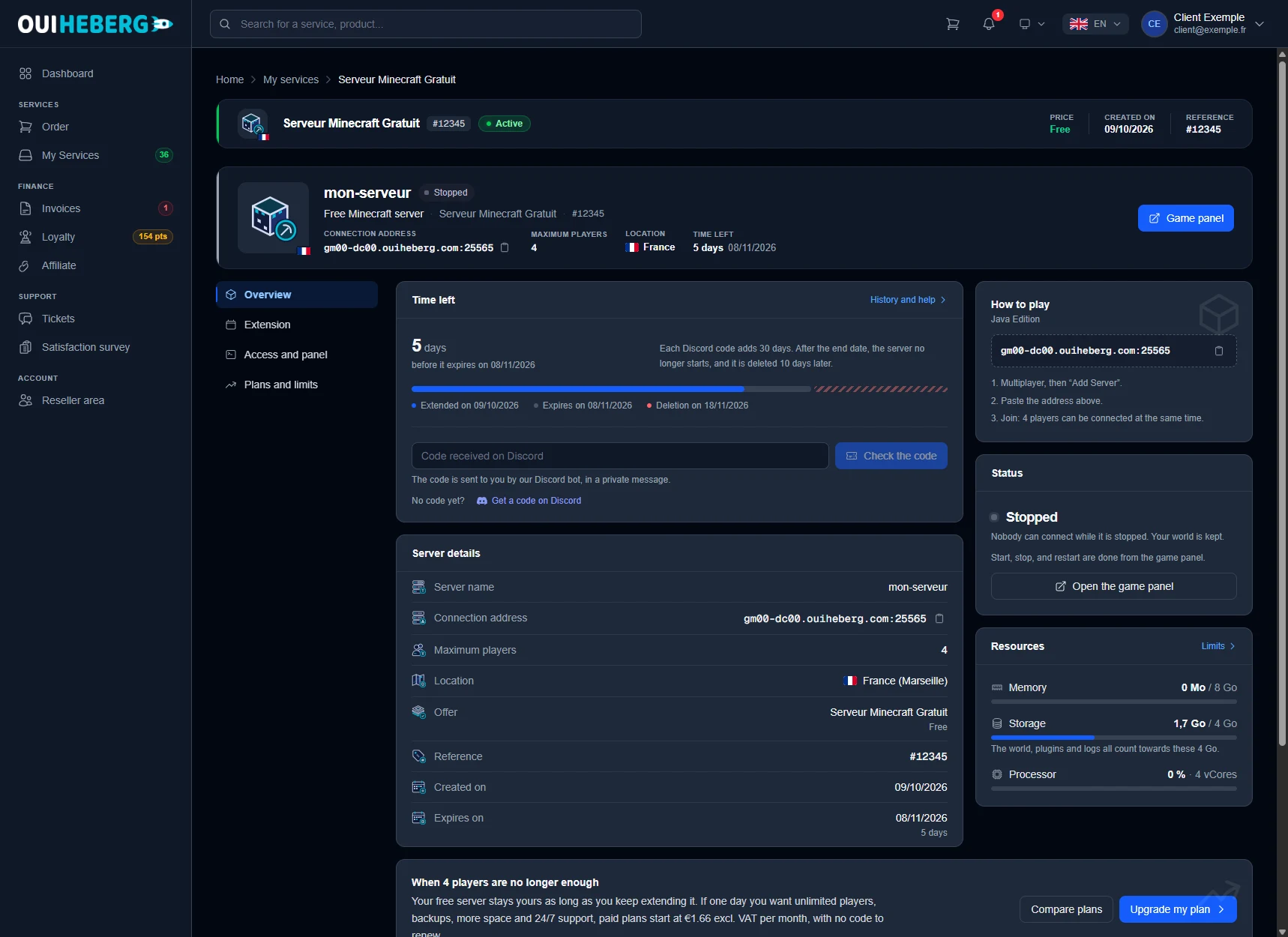
The top banner shows the connection address, the maximum number of players, the location and the time left. In the Overview tab, the Time left card gives the number of days before expiry, followed by a timeline with three dates: the last extension, the expiry and the deletion.
The card also reminds you of the rule. Each Discord code adds 30 days. After the end date, the server no longer starts, and it is deleted 10 days later.
Get a code on Discord
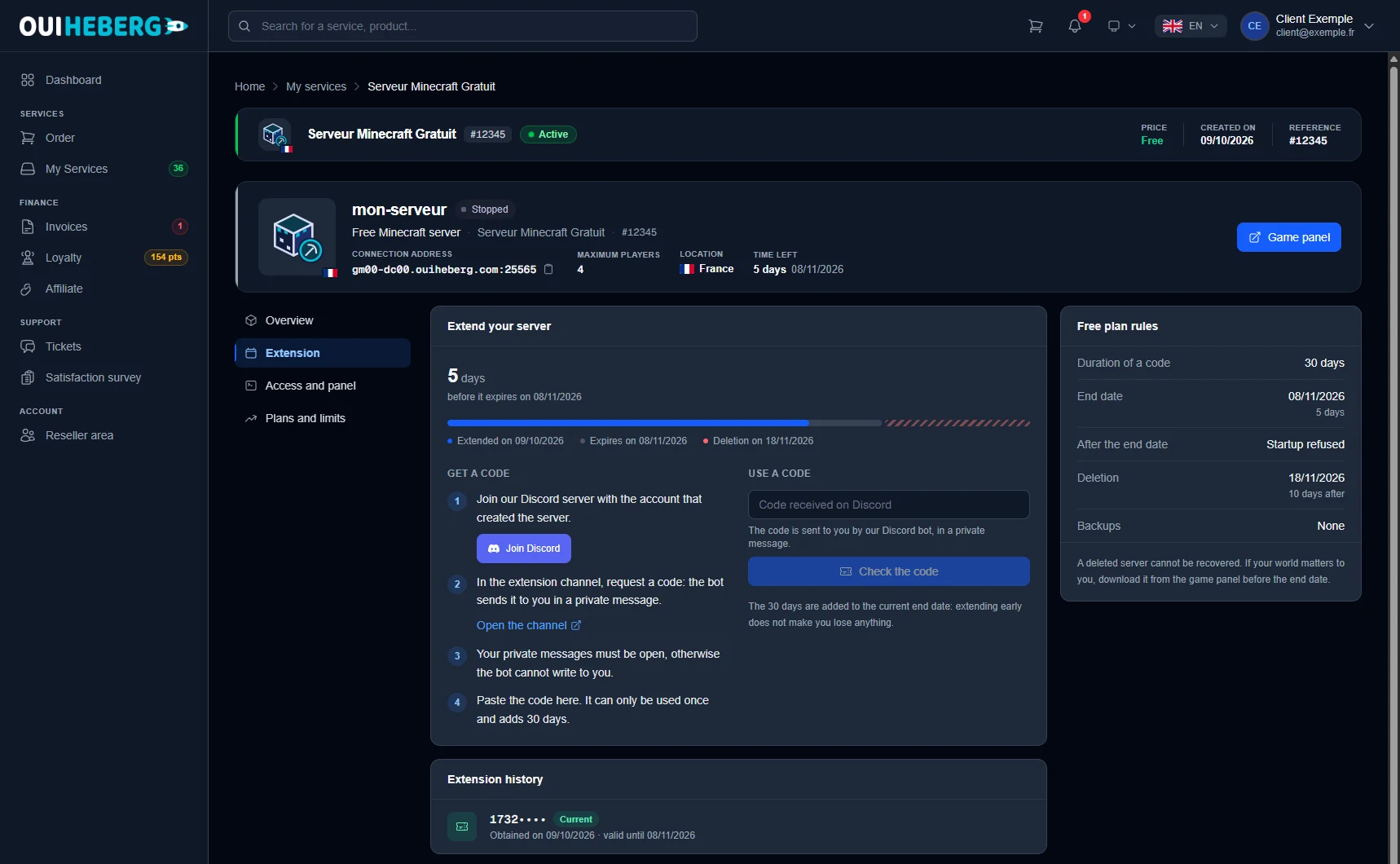
Open the Extension tab. The Get a code block lists the steps.
Join our Discord server with the account that created the server. The Join Discord button takes you there.
In the extension channel, request a code. The Open the channel link takes you straight there. The bot sends you the code in a private message.
Your private messages must be open, otherwise the bot cannot write to you.
Paste the code in the client area, as explained below.
The bot is not messaging you? In Discord, open the privacy settings of the OuiHeberg server and allow direct messages from its members.
Redeem the code in the client area
In the Extension tab, paste the code into the Extension code field. The Code received on Discord field in the Overview tab does the same.
Click Check the code.
The client area shows the current expiry date and the new one. Click Confirm the extension.
A code can only be used once. The 30 days are added to the current end date, so extending early costs you nothing. The Extension history card keeps track of the codes used and how long each one is valid.
If extending is not available from the server page, redeem the code on Discord or in the game panel instead. It counts just the same.
First code for a new server
A server that has never received a code does not start. Its page shows "Your server is waiting for its first code". Paste the code from the bot into the same field, then click Activate my server. Its first 30 days start that day.
If your server has expired
The Free plan rules card, in the Extension tab, sums up what happens after the end date.
Startup is refused. Your world stays in place until deletion.
The server is deleted 10 days after the end date, together with its world.
Until then, an extension code brings it back right away. The 30 days then count from the day you redeem it.
A deleted server cannot be recovered, and the free plan has no backups. If your world matters to you, download it from the game panel or over SFTP before the end date.
Open the game panel and access your files
Everything related to the game is managed in the game panel, using your client area login. The Game panel button in the banner, or Open the game panel, takes you there (dash.ouipanel.com). That is where you find the console, the files, start and stop, and plugin and mod installation.
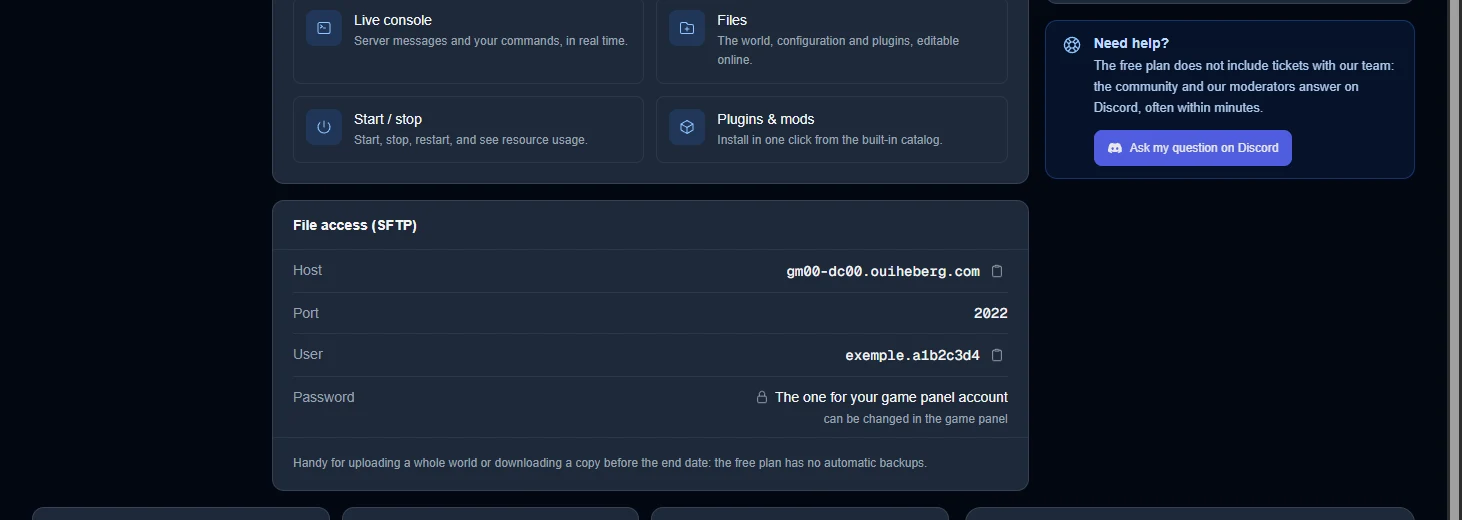
To upload a world or download a copy, open the Access and panel tab. The File access (SFTP) card gives the details to enter in your SFTP client (FileZilla, WinSCP…).
| Field | Value |
|---|---|
| Host | the address shown, without a port number |
| Port | 2022 |
| User | the username shown, copied exactly |
| Password | the one for your game panel account, which you can change there |
Port
2022is for file transfers only. To join the game in Minecraft, use the connection address from the banner.
If the free plan is no longer enough, the server page offers Compare plans and Upgrade my plan.
Need help?
The free plan does not include tickets with our team. The community and our moderators answer on Discord. Use the Ask my question on Discord button in the Access and panel tab, or go straight to our Discord.
Discover our Minecraft hosting plans starting from $2.28/month with automatic mod installation.
Minecraft server hosting →