
 Client area
How to create an email alias
An email alias is an extra address that delivers to an existing mailbox. For example, sales@your-domain.com can deliver to the contact@your-domain.com mailbox, with no extra mailbox or password. This guide shows how to create an email alias on the OuiHeberg professional email plan, and how to remove it.
Open the mailbox list
Open My Services at dash.ouiheberg.com, then your Professional email address service.
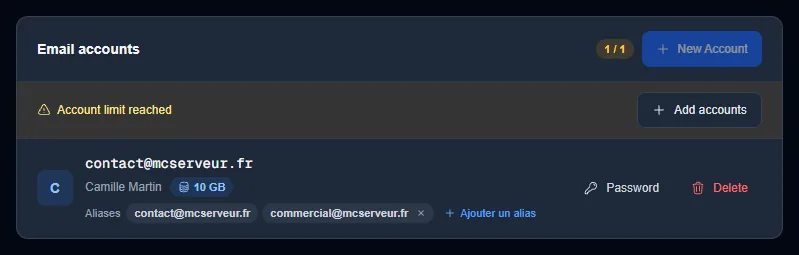
In the left-hand menu, open the Email accounts tab.
Under each mailbox, the Aliases line lists the addresses that deliver to it. The main address of the mailbox is always there. It has no cross, because it cannot be removed.
Add an alias
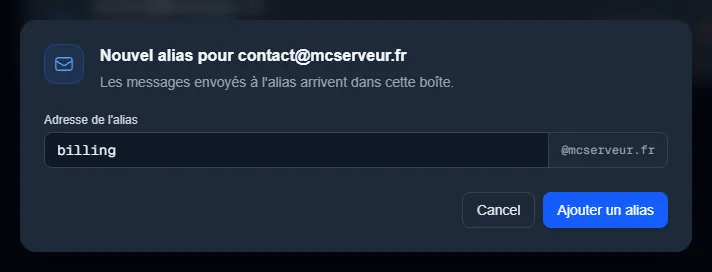
Under the mailbox, click the link with a plus sign, at the end of the aliases. A window opens for that mailbox.
In the alias address field, type the part before the @ sign, such as
sales. The domain is already added to the right of the field.Click the blue button of the window to add the alias.
Wait for the confirmation message. The alias then appears on the Aliases line, and emails sent to that address arrive in the mailbox.
An alias can use letters, numbers, dots, hyphens and the + sign. It always uses the domain of your plan and must not already be used by a mailbox or another alias.
Remove an alias
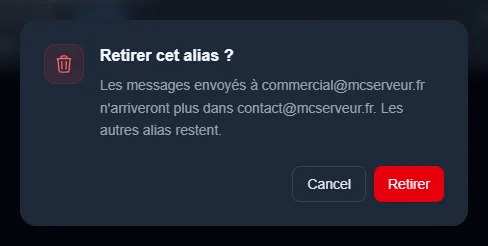
On the Aliases line, click the cross to the right of the alias.
A confirmation window opens. Click the red button to remove the alias, or Cancel to keep it.
Emails sent to that address no longer arrive in the mailbox. The other aliases stay in place.
Other options
For an address that needs its own password, create a second mailbox with New Account instead. The guide How to create a business email address shows how.
To receive a mailbox's emails in another email service, follow the guide How to forward emails to another email address.
All the mailboxes in your plan are in use? The Add accounts button adds more to your plan, prorated for the current period.
Need help?
Open a ticket from Tickets › Open a Ticket, or from the Contact support tile at the bottom of your service page. You can also ask your question on the OuiHeberg Discord.