
 Client area
RedM scripts: how to install resources on your server
RedM scripts run on the server as resources, folders stored in resources. This guide shows how to pick a trustworthy script, check that it is made for RedM, upload it with OuiPanel, declare it in server.cfg and start it. RedM server mods and scripts all install the same way.
Your server, ordered from our RedM server hosting plans, must already start with its Cfx.re key. If it does not, first follow the guide How to make a RedM server: license key, server.cfg and txAdmin.
Pick a trustworthy RedM script
Authors publish their scripts on the Cfx.re forum, in the RedM Releases category, and on their GitHub page. A topic title usually tells you two things.
The framework it needs, in brackets, such as
[VORP],[RSG],[REDEMRP], or[Standalone]for a script that runs on its own.The price, with
[FREE]for a free script and[PAID]for a paid one.
A script built for a framework only works with that framework. A VORP script does not run as is on RSG. To install the framework, follow the guide VORP Core or RSG Core: install a RedM framework on your server.
Only install scripts published by their author. A copy of a paid script found elsewhere breaks its license and may contain code you do not control.
Protected paid scripts
Many paid scripts use the Cfx.re escrow system. After the purchase, you get a download link and the script is tied to your Cfx.re account. It only starts on a server whose license key belongs to that same account. Otherwise the console shows "You lack the required entitlement".
Check that a script is made for RedM
Each resource contains an fxmanifest.lua file that describes it. FXServer is strict about this file on RedM. Open it and look for these three lines.
fx_version 'cerulean'
game 'rdr3'
rdr3_warning 'I acknowledge that this is a prerelease build of RedM, and I am aware my resources *will* become incompatible once RedM ships.'
fx_versionis required.gamemust includerdr3. A resource made for both games usesgames { 'rdr3', 'gta5' }. Agta5-only resource is refused.rdr3_warningmust contain this exact sentence, without changing a single character.The old
__resource.luafile is not accepted on RedM.
If one of these rules is missing, FXServer refuses to start the resource and says so in the console.
Upload the script to the server
Scripts usually come as a .zip archive. Upload it as is, OuiPanel extracts it.
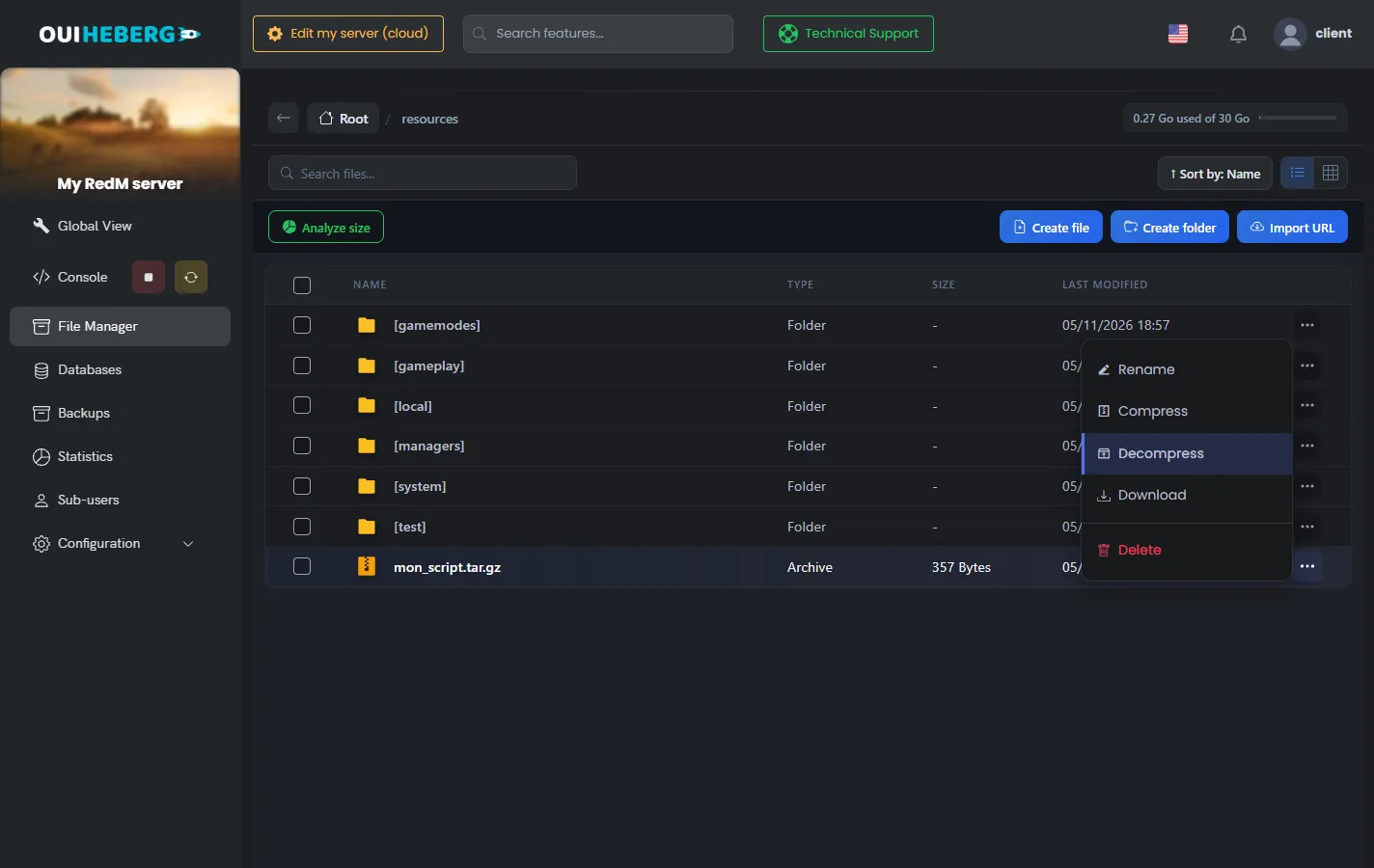
In OuiPanel, click File Manager, then open the
resourcesfolder.Drag the archive onto the page. The "Drop your files here" overlay appears, release the file.
Click ⋯ at the end of the archive's row, then Decompress, and confirm. The archive stays in place.
Open the folder you get. The
fxmanifest.luafile must sit directly inside it, not in a subfolder.If needed, rename the folder with Rename. For example, remove the
-mainsuffix that GitHub adds. The folder name becomes the resource name.Delete the archive with ⋯ › Delete.
The Import URL button also downloads an archive straight to the server. Paste the link of a release published on GitHub.
Drag and drop accepts 100 MB per file. For larger files, use SFTP with the guide How to connect via SFTP with FileZilla.
Keep your scripts in a folder in brackets, for example
[scripts]. FXServer reads it as a category, and a singleensure [scripts]line starts everything inside.
If txAdmin installed your server
A txAdmin recipe, such as the VORP or RSG one, creates its own server folder in txData, for example txData/vorp_123abc.base. Its resources and its server.cfg live there. Put the script in that folder's resources folder, not the one at the root.
Declare the script in server.cfg
A script only starts if an ensure line names it. FXServer reads these lines in order, so every dependency must come before the script that uses it.
In the Console, stop the server with Stop.
Open
server.cfgin the File Manager.Add the script's line after the database and framework lines.
Click Save, then start the server.
# Database
ensure oxmysql

# Framework
ensure vorp_core

# Your scripts
ensure my_script
A script's README file lists its dependencies. On a server installed by txAdmin, you can also edit server.cfg from the txAdmin config editor.
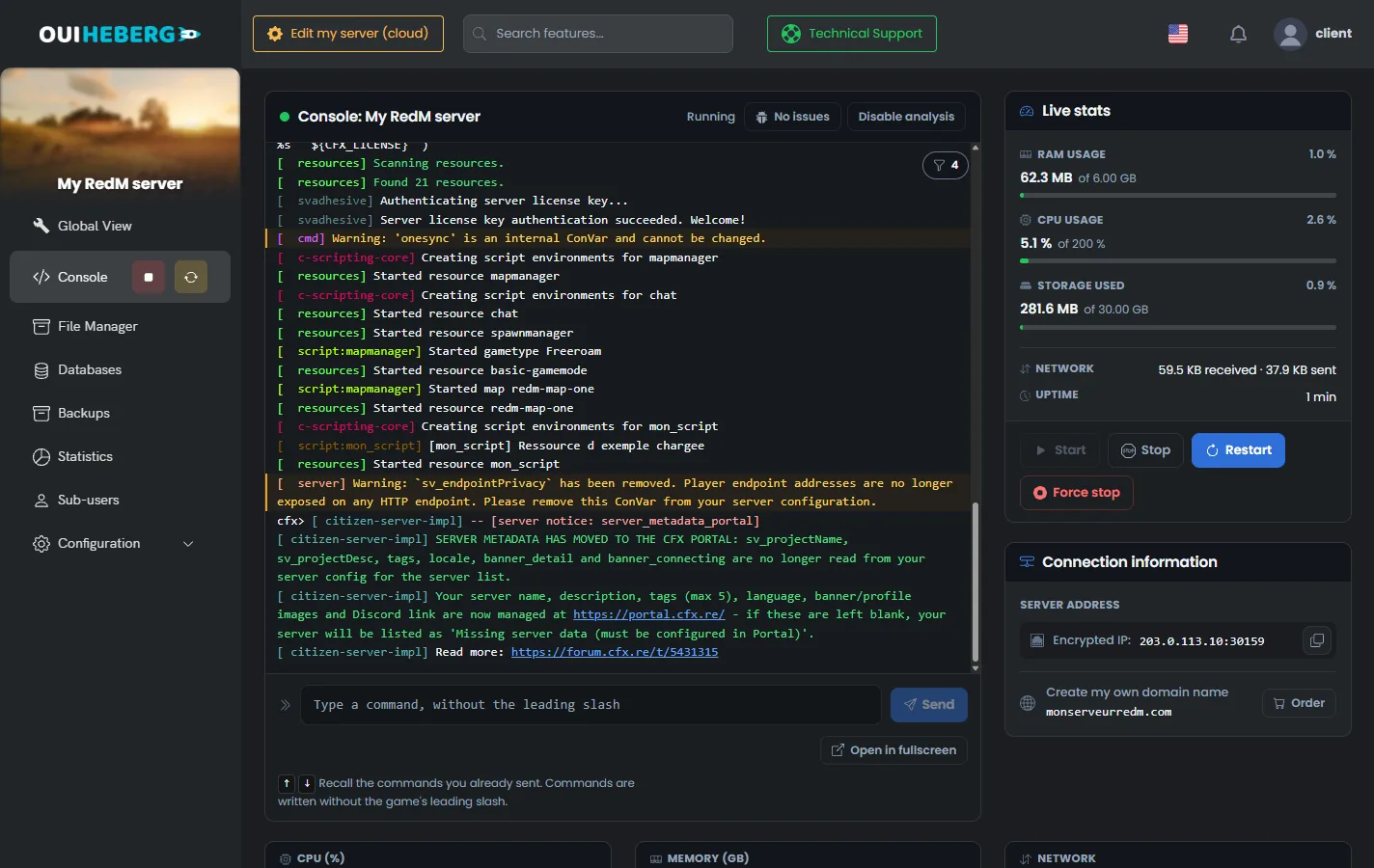
At startup, the console shows "Started resource my_script" once the script is loaded.
Start the script without a restart
With txAdmin, you can try a script without stopping the server. Type these commands in the txAdmin Live Console. The OuiPanel Console does not pass these commands to the game when txAdmin runs the server. Without txAdmin, add the ensure line to server.cfg, then restart the server.
Type
refresh. FXServer scans theresourcesfolder again and finds the new script.Type
ensure my_script.Read the console. A successful start ends with a "Started resource my_script" line.
Still add the ensure line to server.cfg. Without it, the script does not come back at the next start.
| Command | Effect |
|---|---|
refresh | Scans the resources folder again |
ensure name | Starts the resource, or restarts it if it is running |
start name | Starts the resource |
stop name | Stops the resource |
restart name | Restarts the resource |
Configure the script
Many scripts are set up in a config.lua file, at the root of the resource or in a config or shared folder. It holds the language, prices, positions or permissions.
Open the file in the File Manager, edit it, then click Save.
With txAdmin, type
restart my_scriptin the Live Console. Without txAdmin, restart the server.
Some scripts ship a .sql file that creates their tables. Import it into your database with PhpMyAdmin. The guide How to create and manage a MySQL database on OuiPanel explains how to open it.
If the script does not start
The OuiPanel console gives the reason. Here are the most common FXServer messages.
| Message | Fix |
|---|---|
Couldn't find resource my_script. | The folder name differs from the ensure line, or the script sits one subfolder too deep |
Could not find dependency oxmysql for resource my_script. | Install the dependency and put its ensure line before the script's |
Resource my_script does not support the current game (rdr3). | The script is made for FiveM. Look for a RedM version |
Resource my_script does not contain the RedM pre-release warning in fxmanifest.lua. | The rdr3_warning line is missing or differs from the exact sentence |
Resource my_script is not using CitizenFXv2 manifest. | The script uses the old __resource.lua. Ask its author for an updated version |
You lack the required entitlement | The paid script was bought with another Cfx.re account than the one that owns the server key |
An error can also come from the game side. In RedM, the F8 console shows errors from scripts loaded on the player's PC.
Need help?
Open a ticket from Tickets › Open a Ticket, or from the Contact support tile at the bottom of your server's page in the client area. You can also ask your question on the OuiHeberg Discord.
RedM server hosting from $3.46/mo, with txAdmin already on, MariaDB databases for your RP framework and backups included.
View plans →