
 Client area
SCUM admin commands: how to become admin on your server
In SCUM, you become admin by adding your SteamID64 to the server's AdminUsers.ini file. There is no admin password. You then type SCUM admin commands in the in-game chat, with a # prefix. This guide shows how to find your SteamID64, add yourself as admin in OuiPanel and use the console commands published by Gamepires. It assumes you already ordered a server from our SCUM server hosting plans.
The server must have started at least once, otherwise its settings files do not exist yet. The guide SCUM server settings: set up your server with ServerSettings.ini covers that first start.
Find your SteamID64
The SteamID64 is the ID of your Steam account. It is a 17-digit number that starts with 7656119. Your username does not work in its place.
In Steam, click your username at the top right, then Account details.
Your SteamID64 appears under the account name, after "Steam ID". Copy it.
If your Steam profile address starts with steamcommunity.com/profiles/, the number after it is also your SteamID64. Each admin must give you theirs.
Become admin with AdminUsers.ini
A SteamID64 listed in AdminUsers.ini gets access to the admin commands. SCUM creates this file empty on the first start and reads it again at every start.
In the Console, stop the server with Stop.
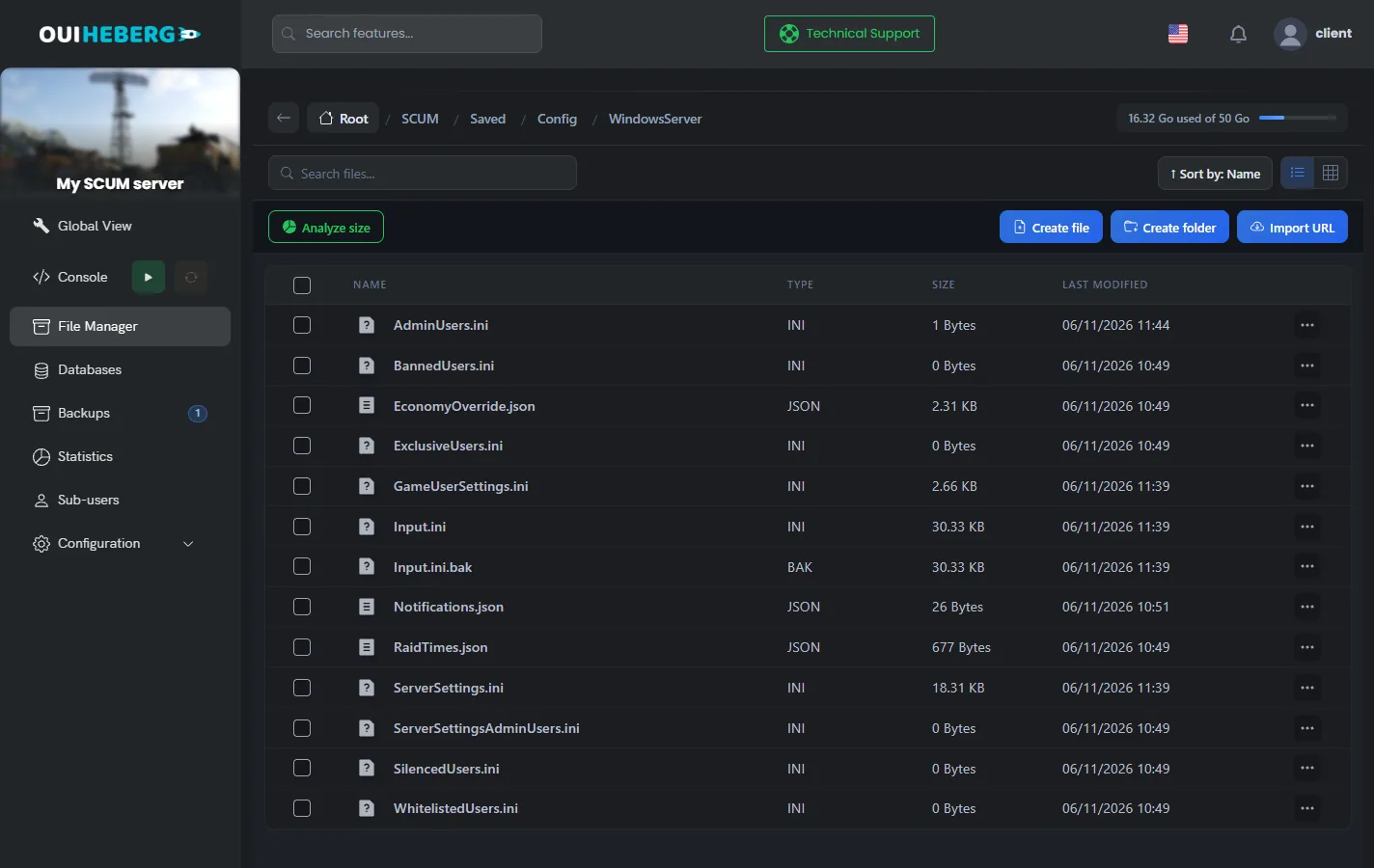
In the side menu, click File Manager, then open the
SCUM/Saved/Config/WindowsServerfolder.Click
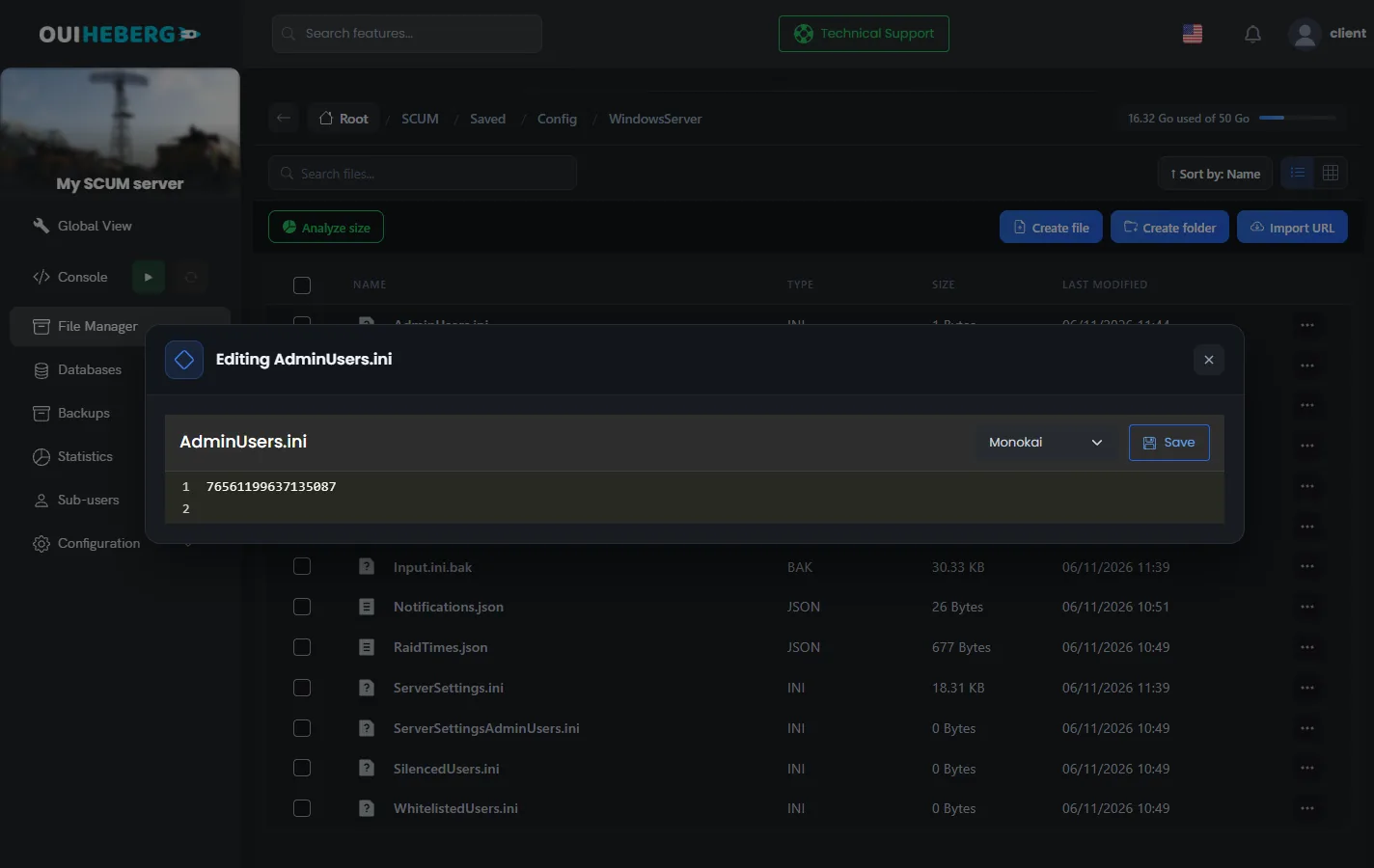
AdminUsers.ini. The "Editing AdminUsers.ini" window opens.Add your SteamID64 on its own line. Put one admin per line.
Click Save, then start the server from the Console.
76561199637135087
This SteamID64 comes from the Gamepires example. Replace it with yours.
You can also edit these files from your computer over SFTP. The guide How to connect via SFTP with FileZilla explains how to connect.
Grant the instant building right
A single right goes between brackets, right after the SteamID64. It grants the #SetGodMode True or False command, which turns instant building on or off.
76561199637135087[SetGodMode]
According to the Gamepires patch notes, an admin shuts the server down with the #ShutdownServer command.
Open the Server Settings menu in game
The in-game "Server Settings" menu changes the server settings without touching the files. It is reserved for the SteamID64s listed in ServerSettingsAdminUsers.ini.
Stop the server, then open
ServerSettingsAdminUsers.iniin the sameWindowsServerfolder.Add your SteamID64 on its own line, then click Save.
Start the server and join it. The "Server Settings" menu is now available.
The two files are independent. To get both the commands and the menu, add your SteamID64 to AdminUsers.ini and to ServerSettingsAdminUsers.ini.
Control who can join
Four other files in the WindowsServer folder filter players. They also take one SteamID64 per line.
| File | Effect |
|---|---|
BannedUsers.ini | Banned players. A player banned in game is added here, and you can also add a SteamID64 by hand |
WhitelistedUsers.ini | Priority players. If the server is full, another player is kicked to make room for them |
ExclusiveUsers.ini | Closed list. Only the players listed can join |
SilencedUsers.ini | Silenced players, with the length of their penalty |
ExclusiveUsers.initakes effect as soon as the first SteamID64 is listed. Add yours and those of all your players at the same time, or they will be locked out.
Type an admin command
Join your server with the Steam account listed as admin.
Open the in-game chat.
Type the command with the
#prefix, then press Enter.
Commands that delete or reset data end with the word please. It is part of the command, so type it.
The OuiPanel Console shows the server log. It is not used to type game commands.
Useful admin commands
These are the commands Gamepires published in its patch notes, with their syntax. The game has others, such as teleporting or kicking a player, whose syntax the studio does not publish.
Manage the server and squads
| Command | Effect |
|---|---|
#SetGodMode True | Turns instant building on. False turns it off. Needs the [SetGodMode] right |
#ShutdownServer | Starts the server shutdown |
#ListSquads | Lists squads, sorted by fame |
#SquadInfo 76561199637135087 | Shows a player's squad |
#ShowFlagLocations true | Shows where base flags are |
#ListActiveAbandonedBunkers | Lists active abandoned bunkers |
#ResetPlayerBalances 76561199637135087 please | Resets a player's money |
Clean up the map
| Command | Effect |
|---|---|
#DestroyAllBaseBuildingElementsForPlayer 76561199637135087 please | Destroys every building of a player |
#DestroyAllBaseBuildingElementsForSquad 14 please | Destroys the buildings of a squad, by its number |
#DestroyAllBaseBuildingElementsForFlag 22 please | Destroys the buildings tied to a flag, by its number |
#DestroyAllItemsWithinRadius 20 | Destroys items within the given radius, in meters. With the all argument, it destroys every item, up to 100 meters |
These commands show how many elements were destroyed. Keep a copy of the world before you use them.
Spawn items and NPCs
| Command | Effect |
|---|---|
#SpawnItem Night_Vision_Goggles_01 | Spawns an item by its technical name. The StackCount option sets the quantity of stackable items |
#SpawnArmedNPC BP_Drifter_Lvl_1 1 | Spawns an armed NPC. The DespawnLifetime option sets how long it stays with no player nearby |
Prepare an event
| Command | Effect |
|---|---|
#SetSkillLevel rifles 5 | Sets the level of a skill. Put a multi-word name in quotes |
#SetFarmingSimulationSpeed 10 | Speeds up crop growth on the whole server. 1 by default, 100 at most |
#SetMountedVehicleProperty Fuel 100% | Fills the tank of the vehicle you sit in. Also works with Health and Battery |
#ToggleFog | Turns fog on or off |
If a command does not work
| Symptom | Solution |
|---|---|
| No command responds | Check that your SteamID64 is in AdminUsers.ini, complete and without spaces, then restart the server |
#SetGodMode does not respond | Add [SetGodMode] right after your SteamID64, then restart the server |
| A delete command does nothing | Add the word please at the end |
| The "Server Settings" menu does not appear | Add your SteamID64 to ServerSettingsAdminUsers.ini, then restart the server |
| Nobody can join anymore | ExclusiveUsers.ini holds at least one SteamID64. Add your players or empty the file |
| A player is kicked when the server is full | A player from WhitelistedUsers.ini took the slot |
To adjust loot, trader prices or quests, follow the guide SCUM mods: loot, economy and quests on your server.
Need help?
Open a ticket from Tickets › Open a Ticket, or from the Contact support tile at the bottom of your server's page in the client area. You can also ask your question on the OuiHeberg Discord.
SCUM server hosting from $9.26/mo, with 12 to 32 GB of memory, SFTP access, backups and DDoS protection included.
View plans →