
 Client area
SCUM mods: loot, economy and quests on your server
SCUM has no official mod support, and Gamepires announced in September 2026 that it would not arrive in 2026. On a server, you customize the game with its official settings, loot, economy and quest files. Unofficial tools that load mods, such as UE4SS, are not supported. This guide shows how to edit those files on a server from our SCUM server hosting plans.
The server must have started at least once. The guide SCUM server settings: set up your server with ServerSettings.ini covers that first start.
What you can change on a SCUM server
| File | What it changes |
|---|---|
ServerSettings.ini | Server rules, NPCs, vehicles, building |
EconomyOverride.json | Trader prices |
| Loot files in JSON | Items found in the world |
| Custom quests in JSON | New quests for your players |
Notifications.json, RaidTimes.json | Scheduled messages, raid times |
The official files are in the SCUM/Saved/Config/WindowsServer folder. Stop the server before you edit them, except Notifications.json, then restart it.
The ServerSettings.ini settings are explained in the setup guide linked above. This one covers the other files.
Change trader prices
EconomyOverride.json sets the prices of items and services at the traders in safe zones. The shipped file starts with general settings, then gives the "traders" list, with two examples at the armory of zone A_0.
"traders": {
  "A_0_Armory": [
    {
      "tradeable-code": "Frag_Grenade",
      "base-purchase-price": "-1",
      "base-sell-price": "-1",
      "delta-price": "-1.0",
      "can-be-purchased": "default",
      "required-famepoints": "-1",
      "available-after-sale-only": "default"
    },
Each trader is named after the code of its safe zone followed by its trade, for example A_0_Armory or B_4_Trader. tradeable-code holds the item's technical name, base-purchase-price its purchase price and base-sell-price the price the trader pays to buy it back.
In the Console, stop the server with Stop.
In the File Manager, open
EconomyOverride.jsonin theWindowsServerfolder.In one of the examples, replace the technical name in
tradeable-codewith the item you want to change.Place that entry under the trader who sells the item, then set its prices.
Click Save, then start the server.
Gamepires details the format in its post on economy modding. Its official guide also mentions a helper tool, trader.scum-global.com.
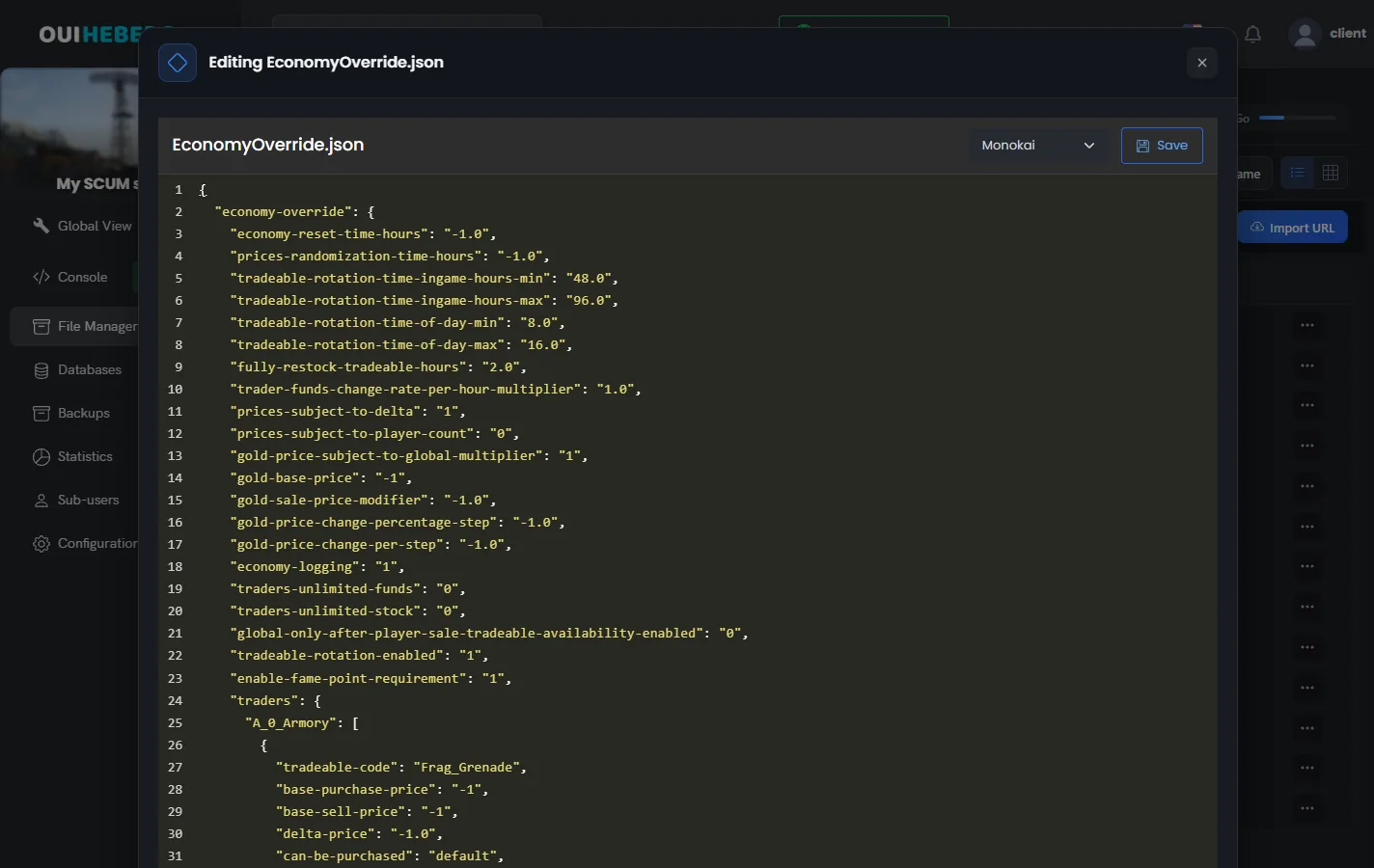
One missing comma or brace makes a JSON file unreadable. Check the structure before you save, and keep a copy of the version that worked.
Item technical names sometimes change. When 1.0 came out, Bobby_Pin_Pacage became Bobby_Pin_Package, for example. After an update, check the names used in your economy and loot files.
To edit these files from your computer, follow the guide How to connect via SFTP with FileZilla.
Change loot and add quests
Loot, meaning the items players find in the world, is also set with JSON files. Gamepires describes their format in its loot modification guide.
Since 1.0, a JSON file also lets you create quests for your community. The Gamepires custom quests guide explains each field. A visual tool, made by a team member, is available on the official game Discord.
The server ships with example quests, such as Example_Interact.json. Start from one of them to write your own.
To check a technical name, an admin can spawn the item in game with #SpawnItem followed by that name. The guide SCUM admin commands: how to become admin on your server lists the commands.
Schedule messages and raid times
Notifications.json shows messages to players on the days and at the times you choose. SCUM creates it on the first start, in the WindowsServer folder. According to Gamepires, the server reloads this file without a restart. Each message is an object in the "Notifications" list.
| Key | Purpose |
|---|---|
day | Display day. A day such as Monday, a range such as Monday-Friday, or Weekend and Everyday |
time | Display time. One time, a list of times or a range such as 14:00-15:00 |
wait | Gap in minutes between two repeats, within a time range |
duration | How long the message stays on screen |
color | Text color in red, green and blue, for example 255-255-255 |
message | Text shown. It accepts #NumPlayers, #Date, #Time, #RestartIn(HH:MM) and #RestartAt(HH:MM) |
RaidTimes.json sets, for the whole server, the time windows when bases can be raided. It works with global raid protection, turned on by scum.RaidProtectionType=3 in ServerSettings.ini. Gamepires explains its format in the patch 0.9.530 notes.
Need help?
Open a ticket from Tickets › Open a Ticket, or from the Contact support tile at the bottom of your server's page in the client area. You can also ask your question on the OuiHeberg Discord.
SCUM server hosting from $9.26/mo, with 12 to 32 GB of memory, SFTP access, backups and DDoS protection included.
View plans →