
 Client area
How to make a RedM server: license key, server.cfg and txAdmin
To make a RedM server, you need a Cfx.re license key and a server.cfg file set up for Red Dead Redemption 2. On our RedM servers, txAdmin is on from delivery and walks you through the setup. This RedM server setup guide covers each step in OuiPanel, the OuiHeberg game panel, then in txAdmin, up to the moment your players join. It assumes you already ordered a server from our RedM server hosting plans.
Create your Cfx.re license key
A RedM server will not start without a license key. The key is free and you create it on the portal of Cfx.re, the team behind RedM and FiveM.
Log in at portal.cfx.re with your Cfx.re account.
Open the Server Registration Keys page, then click Generate Key.
Name the key in Display Name, for example "RedM main". If the portal asks for the game, pick RedM.
Click Generate, then copy the key. It starts with
cfxk_.
The guide Keymaster FiveM covers the portal and key management in detail. RedM uses the same portal. In a OuiBox, OuiPanel asks for this key as soon as you create the server, in the CFX license field of the "This game needs your credentials" block.
A key works for one server at a time. Do not reuse the key of a FiveM project that is already running. Create one for your RedM server.
Open RedM txAdmin
txAdmin is the Cfx.re web panel for running a RedM or FiveM server. It is on by default on your server and has its own port, assigned when the server is created. It is the server's primary port plus one. You have no port to add.
Log in to OuiPanel at dash.ouipanel.com and open your RedM server.
Open the Console. If the server is stopped, click Start.
Wait for the txAdmin box. It starts with "All ready! Please access:", gives the txAdmin address, for example
http://203.0.113.10:30160/, then a PIN code under "Use the PIN below to register:".Open this address in your browser. The "No Cfx.re account linked" page appears. Type the PIN code, then click Link Account.
txAdmin sends you to forum.cfx.re. Log in with your Cfx.re account, by email or username, Google, Patreon or passkey.
The linked Cfx.re account becomes the txAdmin administrator. There is no separate txAdmin account and no local password. A Cfx.re account is free. The console also asks you to open the txAdmin port in your firewall. That message needs no action from you.
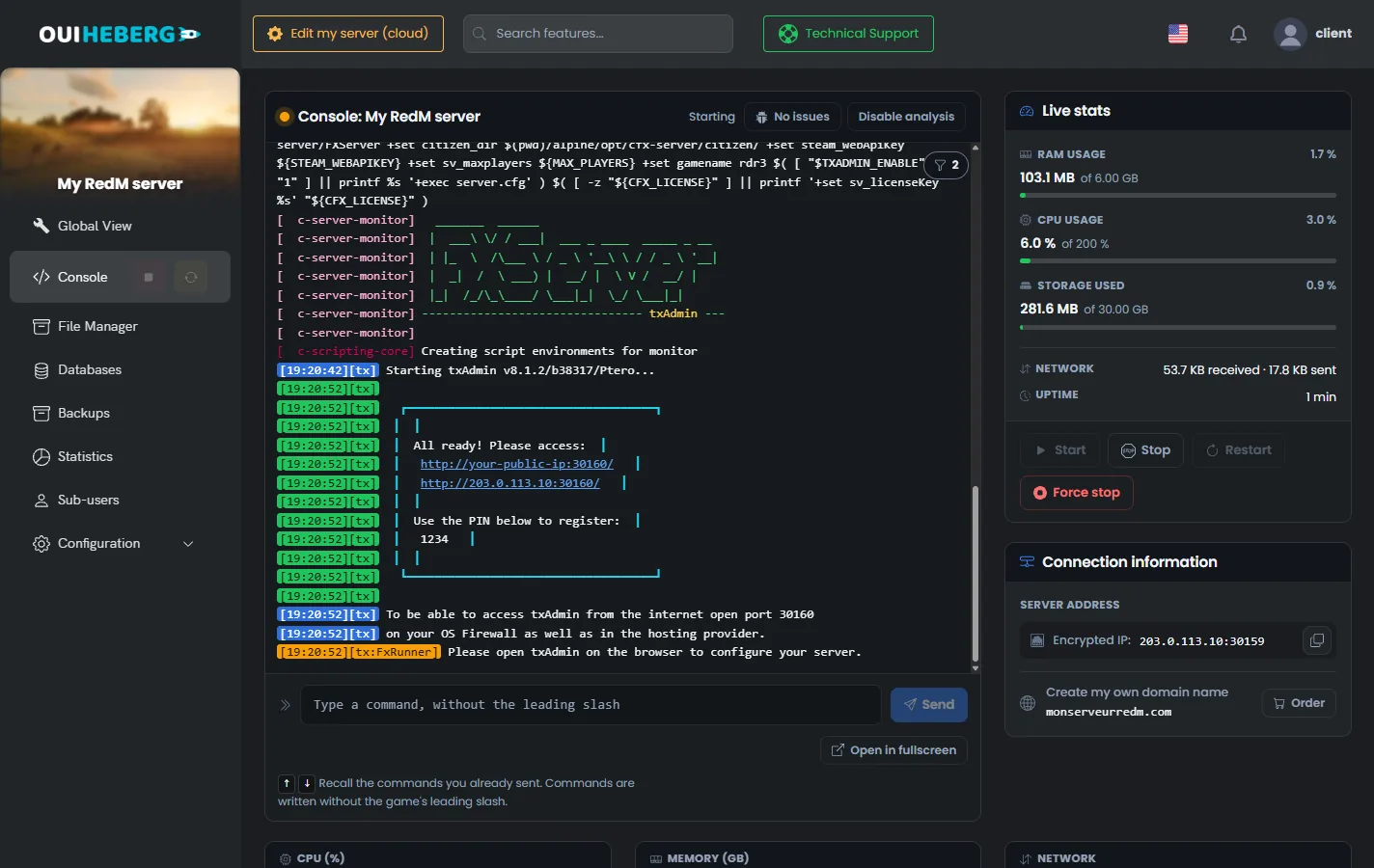
Use an address starting with
http://and the txAdmin port, not the game port. Until an account is linked, the console shows a PIN code again every minute. Do not share it.
Set up the server in txAdmin
Once the account is linked, txAdmin opens a setup wizard. It asks for a server name, then a deployment type.
Popular Recipes offers ready-to-install templates, including RedM Basic Server for a simple RedM base.
Remote URL Template installs a recipe from its address. Roleplay frameworks work this way, as described in the guide VORP Core or RSG Core: install a RedM framework on your server.
Existing Server Data reuses a folder that already holds a
server.cfgand aresourcesfolder, like the one OuiPanel installs.
In every case, the wizard asks for your license key. With a recipe, the field is called Server Registration Key. Paste the key you created on the portal.
Once the wizard is done, txAdmin starts the server and manages its server.cfg. txAdmin writes the server's primary port into it itself, in the endpoint_add_tcp and endpoint_add_udp lines.
The OuiPanel Stop button also stops txAdmin and the server it runs.
Adjust the server variables
The settings read at startup are under Configuration › Server Settings, in the Environment Variables block. Confirm a field with the check mark to its right, then restart the server. The Enable txAdmin switch saves as soon as you click it.
| Variable | Purpose |
|---|---|
CFX license (CFX_LICENSE) | License key. Only used when txAdmin is off |
Maximum players (MAX_PLAYERS) | Number of slots, 48 by default, from 1 to 300 |
Server name (SERVER_HOSTNAME) | Name written to the sv_hostname line of server.cfg |
CFX version (CFX_VERSION) | FXServer version, recommended by default, or a specific build number |
Steam Web API key (STEAM_WEBAPIKEY) | No longer used, leave it on none |
Enable txAdmin (TXADMIN_ENABLE) | txAdmin switch, on by default |
txAdmin port (TXADMIN_PORT) | txAdmin port, filled in when the server is created |
Without a subscription, RedM accepts up to 48 players. Beyond that, your Cfx.re account needs an Element Club subscription. According to redm.net, Argentum goes up to 64 slots, Aurum to 128 and Platinum to 1,024 with OneSync Infinity.
To change the FXServer version, type a build number in CFX version, then click Reinstall server on the same page. The panel offers a backup before it reinstalls.
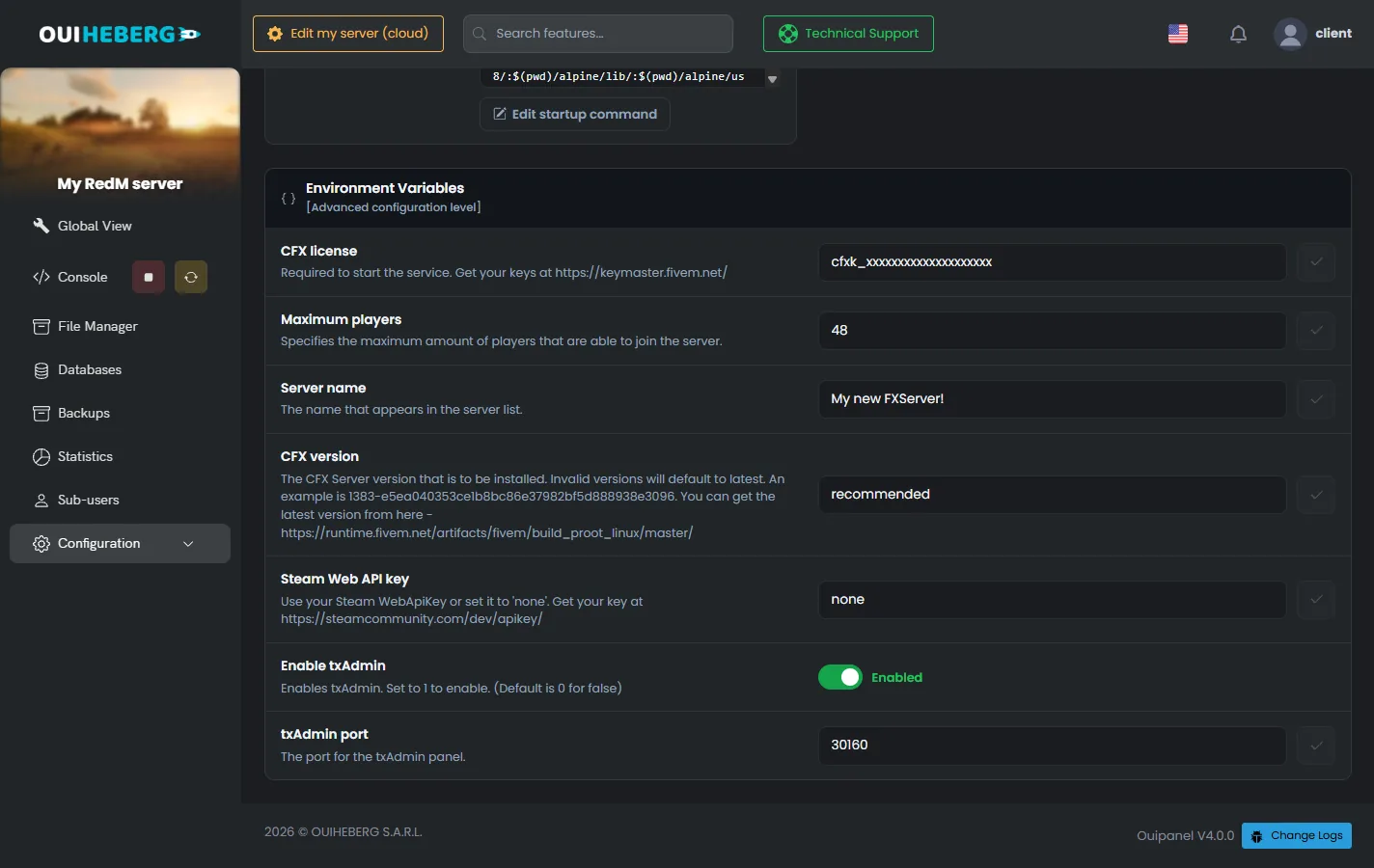
Make a backup before any reinstall. It replaces the FXServer files.
If you turn txAdmin off
Without txAdmin, the server starts directly from the server.cfg file at the root and reads the key from CFX license. When the key is accepted, the console shows "Server license key authentication succeeded. Welcome!". Without a key, the server stops with the message "This server does not have a license key specified".
Configure the server.cfg file
The server.cfg file tells FXServer which resources to start and how to behave. The installation writes one for RedM at the server root.
In the Console, stop the server with the Stop button.
In the side menu, click File Manager.
Click
server.cfg. The "Editing server.cfg" window opens.Edit the file, then click Save.
Restart the server from the Console.
With txAdmin, edit the file that txAdmin uses. A recipe creates its own in the txData folder. txAdmin also lets you edit it from its config editor.
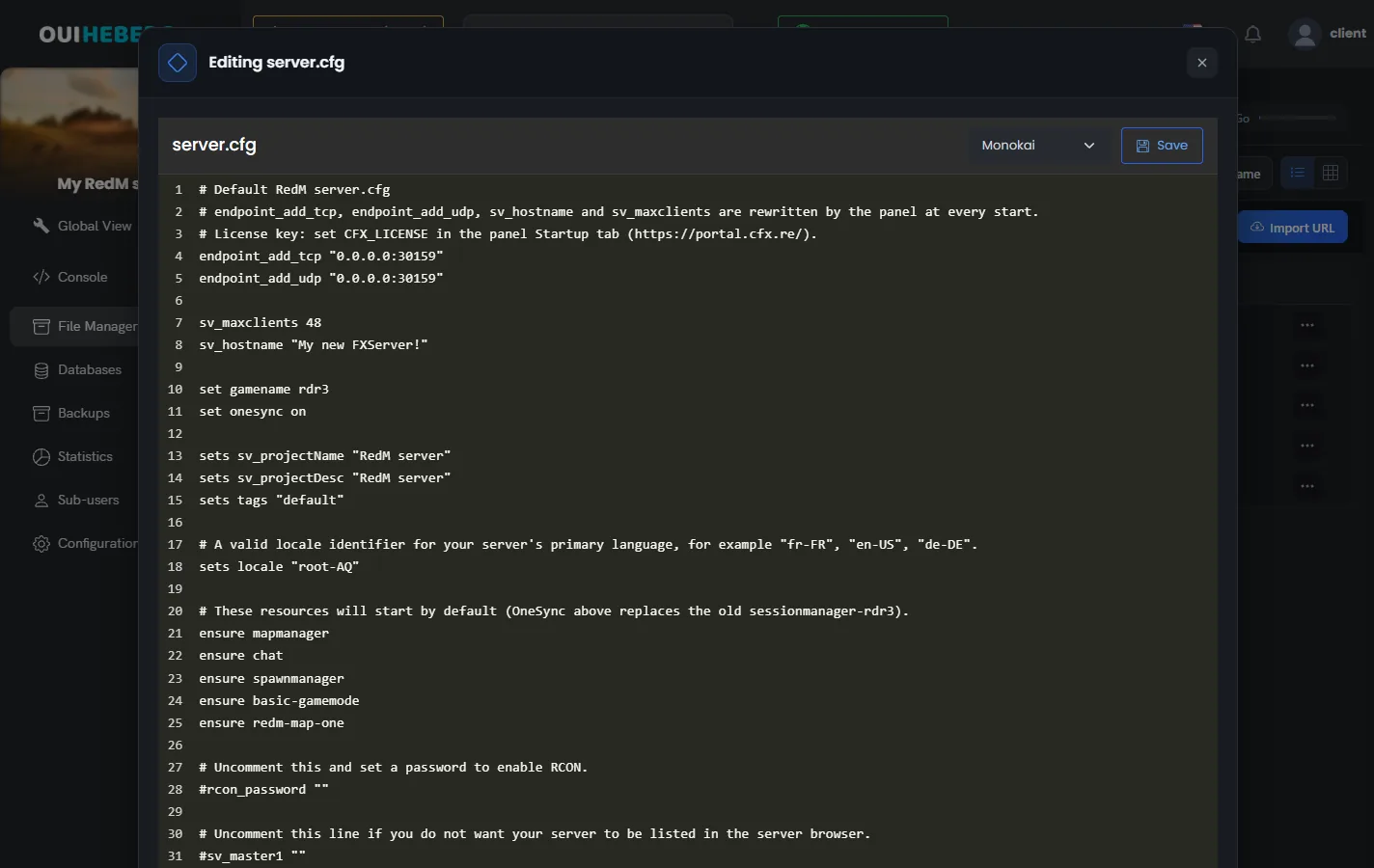
The start of the delivered file
endpoint_add_tcp "0.0.0.0:30159"
endpoint_add_udp "0.0.0.0:30159"

sv_maxclients 48
sv_hostname "My new FXServer!"

set gamename rdr3
OuiPanel rewrites the
endpoint_add_tcp,endpoint_add_udp,sv_maxclientsandsv_hostnamelines at every start. It uses the primary port and the Maximum players and Server name variables. Change these values in the variables, not in the file.set gamename rdr3runs FXServer as a RedM server. OuiPanel also passes this value at startup.OneSync is always on. Since August 16, 2026, it can no longer be set, so the file has no
onesyncline.The file has no
sv_enforceGameBuildline. FXServer already enforces build 1491, the September 2022 update of Red Dead Redemption 2.
The license key is not in this file. It comes from the txAdmin wizard, or from the CFX license variable without txAdmin. A reinstall does not overwrite an existing server.cfg.
The base resources
The installed file starts these resources. basic-gamemode provides a basic free-roam game mode and redm-map-one provides spawn points for RedM.
ensure mapmanager
ensure chat
ensure spawnmanager
ensure basic-gamemode
ensure redm-map-one
A resource written for FiveM only will not start on RedM. If the console flags an ensure line like that, comment it out with #.
The server listing
The server's public name and listing are now set on the Cfx.re portal, in the servers section (portal.cfx.re/servers). The file keeps the sv_projectName, sv_projectDesc, tags and locale lines, with a comment pointing to the portal. FXServer ignores them for the list. Without a listing on the portal, the server shows up as "Missing server data (must be configured in Portal)".
Join the RedM server
Each player needs Red Dead Redemption 2 on PC, as a legal and fully updated copy. Cfx.re lists Steam, the Epic Games Store and the Rockstar store. The RedM client is downloaded from redm.net.
In OuiPanel, open the Console and copy the address from the Connection Information block, under Server address.
Launch RedM.
Open the game console with the F8 key.
Type
connectfollowed by the address and the primary port, for exampleconnect 203.0.113.10:30159, then press Enter.
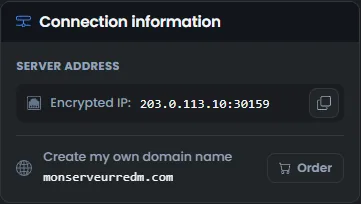
Give your players the server's primary port. The txAdmin port is only for administration.
If the server does not start
The OuiPanel console shows the cause. For RedM, the panel does not open a key alert window, so read the last lines.
| Message or symptom | Fix |
|---|---|
This server does not have a license key specified | txAdmin is off and the key is missing. Paste it into CFX license, or turn txAdmin back on |
| The key is rejected | Check on the portal that the key exists, is active and is not used by another server, then restart |
| The txAdmin page does not open | Check that the server is started, that txAdmin is on and that the address uses http:// and the txAdmin port |
Couldn't find resource | The resource folder is missing from resources, or its name differs from the ensure line |
does not support the current game (rdr3) | The resource is made for FiveM. Remove its ensure line |
| Players cannot connect | Check that they use the primary port and that the endpoint_add_tcp and endpoint_add_udp lines use that port |
For script-related messages, see the guide RedM scripts: how to install resources on your server.
Need help?
Open a ticket from Tickets › Open a Ticket, or from the Contact support tile at the bottom of your server's page in the client area. You can also ask your question on the OuiHeberg Discord.
RedM server hosting from $3.46/mo, with txAdmin already on, MariaDB databases for your RP framework and backups included.
View plans →