
 Client area
Factorio console commands
Factorio console commands start with a slash and are typed in the game's console. On a server hosted by OuiHeberg, you can also send them from the OuiPanel Console, without launching the game. This guide lists the admin commands from the official wiki and shows how to promote an admin. It assumes you already ordered your server from our Factorio server hosting.
The server must have started at least once. The guide How to set up a Factorio dedicated server covers that first start.
Open the console in Factorio
In game, the console is also the chat. According to the official wiki, it opens with the key to the left of 1, above Tab. This key can be changed in the game's controls settings.
A text that starts with
/is a command.A text without a slash is a message sent to the other players.
/helpshows the list of commands, and/helpfollowed by a name describes one command.
Most admin commands are reserved for the server's admins. On a new server, nobody is an admin. The next section deals with that.
Send a command from the OuiPanel Console
The OuiPanel Console passes your commands to the Factorio server. We verified this on a test server. It acts as the server console, so it does not need admin rights.
Open your server in OuiPanel, then the Console. The server must be Running.
Type the command with its slash in the field under the log, for example
/players.Click Send. The game's answer shows up in the log.
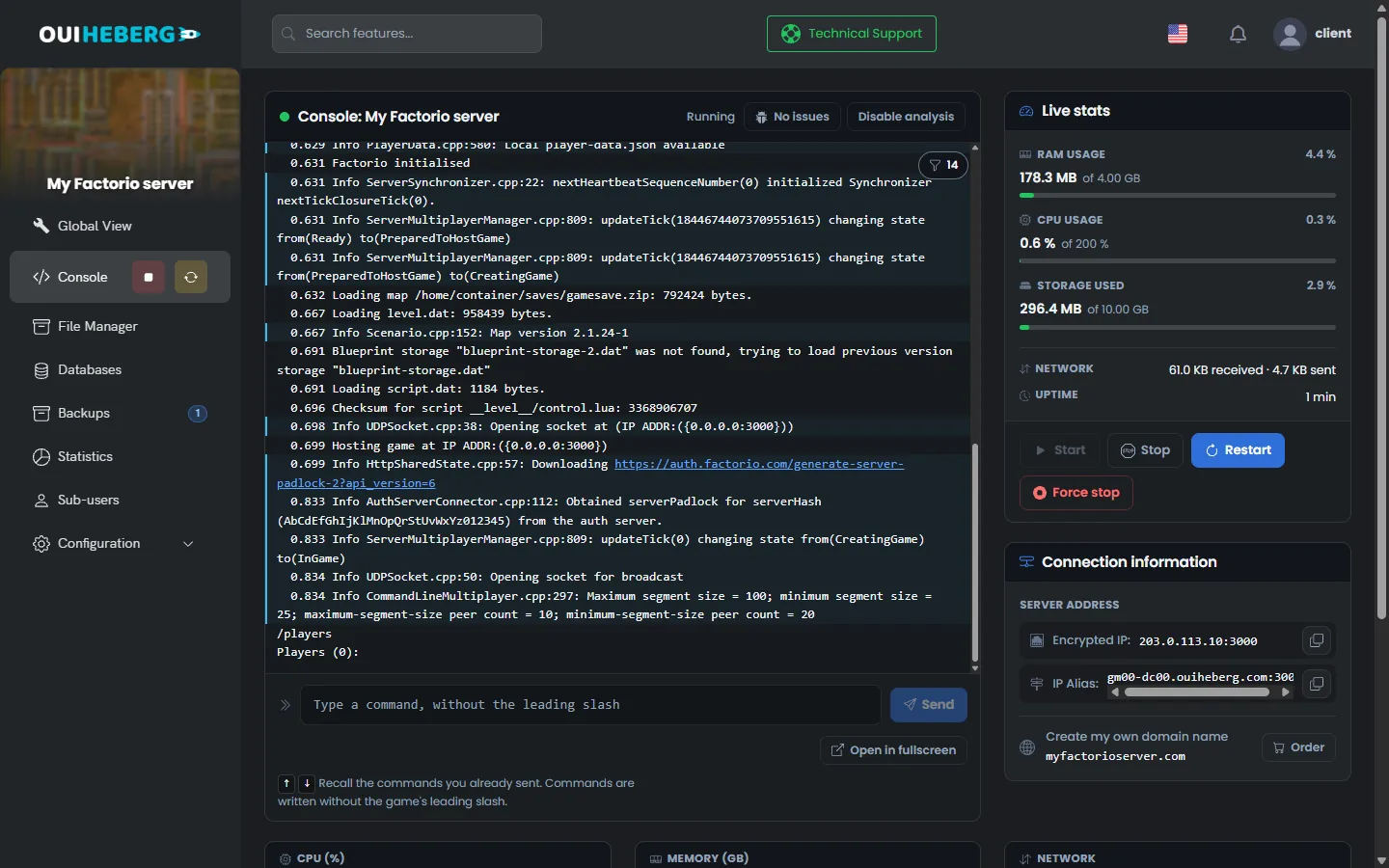
In our test, /version returned the version number, /players the list of players, and /server-save saved the game.
Promote an admin with /promote
An admin can kick, ban and use the reserved commands. Make yourself an admin from the OuiPanel Console, with your in-game username.
/promote MyUsername
In our test, the game answered that the player was added to the admin list and would be promoted upon joining. It also created the server-adminlist.json file at the root of the server.
["myusername", "afriendsname"]
This file holds the admins' usernames, in quotes and separated by commas. You can edit it in the File Manager, with the server stopped. A server reinstall and a backup restore both keep it.
| Command | Effect, according to the official wiki |
|---|---|
/promote Username | Gives the player admin rights |
/demote Username | Removes the player's admin rights |
/admins | Shows the list of admins. With no admin, the command prints nothing |
Only promote people you trust. An admin can ban players and run Lua commands that change the game.
Manage players
These commands come from the official Factorio wiki. We have not tried them with players connected. They are typed in game by an admin, or in the OuiPanel Console.
| Command | Effect |
|---|---|
/players | Lists the players of the game. /players online only keeps connected players |
/kick Username reason | Kicks the player. They can come back |
/ban Username reason | Bans the player from the server |
/unban Username | Lifts the ban |
/bans | Shows the list of banned players |
/mute Username | Prevents the player from writing in the chat |
/unmute Username | Lets the player write again |
/purge Username | Clears the player's messages from the chat |
/whitelist add Username | Adds the player to the whitelist. remove, get and clear also exist |
Our servers start without the game's whitelist option. To keep access for your friends, rely on the game password instead, set in the Server password variable.
Save and stop the game
| Command | Effect |
|---|---|
/server-save | Saves the game on the server, in the saves folder |
/save name | Saves the game under another name. Server console only |
/quit | Saves the game, then stops the server. Server console only |
/version | Shows the game version |
/time | Shows how old the game is |
/seed | Shows the map seed |
/evolution | Shows the enemy evolution factor |
/config | Opens the server settings window in game, for an admin |
The OuiPanel Stop button sends /quit. In our test, the server saved the map before it shut down. You do not need to type the command.
For the name, the password or the number of players, use the OuiPanel variables instead. They are written to the settings file at each start.
Avoid the commands that disable achievements
Factorio also accepts Lua commands, which change the game directly. They give items, change the game speed or reveal the map.
| Command | Purpose |
|---|---|
/c or /command | Runs a Lua command |
/sc or /silent-command | Runs a Lua command without printing it in the chat |
/measured-command | Runs a Lua command and measures how long it takes |
According to the official wiki, achievements are permanently disabled for the save as soon as a Lua command is used. This cannot be undone, except by restoring an older backup.
The commands in the tables above are not Lua commands. According to the wiki, it is the script commands that disable achievements. In Wube's example file, the allow_commands setting reserves Lua commands for admins.
Create a backup on the Backups page before you try a Lua command on a game that matters.
If a command does not work
| Symptom | Solution |
|---|---|
| The command goes to the chat | The leading slash is missing. In the OuiPanel Console too, type /players and not players |
| The game answers that you are not an admin | Type /promote followed by your username in the OuiPanel Console, then reconnect |
| The username is not recognised | Use the player's username as shown by /players |
| The OuiPanel Console does not answer | The server must be Running. Start it, then send the command again |
| The name or the password goes back after a restart | These values come from the OuiPanel variables, not from /config. Change them in Environment Variables |
| The server misbehaves since a mod was added | Remove the mod, then restart. See the guide How to install mods on a Factorio server |
To edit a file from your computer, such as server-adminlist.json, follow the guide How to connect via SFTP with FileZilla.
Need help?
Open a ticket from Tickets › Open a Ticket, or from the Contact support tile at the bottom of your server's page in the client area. You can also ask your question on the OuiHeberg Discord.
Factorio server hosting from $2.30/mo, on the game's official dedicated server, with SFTP access, backups and DDoS protection included.
View plans →