
 Client area
Icarus admin commands
In Icarus, admin commands are typed in the in-game chat, after logging in with the admin password. On a server from OuiHeberg, this password is generated when the server is created and you find it in OuiPanel. This guide shows how to find it, log in as admin and use the official RocketWerkz commands. It assumes you already ordered a server from our Icarus server hosting plans.
The server must have started at least once. The guide How to set up an Icarus dedicated server explains that first start.
Find the admin password
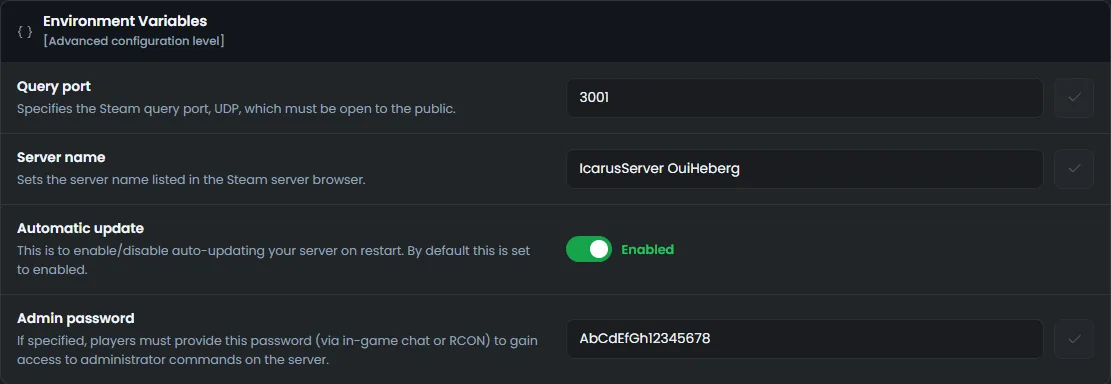
The admin password is a server variable in OuiPanel. You can copy it or change it.
Open your server in OuiPanel, then Configuration › Server Settings.
In the Environment Variables block, copy the value of the Admin password field.
To change it, type a new password, confirm with the check mark, then restart the server.
The generated password has 16 characters. A new password must have 8 to 32. It accepts letters, digits and the signs - _ . @ +. At each start, OuiPanel writes it to the AdminPassword line of ServerSettings.ini. So change it in the variable, not in the file.
Only give this password to your admins. An admin can kick and ban players, send everyone back to the lobby and delete games.
According to RocketWerkz, an empty admin password would make every player an admin. That is why the field cannot stay empty.
Log in as admin
Join your server, in a game or in the lobby.
Open the in-game chat.
Type
/AdminLoginfollowed by the password, then confirm.
/AdminLogin MyAdminPassword
Commands start with / or \. In the lobby, the slash is not needed, according to RocketWerkz.
Icarus has no RCON reachable over the network. The OuiPanel Console is for reading the server log. Its command field sends nothing to the game, so type commands in the in-game chat.
Kick, ban or unban a player
These commands require an admin login. They target a player by SteamID or by name.
| Command | Effect |
|---|---|
/KickPlayer PlayerName | Kicks the player, who can come back right away |
/BanPlayer PlayerName | Kicks the player and adds them to the server ban list. They can no longer join |
/UnbanPlayer SteamID | Removes the player from the ban list |
KickPlayer and BanPlayer accept an optional reason after the player. The SteamID is a 17-digit number that starts with 7656119. It appears in the player's Steam profile address, after steamcommunity.com/profiles/, if the profile has no custom address.
Manage the current game
| Command | Effect |
|---|---|
/AdminSay Restart in 10 minutes | Shows the message to all players, without an author name |
/ReturnToLobby | Kicks all players and sends the server back to the lobby |
/ReturnToLobbyWhenEmpty | Sends the server back to the lobby as soon as it is empty, without waiting for the ShutdownIfEmptyFor delay |
Warn your players with /AdminSay before you stop or restart the server.
According to the RocketWerkz patch notes, an admin can also change the game settings (Custom World Settings) in game, from the pause menu. The official list has no cheat command, such as spawning items.
Start a game from the lobby
In the lobby, three commands resume, load or create a game. You type them without a slash.
| Command | Effect |
|---|---|
ResumeProspect | Resumes the last game played on the server |
LoadProspect MyGame | Loads a game saved in the Icarus/Saved/PlayerData/DedicatedServer/Prospects folder |
CreateProspect Tier1_Forest_Recon_0 3 false MyGame | Creates and starts a new game |
CreateProspect takes four values in order. First the internal name of the prospect, then the difficulty, from 1 (easy) to 4 (extreme). Next true or false for Hardcore mode, without respawns. Last the save name, required for an outpost.
The example in the table is the one from RocketWerkz. It starts the tutorial mission on difficulty 3. The list of internal names published by the studio has not kept up with the latest maps. The easiest way is still to pick the game on screen, in the lobby.
These values can also go into ServerSettings.ini, after LoadProspect= or CreateProspect=. The server then applies them at startup.
Keep the lobby for admins
Two lines in ServerSettings.ini control what players who are not logged in as admin can do in the lobby.
| Setting | Effect, with its default value |
|---|---|
AllowNonAdminsToLaunchProspects | With True, any player can start or load a game. With False, only admins can (True) |
AllowNonAdminsToDeleteProspects | With True, any player can delete a game. With False, only admins can (False) |
In the Console, stop the server with Stop.
In the File Manager, open
ServerSettings.iniin theIcarus/Saved/Config/WindowsServerfolder.Change the value, click Save, then start the server.
You can also edit this file from your computer over SFTP. The guide How to connect via SFTP with FileZilla explains how to connect.
A game deleted from the lobby is lost, unless you have a backup of it. Leave
AllowNonAdminsToDeleteProspectsonFalse.
If a command does not work
| Symptom | Solution |
|---|---|
| No command responds | Log in first with /AdminLogin. After you reconnect to the server, type it again |
| The command is typed in the OuiPanel Console | The console sends nothing to the game. Type the command in the in-game chat |
| The password is rejected | Copy it from the Admin password variable. After a change, restart the server |
| The target player cannot be found | Use their SteamID rather than their name |
| A lobby command does nothing | Type it without a slash, with the exact save name |
| A player starts games without being an admin | Set AllowNonAdminsToLaunchProspects to False, then restart the server |
| The server misbehaves since you added a mod | Remove the mod, then restart. See the guide Can you install mods on an Icarus server? |
Need help?
Open a ticket from Tickets › Open a Ticket, or from the Contact support tile at the bottom of your server's page in the client area. You can also ask your question on the OuiHeberg Discord.
Icarus server hosting from $9.26/mo, for up to 8 co-op players, with SFTP access, backups and DDoS protection included.
View plans →