
 Client area
How to set up a Factorio dedicated server
To set up a Factorio server, start it once in OuiPanel, then give its address and password to your players. The server is private by default and needs no factorio.com account. This guide follows each step in OuiPanel, the OuiHeberg game panel, from the first start to a public server. It assumes you already ordered your server from our Factorio server hosting.
Start your Factorio server for the first time
Your server runs the headless build of Factorio, published by Wube, the game's developer. It runs on Linux and installs without a Steam account or a factorio.com account. You have nothing to install.
Log in to OuiPanel at dash.ouipanel.com and open your Factorio server.
Open the Console, then click Start.
Wait until the console shows the Running state.
On the first start, the server creates the map saves/gamesave.zip. The console then prints the line Hosting game at, and the game is open.
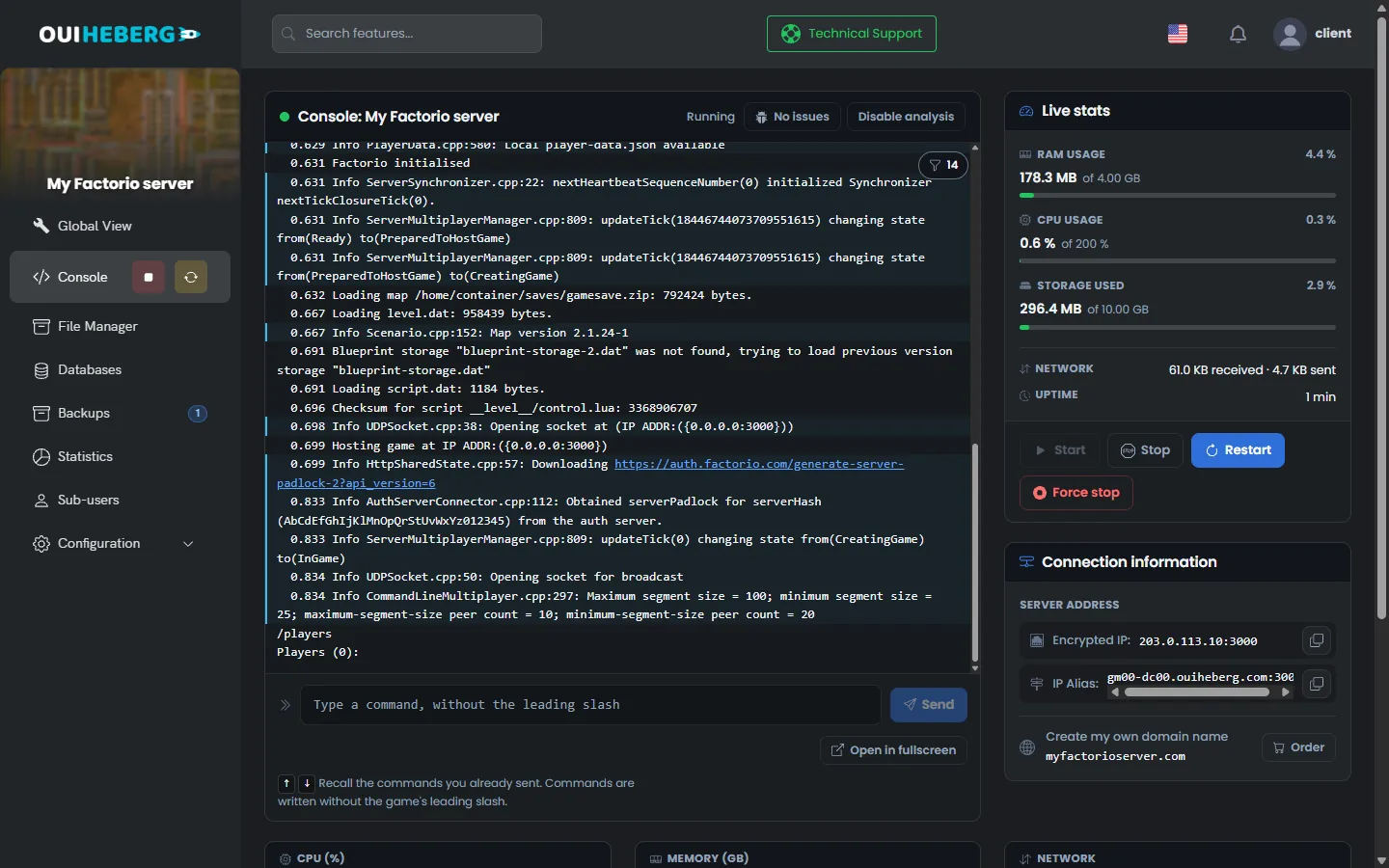
By default, Factorio pauses the game when nobody is connected. Your factory does not run while you are away. This behaviour is set in server-settings.json, with the auto_pause key.
The Stop button lets Factorio save the map before it shuts down. Still, warn your players before you stop or restart the server.
Join the server by its address
A new server is private. It is not shown in the game's public list, and players join it by its address. It is also protected by a game password, generated by OuiPanel when the server is created.
In the Console, note the address in the Connection information block, for example
203.0.113.10:3000.Open Configuration › Server Settings, then copy the value of the Server password field.
Launch Factorio, open the multiplayer menu and choose to connect to an address.
Enter the address with its port, then the game password.
The last two steps come from the official Factorio wiki. The game uses a single port, over UDP. Every player needs the same game version as the server.
According to Wube's example file, with require_user_verification set to true, the server only accepts players whose game is linked to a valid factorio.com account. This is the setting we ship.
Give your players the address and the password together. The password is changed in the variables.
Set the variables in OuiPanel
The settings read at startup are in Configuration › Server Settings, in the Environment Variables block. Confirm a field with the check mark on its right, then restart the server.
| Variable | Purpose |
|---|---|
| Factorio version | Installed version. latest means the latest stable release |
| Maximum players | Number of slots, from 1 to 100. The shipped value is 20 |
| Save name | Name of the map created when the saves folder is empty, gamesave by default |
| Server name | Name of the game, "Serveur Factorio OuiHeberg" by default |
| Server description | Short text that describes the game |
| Server password | Password asked from players, generated at creation. Clear the field for a game without a password |
| Visible in the server browser | Switch, off by default. When on, it makes the server public |
| Server username | Your factorio.com username. Only used by a public server |
| Server token | Your factorio.com token. Only used by a public server |
| Space Age (expansion) | Switch, off by default. When on, it loads the expansion |
| Autosave interval | Time between two autosaves, 10 minutes by default |
| Autosave slots | Number of autosaves kept, 5 by default |
| AFK kick | Time in minutes before an idle player is kicked. At 0, nobody is kicked |
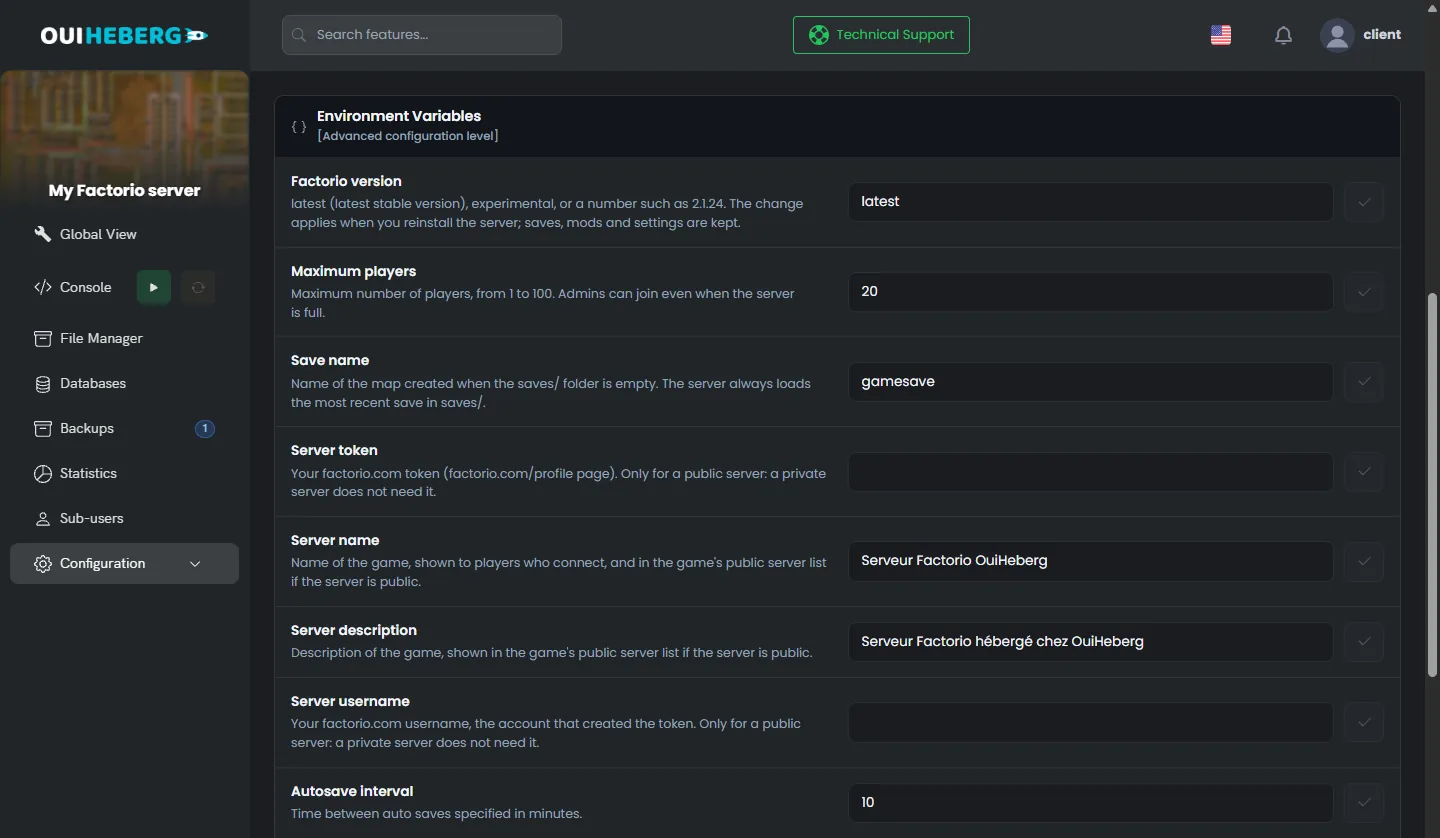
At each start, OuiPanel writes these values to the data/server-settings.json file. Change these settings in the variables, because an edit made in the file would be overwritten.
Without a password, anyone who knows the server address can join and tear down your factory. Keep one, even on a private server.
Choose between the base game and Space Age
A new server runs the base game. The Space Age expansion is already on the server, and the Space Age (expansion) switch decides whether it is loaded. The choice applies at each start.
When off, the server loads the base game only. Your players only need the base game.
When on, the server loads the four official mods of the expansion,
space-age,quality,elevated-railsandrecycler.
Factorio requires every player to have the same mods as the server. With the switch on, every player must own Space Age. The server itself has nothing to buy.
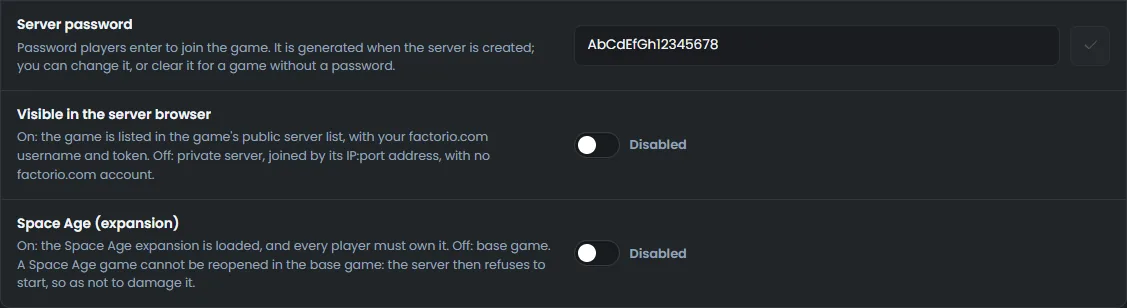
You can turn Space Age on for a base game save. At the next start, the game converts the map, and the console warns you. Once saved, that game no longer opens as a base game.
The other way round, the server refuses to start if you turn Space Age off while the latest save uses the expansion. The console explains why. To go back to the base game, move the files of the saves folder elsewhere. The server then creates a new map.
Create a backup on the Backups page before you turn Space Age on for an existing game. The change cannot be undone.
Change the Factorio version
The server keeps the installed version. It does not update by itself on restart. Your players and the server stay on the same version until you decide otherwise.
In the Factorio version variable, keep
latestfor the latest stable release. Typeexperimentalfor the experimental release, or an exact number such as2.1.24.Confirm with the check mark, then click Reinstall server on the same page.
Start the server from the Console.
The reinstall replaces the game files. It keeps your saves, your mods, your settings and the admin list. With latest, it installs the latest stable release. This is also how you update the server.
If the requested number does not exist, the install stops with a message, and the game already installed stays in place. A save written by a recent version does not open with an older version.
Make the server public
A public server appears in the game's list of multiplayer games. Wube requires a factorio.com account for this. The server signs in with your username and a token, never with your password.
Log in at factorio.com/profile and copy your token.
In the variables, enter your username in Server username and the token in Server token.
Turn on the Visible in the server browser switch.
Restart the server, then read the console.
Without a username or a token, a public server refuses to start, and the console explains why. If factorio.com rejects the token, the game stays reachable by its address, but it is not listed. The console reports it with a message.
According to Wube's example file, the game should then be listed in the game's public list, under the name set in Server name. We have not yet verified this listing with a real account on our servers.
The token is stored in plain text in the variables and in
data/server-settings.json. Your sub-users can read it. Never enter the password of your factorio.com account.
Edit the server-settings.json file
Settings that have no variable are changed in data/server-settings.json. The server reads this file at startup.
In the Console, stop the server with Stop.
In the side menu, click File Manager, then open the
datafolder.Click
server-settings.json. The "Editing server-settings.json" window opens.Change the values, then click Save.
Start the server from the Console.
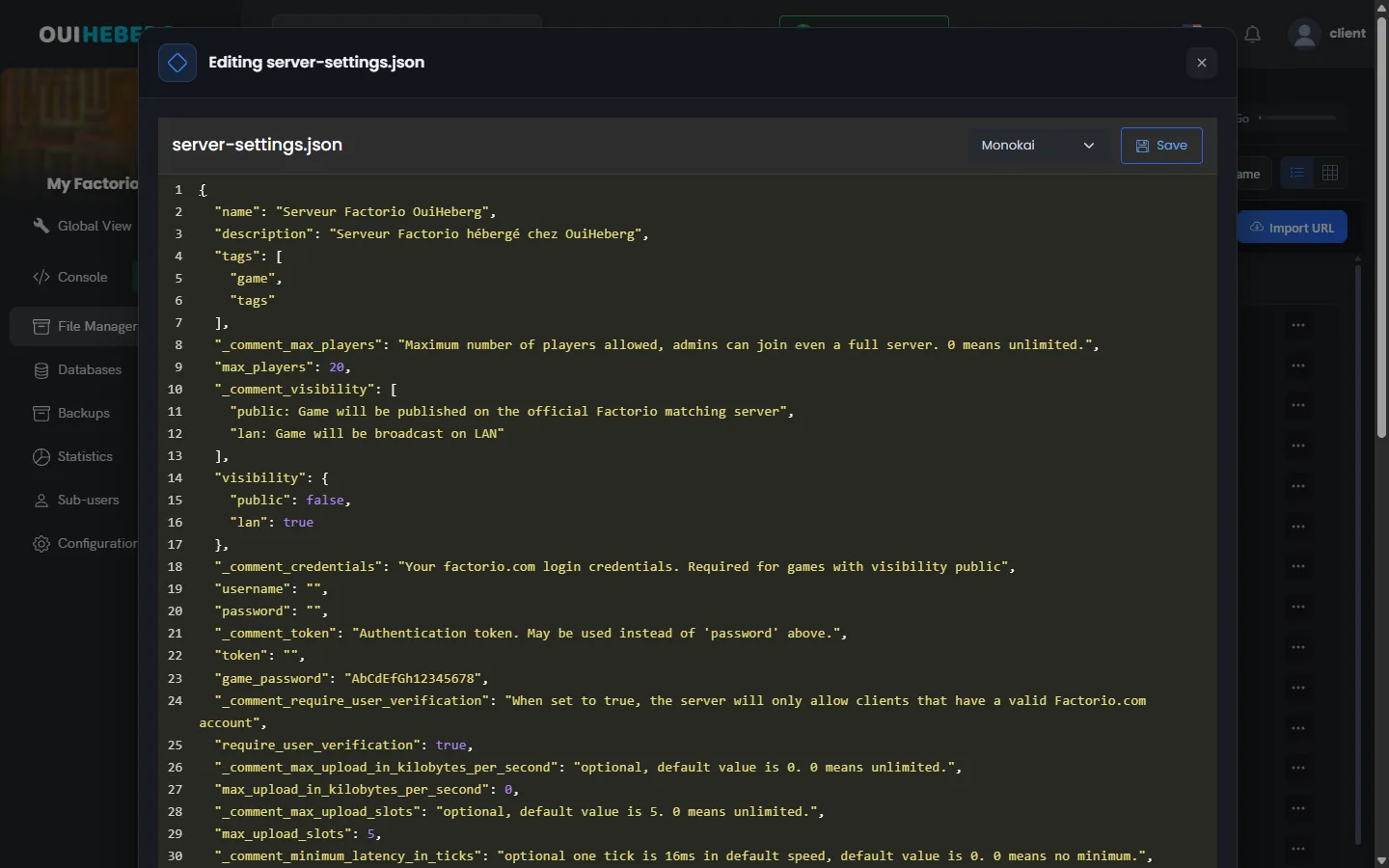
The lines written by OuiPanel
"name": "Serveur Factorio OuiHeberg",
"description": "Serveur Factorio hébergé chez OuiHeberg",
"max_players": 20,
"visibility": {
  "public": false,
  "lan": true
},
"username": "",
"token": "",
"game_password": "GamePassword",
"autosave_interval": 10,
"autosave_slots": 5,
"afk_autokick_interval": 0,
OuiPanel rewrites these ten values at each start, with public for the visibility. It does not touch the other lines of the file, nor their order. On a private server, username and token stay empty.
The settings that remain yours
| Setting | Effect, according to Wube's example file |
|---|---|
auto_pause | When true, the game pauses when no player is connected |
require_user_verification | When true, only players with a valid factorio.com account can join |
allow_commands | Who can run Lua commands. The original value is admins-only |
only_admins_can_pause_the_game | When true, only admins can pause the game |
tags | Keywords shown with the game in the public list |
If the file is no longer valid JSON, the server refuses to start rather than overwrite it. Check the commas and the quotes.
The shape of the map is set in data/map-gen-settings.json and data/map-settings.json. According to the official wiki, the game reads these two files when it creates a map, so when the saves folder is empty.
Back up and restore your game
Factorio stores each game in a .zip archive in the saves folder. Autosaves go there too. At startup, the server loads the most recent save in the folder.
To continue a game started in single player, stop the server, then upload its .zip file to saves. The save must come from the same game version, or from an older one. If it uses Space Age, turn the switch on before you start.
The Backups page of OuiPanel creates a copy of the server with Create backup. It contains your saves, your mods, your settings and the admin list, without the game files. After a restore, the game is downloaded again at the next start.
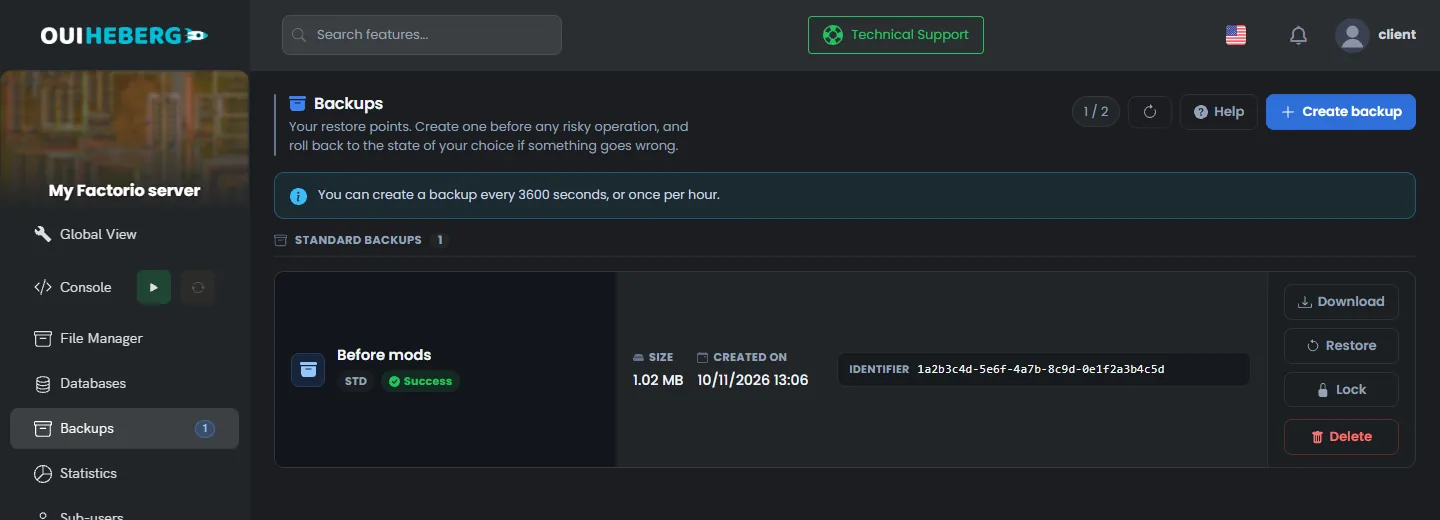
You can also copy the saves folder to your computer over SFTP, with the guide How to connect via SFTP with FileZilla.
To add mods, read the guide How to install mods on a Factorio server. To promote an admin or kick a player, read the guide Factorio console commands.
If the server does not start
The OuiPanel console shows the server log. Read its last lines first.
| Symptom | Solution |
|---|---|
| The console asks for a username and a token | The server is set to public. Fill in Server username and Server token, or turn off Visible in the server browser |
| The console refuses to start because of Space Age | The latest save uses the expansion. Turn on Space Age (expansion), or move the files of the saves folder |
| The console asks you to reinstall the server | Click Reinstall server in Server Settings. Your saves are kept |
| The name or the password goes back to the old value | These values come from the OuiPanel variables. Change them in Environment Variables |
| A player cannot join | Check the address with its port, the password, the game version and the mods. With Space Age on, the player must own the expansion |
| The public server is not in the game's list | Read the console. It reports a token rejected by factorio.com |
| The factory does not run when nobody is connected | This is the automatic pause. Set auto_pause to false in server-settings.json |
Need help?
Open a ticket from Tickets › Open a Ticket, or from the Contact support tile at the bottom of your server's page in the client area. You can also ask your question on the OuiHeberg Discord.
Factorio server hosting from $2.30/mo, on the game's official dedicated server, with SFTP access, backups and DDoS protection included.
View plans →