
 Client area
How to add mods to an Unturned server
To add mods to an Unturned server, put their Steam Workshop IDs in a file, then restart. The server then downloads the mods and maps by itself. This guide also shows where to upload plugins for RocketMod, which is installed with your server. It assumes you already ordered your server from our Unturned server hosting.
The server must have started at least once. The guide How to make an Unturned server explains that first start.
Find the ID of a Workshop mod
Every mod and every map on the Unturned Steam Workshop has an ID, a number. You read it at the end of its page address, after ?id=.
https://steamcommunity.com/sharedfiles/filedetails/?id=1702240229
Here, the ID is 1702240229. It belongs to the Greece map, which we used for our test.
OuiPanel has no mod manager for Unturned. Everything goes through one server file, described below.
Add the mods to WorkshopDownloadConfig.json
The list of mods to download is in Servers/PterodactylUnturned/WorkshopDownloadConfig.json. The game creates this file at the first start.
In the Console, stop the server with Stop.
Click File Manager, then open the folders
ServersandPterodactylUnturned.Click
WorkshopDownloadConfig.json. The "Editing WorkshopDownloadConfig.json" window opens.Add the IDs to
File_IDs, separated by commas, then click Save.Start the server from the Console.
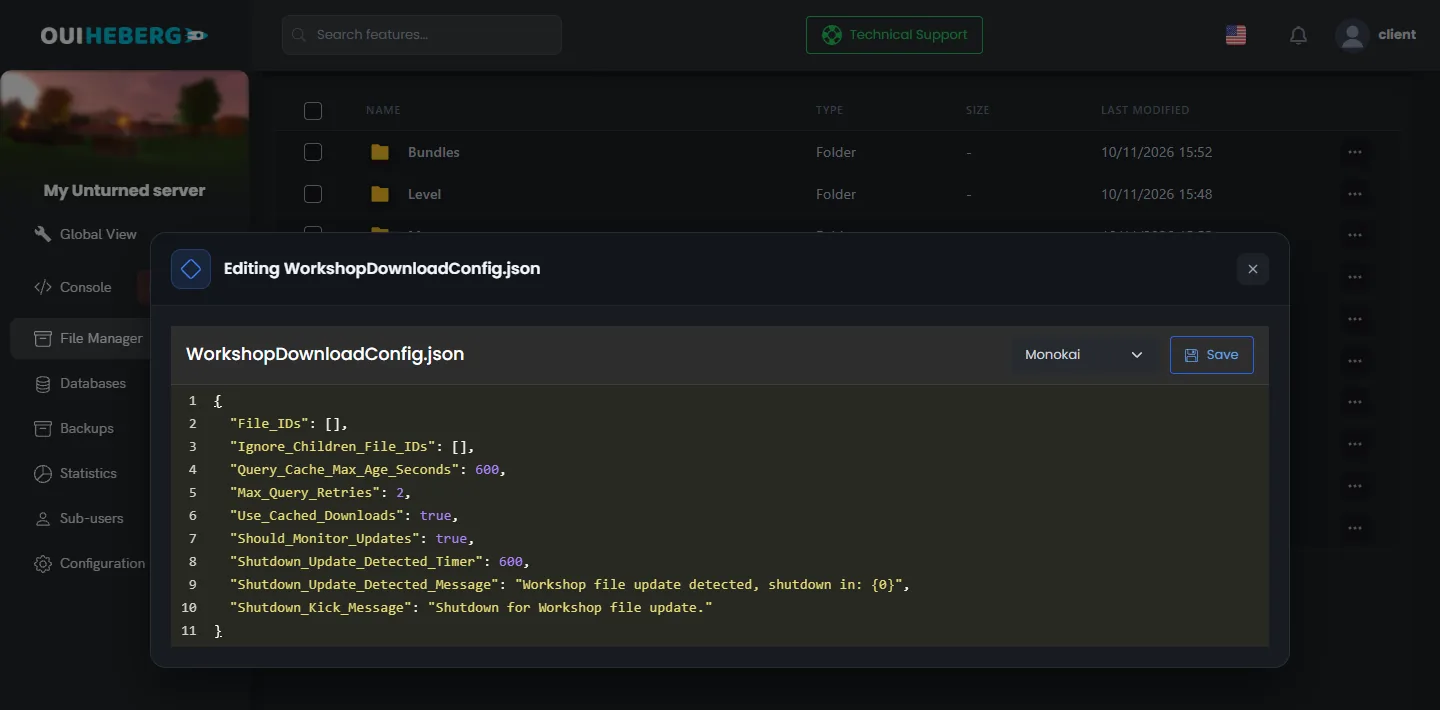
"File_IDs": [1702240229, 1753134636],
This example requests the Greece and Hawaii maps. At start, the server downloads every item in the list, with its dependencies. In our test, it downloaded the Greece map and the mod it depends on, then it started.
That start takes longer than usual. A large map also takes several hundred MB on the server disk.
According to the developer's documentation, players then download the same mods by themselves when they connect. We have not checked this with a player yet.
Do not touch the other lines of the file. Keep the JSON valid, with its commas and brackets.
Change the map
The map is chosen in the Map variable, in Configuration › Server Settings. A new server loads PEI.
The official maps
PEI,Washington,Yukon,RussiaandGermanyare installed with the server.A Workshop map takes two steps. Add its ID to
File_IDs, then write its name in Map.
In our test, we added the Greece ID, wrote Greece in the variable, then restarted. The server downloaded the map and loaded it.
According to the game's wiki, the map name is case-sensitive. Each map has its own folder in Servers/PterodactylUnturned/Level, with its world.
Create a backup on the Backups page before you change the map or add mods to a world that matters.
Install a RocketMod plugin
RocketMod adds plugins and commands to the server. Your server uses the version maintained by the game's developer, installed and enabled with the server. In our test, it loaded at start, and the console showed the line Rocket Unturned.
Stop the server from the Console.
In File Manager, open the folder
Servers/PterodactylUnturned/Rocket.Drag and drop the plugin's
.dllfile into thePluginsfolder.Start the server, then read the console.
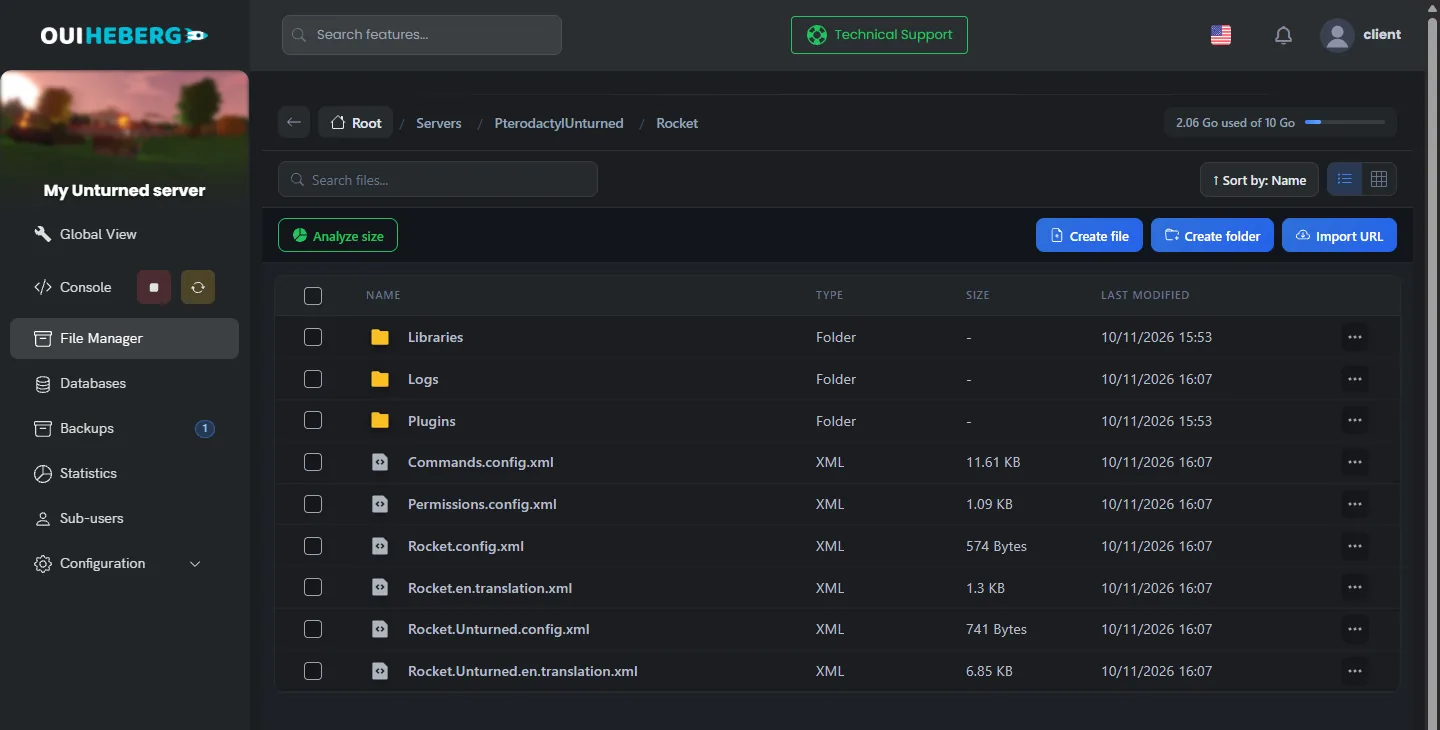
The Plugins folder is created empty. We have not tested a plugin on our servers yet. Based on how RocketMod works, a loaded plugin should create its own settings folder in Plugins.
| File in the Rocket folder | Purpose, according to RocketMod |
|---|---|
Permissions.config.xml | Player groups and permissions |
Commands.config.xml | List of commands and their settings |
Rocket.config.xml | General RocketMod settings |
Rocket.Unturned.config.xml | Settings specific to Unturned, including the automatic save |
OuiPanel rewrites the automatic save line of Rocket.Unturned.config.xml at every start. So set that delay in the Automatic save (minutes) variable.
To upload several files at once, use SFTP with the guide How to connect via SFTP with FileZilla.
Do not delete RocketMod if you care about the automatic world save. RocketMod is what saves the world at a regular interval. Without it, the server only saves it at every shutdown.
Install OpenMod
OpenMod is another plugin framework, developed by a third party. It is not installed on our servers, and we have not tested it. What follows comes from the developer's documentation.
OpenMod would install next to RocketMod and run its plugins.
It would be added with a RocketMod plugin and the
openmod installcommand, or by copying theOpenMod.Unturnedfolder intoModules.At the first start, it would download its components.
If you try it, create a backup first. The Modules folder is part of the OuiPanel backups.
Update or remove a mod
According to the developer's documentation, Workshop mods are updated at every server start. The server would also watch for their updates during the game. It would then warn players in chat and shut down after a delay. Then start it again from the Console.
To remove a mod, stop the server, then delete its ID from File_IDs. To remove a plugin, delete its .dll file from the Plugins folder.
Mods and plugins come from their authors. Our support helps you with the server and with OuiPanel, not with the content or the errors of a mod.
If a mod does not load
| Symptom | Solution |
|---|---|
| The server starts without the mod | Check the ID in File_IDs and the file syntax, then restart |
| The server cannot find the map | The name written in Map must be the map's name, capitals included. Its ID must be in File_IDs |
| The start takes a long time | The server is downloading the mods. Wait for the line Loading level: 100% |
| The disk is full | Workshop maps are heavy. Remove some IDs, or move to a plan with more storage |
| A plugin does not respond | Read the console at start. Check that the .dll file is in Plugins |
| The server crashes since you added a mod | Remove the last mod you added, or restore a backup from Backups |
For admin commands, read the guide Unturned admin commands.
Need help?
Open a ticket from Tickets › Open a Ticket, or from the Contact support tile at the bottom of your server's page in the client area. You can also ask your question on the OuiHeberg Discord.
Unturned server hosting from $2.30/mo, on the game's official dedicated server, with SFTP access, backups and DDoS protection included.
View plans →