
 Client area
Unturned admin commands
Unturned admin commands are typed in the server console or in the game chat. On a server hosted with OuiHeberg, you send them from the OuiPanel Console, without launching the game. This guide lists the commands from the official documentation and shows how to become admin. It assumes you already ordered your server from our Unturned server hosting.
The server must have started at least once. The guide How to make an Unturned server explains that first start.
Send a command from the OuiPanel Console
The OuiPanel Console passes your commands to the Unturned server. We checked this on a test server. It acts as the server console, so it does not need admin rights.
Open your server in OuiPanel, then the Console. The server must be Running.
Type the command without a slash in the field below the log, for example
players.Click Send. The game's answer appears in the log.
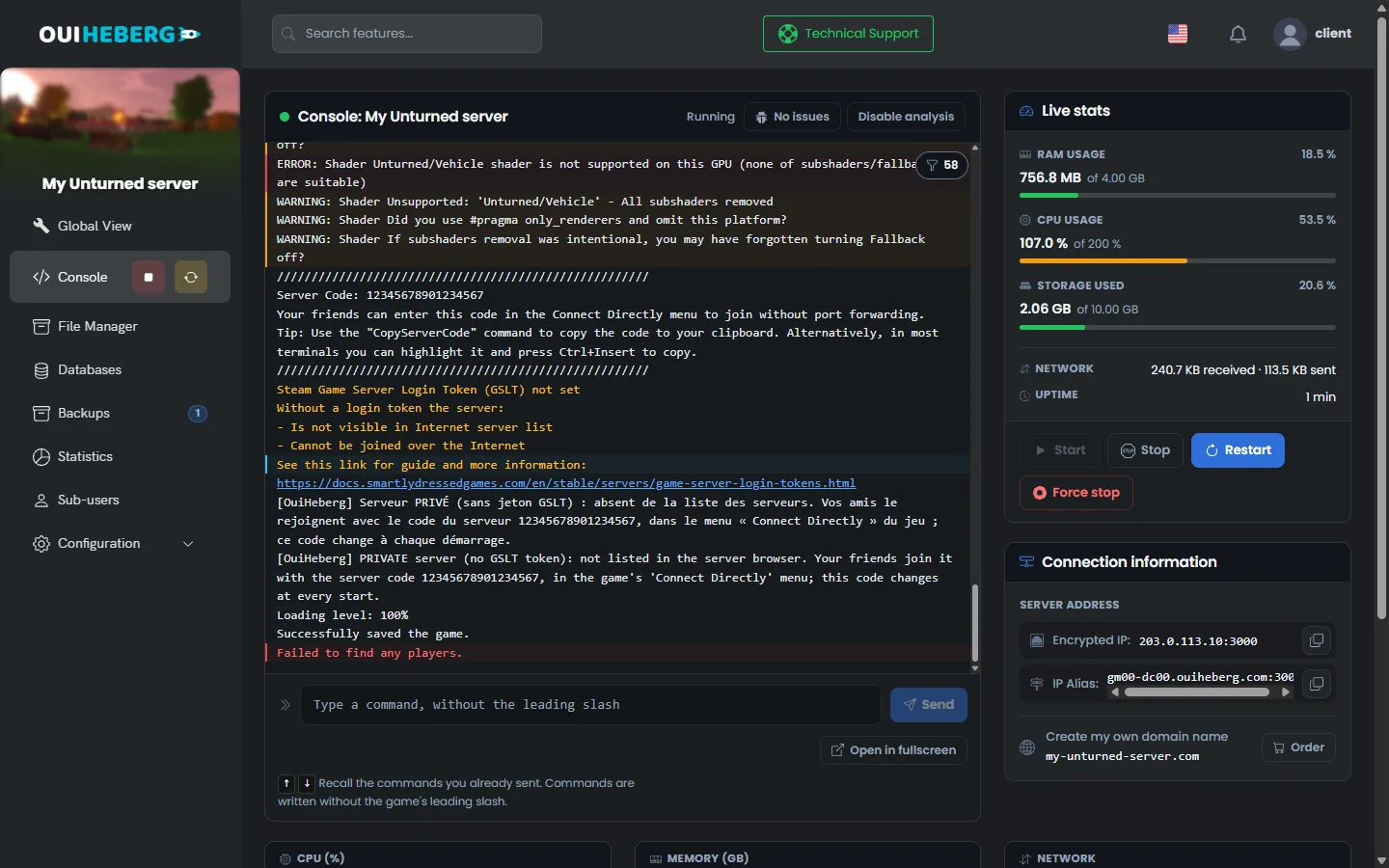
In our test, save answered Successfully saved the game. The players command answered Failed to find any players., because nobody was connected.
In the OuiPanel console, do not type a slash. Write
save, not/save.
Type a command in the game chat
According to the developer's documentation, an admin can also type commands in the game chat. They then start with a slash, for example /kick. The @ sign is accepted instead.
We have not tried these commands in game with a connected player yet. A player who is not admin cannot use them.
Become admin of the server
On a new server, nobody is admin. The developer's documentation gives several ways, all tied to your 17-digit Steam ID, the SteamID64.
| Way | Effect, according to the developer's documentation |
|---|---|
Owner SteamID64 in Commands.dat | Names the server owner, admin at every start |
admin SteamID64 in the console | Gives admin rights to the player while the server runs |
unadmin SteamID64 | Removes the player's admin rights |
admins | Shows the list of admins |
Owner 76561198000000000
Add this line, with your own ID, to Servers/PterodactylUnturned/Server/Commands.dat. Put it below the block written by OuiPanel, with the server stopped. OuiPanel keeps your lines at every start. The game stores the admins in the Adminlist.dat file of the same folder.
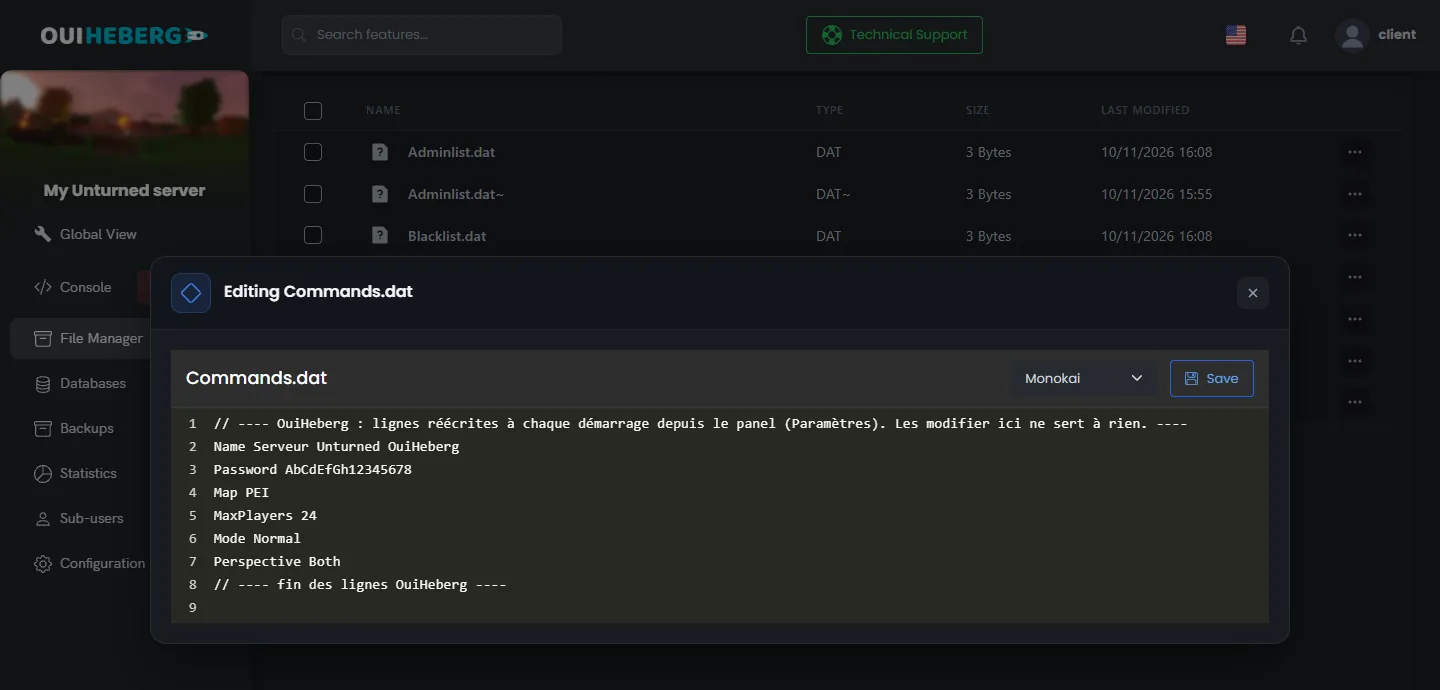
We have not checked these ways with a connected player yet.
Only name people you trust as admin. An admin can ban players and shut the server down.
Manage players
These commands come from the Unturned server's built-in help, the one shown by the help command. We have not tried them with connected players. Parameters are separated by a slash. In the game chat, add a slash at the beginning.
| Command | Effect |
|---|---|
players | Lists the connected players |
kick Player/Reason | Kicks the player. They can come back |
ban Player/Reason/Duration | Bans the player. Without a duration, the ban is permanent |
unban SteamID64 | Lifts the ban |
bans | Shows the list of banned players |
slay Player/Reason | Kills the player and bans them permanently |
permit SteamID64/Tag | Adds the player to the whitelist |
say Text | Sends a message to all players |
The player is named by their name or by their SteamID64. To keep access for your friends, rely first on the server password, set in the Server password variable.
Act on the game
These commands also come from the server's built-in help. According to the developer's documentation, those that give items, vehicles or experience require cheats to be allowed, with a Cheats line in Commands.dat.
| Command | Effect |
|---|---|
give Player/ID/Amount | Gives an item to the player, by its ID |
vehicle Player/ID | Spawns a vehicle near the player |
experience Player/Amount | Gives experience to the player |
teleport Player/Destination | Teleports the player to another player or to a place on the map |
time Number | Sets the time of the day and night cycle |
day and night | Switches to day or night |
weather storm | Starts rain, or stops it if it is already raining. weather none hands control back to the map's weather cycle |
airdrop | Triggers an airdrop |
Item and vehicle IDs are listed on the game's official wiki.
At start, the console also lists the commands added by RocketMod, such as heal, god, tp or broadcast. We have not tested their effect in game.
Save and stop the server
| Command | Effect |
|---|---|
save | Saves the world right away. Tested on our servers |
shutdown | Saves the world, disconnects the players, then stops the server |
shutdown Delay/Message | Same shutdown after a delay, with a message to players, according to the server's help |
The OuiPanel Stop button sends shutdown. In our test, the server saved the world before it stopped. So you do not need to type the command.
For the name, password, map or player count, use the OuiPanel variables. They are rewritten to Commands.dat at every start.
If a command does not work
| Symptom | Solution |
|---|---|
| The console does not recognise the command | Remove the slash. In the OuiPanel Console, write save, not /save |
| The game answers that you lack permission | Become admin with Owner or admin, then reconnect |
The give command is refused | Add a Cheats line to Commands.dat, then restart |
| The player is not found | Use their SteamID64, or their name as shown by players |
| The OuiPanel console does not answer | The server must be Running. Start it, then send the command again |
| The name or map comes back after a restart | These values come from the OuiPanel variables. Change them in Environment Variables |
To add mods or plugins, read the guide How to add mods to an Unturned server. To edit a file from your computer, follow the guide How to connect via SFTP with FileZilla.
Need help?
Open a ticket from Tickets › Open a Ticket, or from the Contact support tile at the bottom of your server's page in the client area. You can also ask your question on the OuiHeberg Discord.
Unturned server hosting from $2.30/mo, on the game's official dedicated server, with SFTP access, backups and DDoS protection included.
View plans →