
 Client area
Can you install mods on an Icarus server?
You can install mods on an Icarus server, but without official support. Icarus has no Steam Workshop and no modding tool from RocketWerkz. Community mods are .pak files that go on the server and on every player's PC. This guide shows how to install them on a server from our Icarus server hosting plans. The effect of a mod in game is not guaranteed, and our team does not provide support for mods.
The server must have started at least once. The guide How to set up an Icarus dedicated server explains that first start.
What Icarus mods are
An Icarus mod is a .pak file that changes or adds game data. Most of them are published on Nexus Mods. Some players manage them on their PC with Icarus Mod Manager, a community tool.
The server and every player need the same
.pakfiles, in the same version.A mod can stop working after the game update, every Thursday.
A mod is not always made for servers. Its page says so, along with the game version it targets.
A mod can damage a running game. Before you add one, make a copy of the
Icarus/Saved/PlayerData/DedicatedServer/Prospectsfolder.
Install a mod on the server
In the Console, stop the server with Stop.
In the side menu, click File Manager, then open the
Icarus/Content/Paksfolder.If the
modsfolder does not exist, create it with Create folder.Open
modsand drop the mod's.pakfile into it.Start the server from the Console.
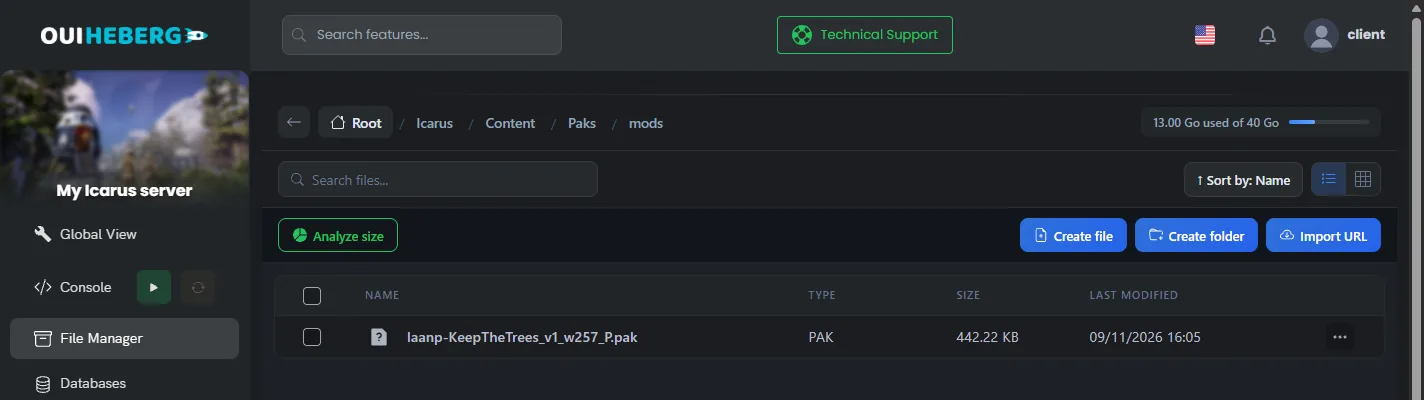
At startup, the server finds and loads the .pak files from the mods folder, then starts normally.
To remove a mod, delete its .pak file from the mods folder, then restart the server.
The File Manager accepts 100 MB per file. For a larger file, or for several mods at once, use SFTP. The guide How to connect via SFTP with FileZilla explains how to connect.
OuiPanel backups keep the
Icarus/Savedfolder, with your settings and your games. They do not keep theIcarus/Contentfolder, so your mods are not included. Keep a copy of your.pakfiles on your computer.
Install the same mods for every player
Each player copies the same files into the game folder on their PC.
In the Steam library, right-click Icarus, then choose Manage › Browse local files.
Open the
Icarus/Content/Paksfolder, then create themodsfolder if it does not exist.Copy into it the
.pakfiles installed on the server.
Send your players the list of mods with their versions. A player without the same files may run into errors in game.
After a game update
Icarus gets an update every Thursday, and the server must move to the same version as the players. A mod that has not caught up can then cause errors or block startup.
If the server no longer starts, remove the
.pakfiles from themodsfolder, then restart it.Put the mods back one by one to find the one that blocks.
When its author releases an updated version, replace the file on the server and for every player.
While you test, you can keep the right to start games for admins. The guide Icarus admin commands explains how.
If a mod does not work
| Symptom | Solution |
|---|---|
| The server no longer starts after adding a mod | Remove the last .pak file you added, then restart the server |
| The mod has no effect | Check that the file is in Icarus/Content/Paks/mods and that it ends with .pak. Also check on its page that it supports servers |
| A player runs into errors | Check that they have the same .pak files as the server, in the same version |
| Everything stopped working on a Thursday | The game got its update. Wait for the updated mods, and play without them in the meantime |
Need help?
Open a ticket from Tickets › Open a Ticket, or from the Contact support tile at the bottom of your server's page in the client area. You can also ask your question on the OuiHeberg Discord.
Icarus server hosting from $9.26/mo, for up to 8 co-op players, with SFTP access, backups and DDoS protection included.
View plans →