
 Client area
How to install mods on a Factorio server
To install mods on a Factorio server, upload their .zip files to the server's mods folder, then restart. Every player then needs exactly the same mods. This guide shows where to find the files, how to upload them with OuiPanel and how to enable them. It assumes you already ordered your server from our Factorio server hosting.
The server must have started at least once. The guide How to set up a Factorio dedicated server covers that first start.
Understand what the server expects
A Factorio mod is a .zip archive, named after the mod and its version. At startup, the server reads the mods in its mods folder.
According to the official wiki, the server and all players must have exactly the same game version and the same mods.
The server does not download any mod by itself. The Factorio mod portal requires a factorio.com account for each download.
OuiPanel has no mod manager for Factorio. Files are uploaded by hand.
Mods are made by the community. You install them at your own risk, and our support does not troubleshoot them.
Get the mod files
The safest way is to start from your own game. You are then sure to have the same files as the server.
In Factorio, open the mods menu and install the ones you want, with their dependencies.
Close the game, then open the
modsfolder on your computer.Find the
.ziparchives of the mods to upload.
According to the official wiki, this folder is here.
| System | Mods folder |
|---|---|
| Windows | %appdata%\Factorio\mods |
| Linux | ~/.factorio/mods |
| macOS | ~/Library/Application Support/factorio/mods |
A mod can require other mods to work. Upload these dependencies too, otherwise the server will not load the mod.
Upload the mods to the mods folder
In the Console, stop the server with Stop.
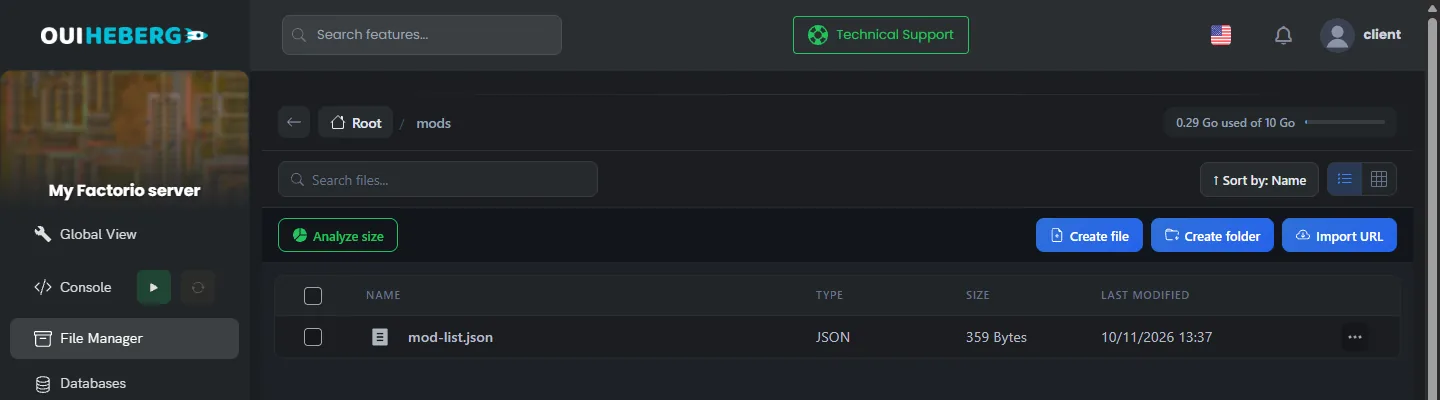
In the side menu, click File Manager, then open the
modsfolder.Drag the
.zipfiles from your computer into the file list. Do not unzip them.Start the server from the Console.
For several mods or large files, use SFTP with the guide How to connect via SFTP with FileZilla.
In our test, a mod uploaded to mods was loaded at the next start. The console reported it with a Loading mod line, and the game added it to mod-list.json by itself, enabled.
We have not verified how mods behave in game, with players connected. Test each mod on your save before you invite everyone.
Enable or disable a mod in mod-list.json
The mods/mod-list.json file lists the mods known to the server. The enabled value says whether the mod is loaded. Set it to false to disable a mod without deleting its file.
{
  "mods": [
    { "name": "base", "enabled": true },
    { "name": "elevated-rails", "enabled": false },
    { "name": "quality", "enabled": false },
    { "name": "recycler", "enabled": false },
    { "name": "space-age", "enabled": false },
    { "name": "my-mod", "enabled": true }
  ]
}
Stop the server, then open
mod-list.jsonin the File Manager.Change the
enabledvalue of the mod, then click Save.Start the server.
The name is the mod's name, without its version number. Never remove the base line, which is the game itself.
At each start, OuiPanel sets the four Space Age lines from the switch in the variables. It keeps the lines of your own mods.
Use Space Age and its official mods
The Space Age expansion comes as four official mods, space-age, quality, elevated-rails and recycler. They are already on the server. You have no file to upload.
To load them, turn on the Space Age (expansion) switch in Configuration › Server Settings, then restart. Do not edit these four lines by hand in mod-list.json, because they would be rewritten.
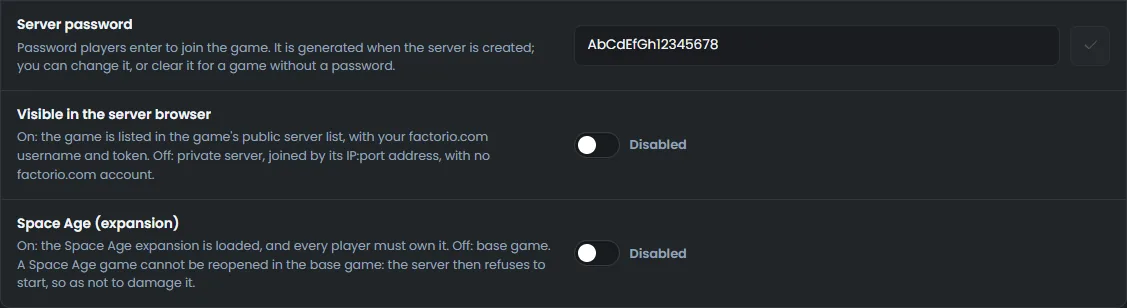
With the expansion loaded, every player must own Space Age. The guide How to set up a Factorio dedicated server details the move from the base game to Space Age and its limits.
Many mods on the portal exist in two versions, with or without Space Age. Read the mod's page before you upload it.
Update or remove a mod
To update a mod, stop the server, upload the new archive and delete the old one. Your players must make the same update in their game.
The game should offer each player to sync their mods with the server's when they connect. We have not verified this on our servers.
To remove a mod, delete its file or set its line to false. The items and buildings added by that mod can then disappear from the save.
Create a backup on the Backups page before you add, update or remove a mod. It contains your saves and the
modsfolder.
If a mod causes trouble
| Symptom | Solution |
|---|---|
| The server no longer starts after adding a mod | Read the last lines of the console. A dependency is often missing, or the mod targets another game version |
| The mod is not loaded | The file must stay a .zip archive, directly in mods. Also check its line in mod-list.json |
| A player is refused for different mods | They need the same mods, in the same versions, and the same game version as the server |
| A player without Space Age cannot join | The Space Age (expansion) switch is on. Every player must then own the expansion |
| A Space Age line goes back to its old value | These four lines follow the Space Age (expansion) switch in the variables |
| The game misbehaves since a mod was added | Restore the backup made before adding it, or remove the mod |
For the admin commands, read the guide Factorio console commands.
Need help?
Open a ticket from Tickets › Open a Ticket, or from the Contact support tile at the bottom of your server's page in the client area. You can also ask your question on the OuiHeberg Discord.
Factorio server hosting from $2.30/mo, on the game's official dedicated server, with SFTP access, backups and DDoS protection included.
View plans →