
 Client area
Sons of the Forest console commands
Sons of the Forest console commands are typed in the game, not in the server console. Endnight, the game's studio, documents no server command. Administration goes through the server owners, from the game. This guide shows how to become one, what you can do in game and what is known about cheat commands. It assumes you already ordered your server from our Sons of the Forest server hosting.
The server must have started at least once. The guide Sons of the Forest dedicated server setup explains this first start.
Use the OuiPanel console
The OuiPanel Console shows the server log and its Start, Stop and Restart buttons. It does not control the game. The game reads no command from its console, and Endnight provides no remote console.
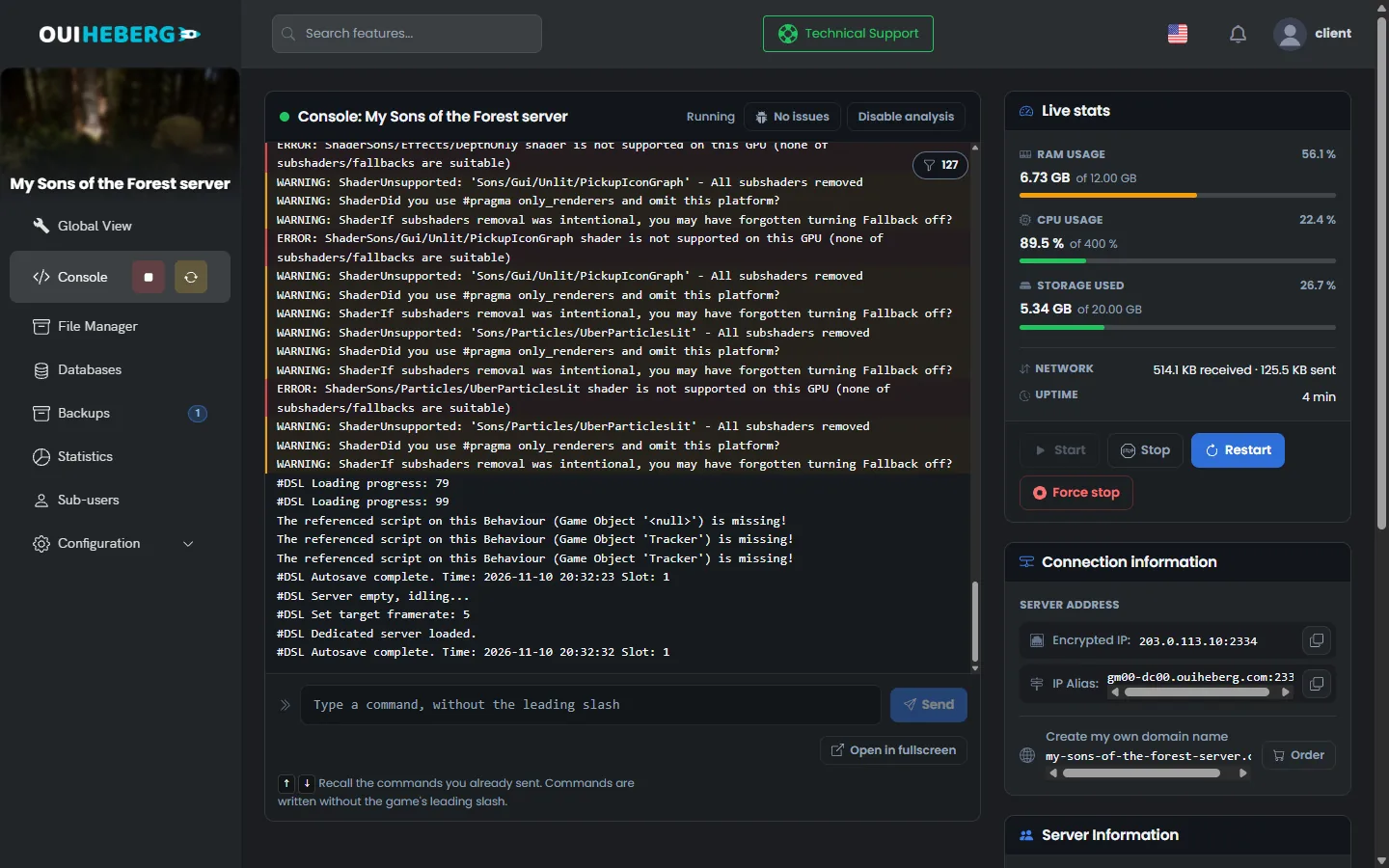
In our test, the save command, sent from the console, saved nothing. The console only echoed the line. Other commands found online, such as kick or ban, do not exist on the server console either, according to another host that tried them.
To know when the game was saved, look for the
Autosave completeline in the console. It comes back every 10 minutes, with the time.
Become admin with ownerswhitelist.txt
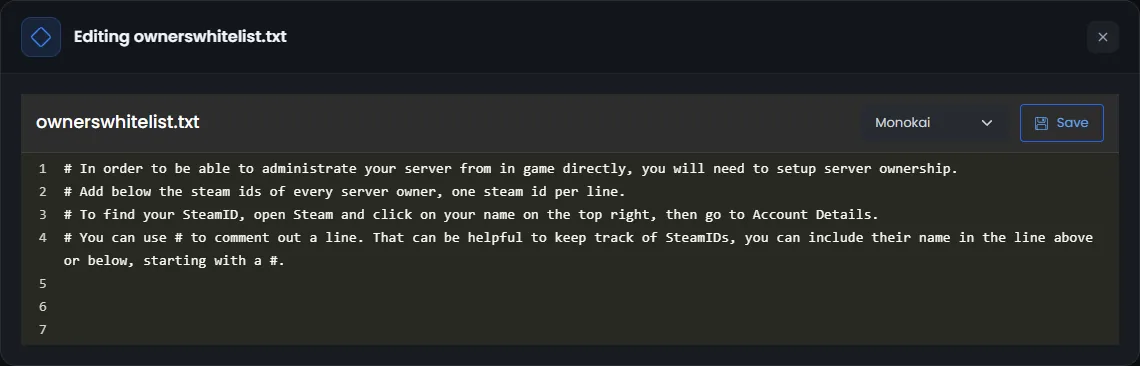
According to Endnight, server owners have every right in the game. You declare them in the file serverconfig/ownerswhitelist.txt, with their 17-digit Steam ID, the SteamID64.
In Steam, click your name at the top right, then the account details. Note your Steam ID.
In OuiPanel, click File Manager, then open the
serverconfigfolder.Click
ownerswhitelist.txt. The "Editing ownerswhitelist.txt" window opens.Add one line per owner, below the comment lines, then click Save.
Restart the server.
76561198000000000
Lines that start with # are comments. You can write the player's name there, above their ID. The file is delivered with the server and OuiPanel does not rewrite it. We have not checked owner rights with a connected player yet.
Only declare people you trust as owners. According to Endnight, an owner can kick and ban the other players.
Manage players from the game
According to Endnight, an owner manages players in the game's pause menu, in the players section. We have not tried this menu on our servers yet.
| Action | According to Endnight |
|---|---|
| Name an admin | An owner can upgrade a guest to administrator, then downgrade them back to guest |
| Kick a player | An owner can remove a guest from the game |
| Ban a player | An owner can ban a guest, then lift that ban |
| Set damage between players | The admin menu sets player versus player damage |
| Allow cheats | A multiplayer option allows the cheat console, or blocks it |
To keep the server for your friends, rely first on the password, set in the Server password variable.
Allow the cheat console
According to other hosts, a server does not allow the cheat console by default. Endnight mentions two ways to open it. We have tried neither of them.
In game, the multiplayer option that allows cheats, according to Endnight's patch notes.
When a game is created, the
GameSetting.Multiplayer.Cheatskey set totrue, in theCustomGameModeSettingsblock ofdedicatedserver.cfg, according to its guide.
"GameSetting.Multiplayer.Cheats": true,
This block is only read in custom mode, when the game is created. So you need to choose custom in Game mode and start a new game, as the guide Sons of the Forest dedicated server setup explains.
According to these hosts, cheats apply to every player once allowed, and nothing shows who uses them. Keep them for a server among friends.
Type a cheat command in the game
Endnight publishes no command list. The steps and the commands below come from community lists and from other hosts. We have not tried them. According to these lists, each command only applies to the player who types it.
On the server, open the chat with the Enter key, type
cheatstick, then confirm.Press F1 to open the cheat console.
Type the command, then confirm with Enter.
According to these lists, cheatstick is only recognized with a keyboard set to US English. Add this layout in Windows, then switch to it before you type the word.
| Command | Effect, according to these lists |
|---|---|
godmode on | Makes your character immune to damage. godmode off cancels it |
speedyrun on | Makes you run much faster |
energyhack on | Stops energy and stamina from dropping |
additem Item | Adds an item to your inventory, by its name or its number |
addallitems | Adds every item of the game to your inventory |
settimeofday 15 | Sets the game time, on a 24-hour clock |
season winter | Changes the season, with spring, summer, autumn or winter |
freecamera on | Detaches the camera from your character |
Commands from The Forest, Endnight's first game, do not work here. Their lists still often circulate under the same name.
Stop the server without losing the game
No command of the OuiPanel console saves the game. The Stop button shuts the game down without saving, and Restart goes through the same shutdown. We checked it on a test server.
In the Console, find the time of the last
Autosave completeline.Wait for the next line, 10 minutes later at most.
Then click Stop or Restart.
Warn your players before the shutdown. Whatever they do after the last automatic save would be lost.
If a command does not work
| Symptom | Solution |
|---|---|
| The OuiPanel console does not react to a command | This is normal. The game reads no command from the server console |
| You do not have owner rights | Check the 17 digits of your ID in ownerswhitelist.txt, one per line, then restart |
| The cheat console does not open | Switch the keyboard to US English, then type cheatstick in the chat again |
| The console opens but commands do nothing | Cheats are not allowed on the server. An owner has to allow them |
| A command found online is unknown | It may come from The Forest, the first game, which has other commands |
To set the number of slots on the server, read the guide How many players can play Sons of the Forest?. To edit a file from your computer, follow the guide How to connect via SFTP with FileZilla.
Need help?
Open a ticket from Tickets › Open a Ticket, or from the Contact support tile at the bottom of your server's page in the client area. You can also ask your question on the OuiHeberg Discord.
Sons of the Forest server hosting from $9.26/mo, for up to 8 co-op players, with SFTP access, backups and DDoS protection included.
View plans →