
 Client area
Sons of the Forest dedicated server setup
To set up a Sons of the Forest server, start it once in OuiPanel, then give its password to your friends. The server downloads without a Steam account and you have nothing to install. This guide follows each step in OuiPanel, the OuiHeberg game panel, from the first start to backups. It assumes you already ordered your server from our Sons of the Forest server hosting.
Start your Sons of the Forest server for the first time
Endnight, the game's studio, only publishes a Windows version of the server. On our machines, it runs on Linux with Wine, a tool that runs Windows programs. Everything is already set up.
Log in to OuiPanel at dash.ouipanel.com and open your Sons of the Forest server.
Open the Console, then click Start.
Wait until the console shows the Running status.
At the first start, the server downloads the game from Steam. This start therefore takes longer than the next ones. The server is ready when the console shows a line that ends with server loaded.
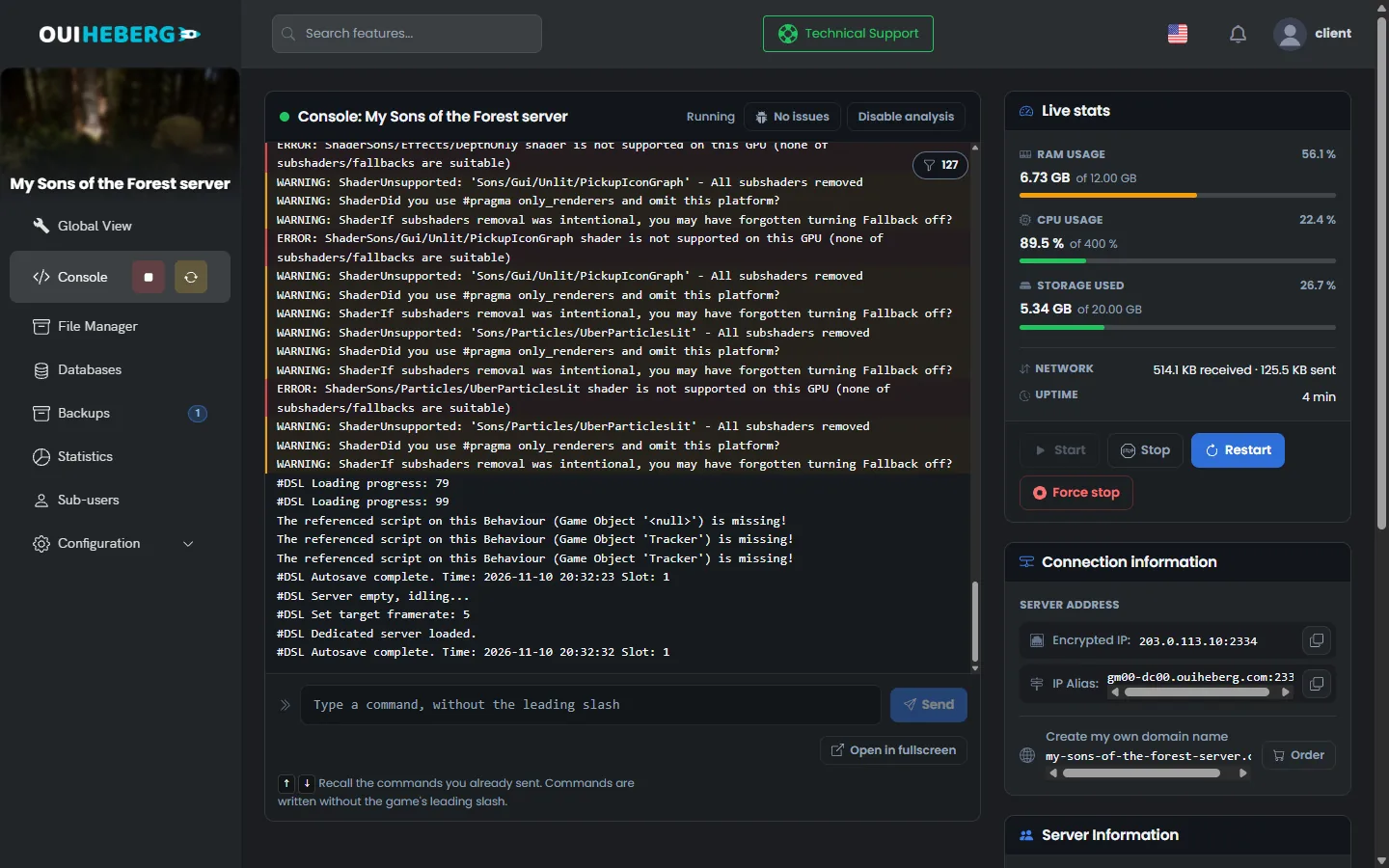
While loading, the console shows dozens of WARNING and ERROR lines about shaders. They are normal. The server has no graphics card and the game reports it. In our test, a new server started on the first try, without any relaunch.
The Stop button shuts the game down without saving the game. Whatever players did since the last automatic save is then lost. Wait for that save, every 10 minutes, before you stop or restart the server.
Join the server from the game
Your server is protected by a password, generated by OuiPanel when the server is created. It is delivered under the name "Serveur Sons of the Forest OuiHeberg". Give it your own name in the Server name variable, otherwise the game's list shows this default name.
Open Configuration › Server Settings, then copy the value of the Server password field.
In the Global View, note the main address of the server, in the form
IP:port.Launch Sons of the Forest, open the multiplayer menu and look for your server by its name in the server list.
Enter the password when the game asks for it.
In our test, Steam did list the server under its name. We have not checked the connection with a player yet. The last two steps therefore come from Endnight's guide and from its patch notes. According to those notes, the multiplayer menu also accepts a direct connection, with the IP address and the port of the server.
The port shown by OuiPanel is the game port. The query port and the BlobSync port come right after it. They are assigned with the server and you have nothing to open.
Set the variables in OuiPanel
The settings read at start are in Configuration › Server Settings, in the Environment Variables block. Confirm a field with the check mark on its right, then restart the server.
| Variable | Purpose |
|---|---|
| Query port | Port of the Steam server list, right after the main port. It is locked |
| BlobSync port | Port through which the game exchanges its data with players. It is locked |
| Server name | Name shown in the game's list, 60 characters at most |
| Maximum players | Number of slots, from 1 to 8, the game's limit. The delivered value is 4 |
| Server password | Password asked from players, generated at creation. According to Endnight, 40 characters at most |
| Game mode | List with normal, hard, hardsurvival, peaceful or custom. Only read when a game is created |
| Automatic update | Switch enabled by default. Steam updates the game at every start |
| Skip the network test | List with true or false. The delivered value is true, keep it |
| Save slot | Number of the game that is loaded, 0000000001 on delivery. A new number creates a new game |
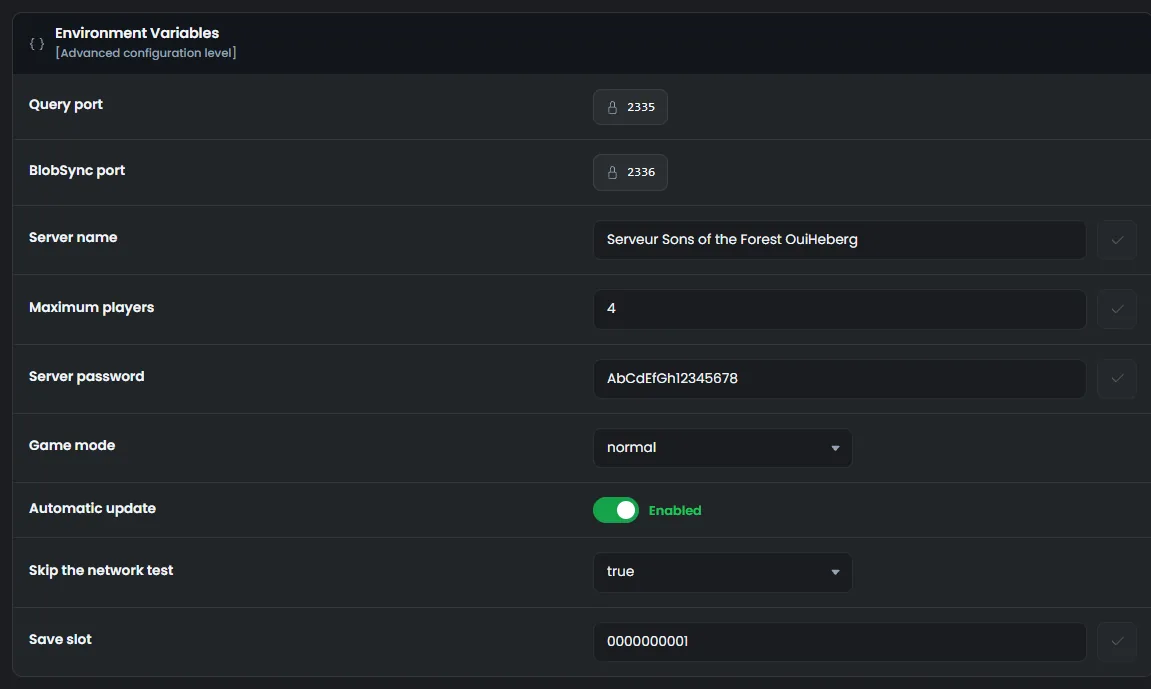
According to Endnight, an empty password opens the server to everyone. Keep one if the server is meant for your friends.
Do not set Skip the network test to
false. In our test, the console then stayed onTesting public accessibility...and the server never finished starting. Withtrue, Steam still listed the server.
Understand the dedicatedserver.cfg file
The game also reads its settings from the file serverconfig/dedicatedserver.cfg, in JSON format.
In the side menu, click File Manager.
Open the
serverconfigfolder.Click
dedicatedserver.cfg. The "Editing dedicatedserver.cfg" window opens.
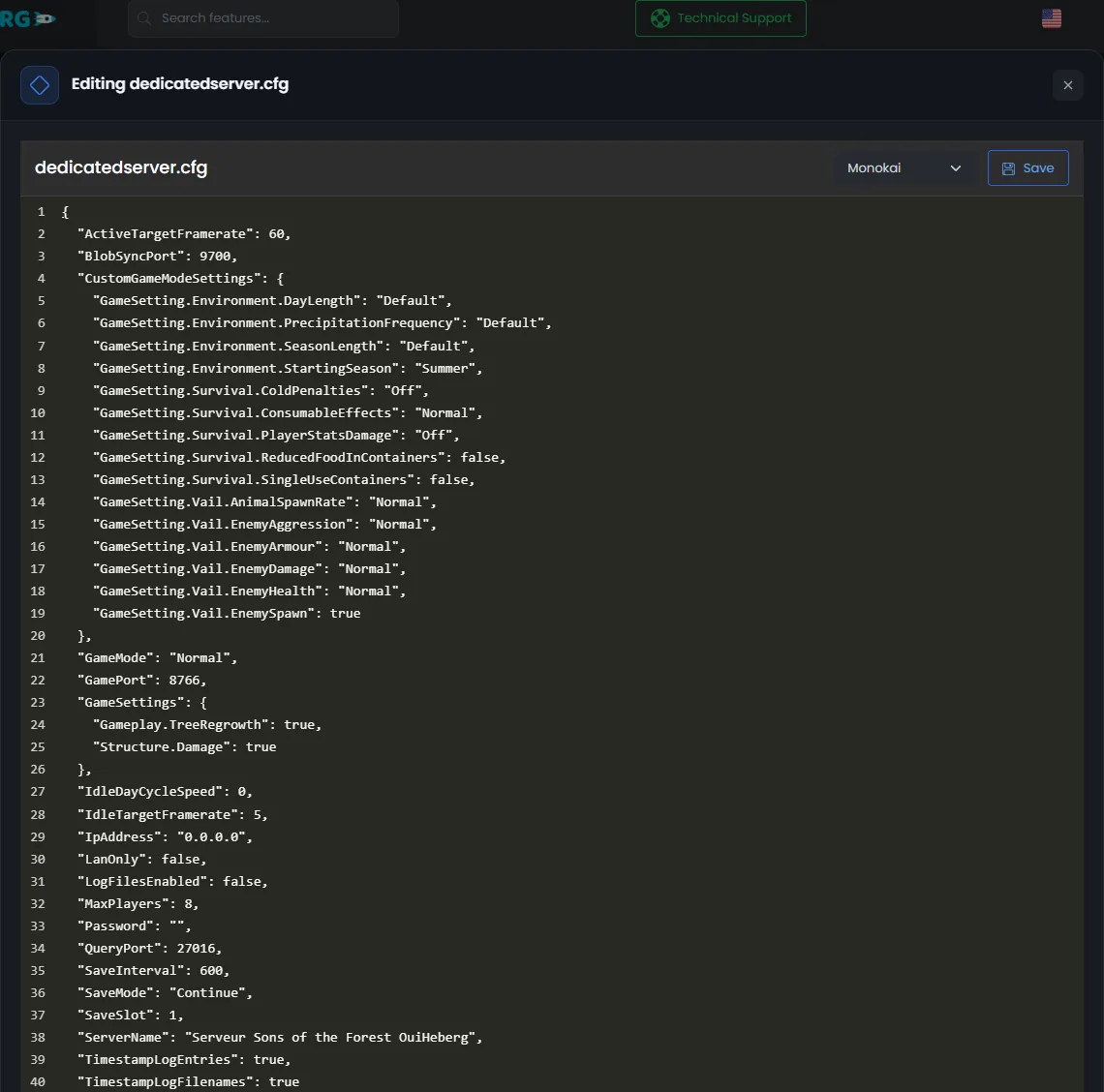
At every start, OuiPanel writes the server name, ServerName, and the save slot, SaveSlot, to this file. The ports, the player count, the password and the game mode go through the startup command. According to Endnight, this command takes priority over the file.
The GamePort, QueryPort, BlobSyncPort, MaxPlayers, Password and GameMode keys of the file therefore have no effect. We checked it for the password. The Password field of the file stays empty, and the game uses the one from the panel.
According to Endnight's guide, the game reads the other keys, for example these ones.
"LanOnly": false,
"SaveInterval": 600,
"SaveMode": "Continue",
LanOnlyset totrueremoves the server from the public list.SaveIntervalsets the gap between two automatic saves. The value 600 means 10 minutes.GameSettingssets tree regrowth and damage to buildings, in every mode.
We have not tried other values for these keys on our servers yet. Edit the file with the server stopped, click Save, then start the server.
Never set
SaveModetoNew. According to Endnight, the game then creates a new game at every start and overwrites the one in the chosen slot.
Start a new game
The game mode is set when the game is created. According to Endnight, it is ignored when the game already exists. To change mode, start another game in a new slot.
Wait for an automatic save, then stop the server.
In Environment Variables, choose the Game mode.
In Save slot, enter a free number, for example
2.Start the server.
In our test, the game created the missing game, then loaded it again at the next start. The old game stays in its folder. Enter its number again to get it back. The custom mode also reads the CustomGameModeSettings block of dedicatedserver.cfg, also at creation, according to Endnight.
Games are stored in serverconfig/Saves/DedicatedServer/Multiplayer/. Each folder carries the slot number on 10 digits, 0000000001 for slot 1. The game itself is the SaveData.zip file.
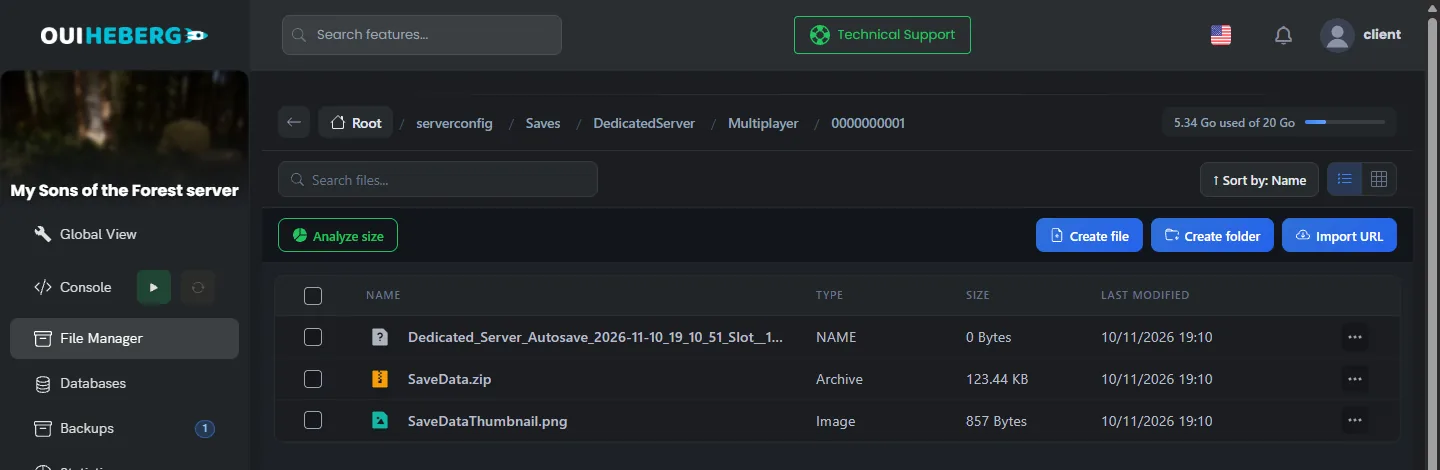
To continue a game from your PC, you would copy its folder into Multiplayer, then enter its number in Save slot. On the PC, online games are stored in AppData/LocalLow/Endnight/SonsOfTheForest/Saves, under your Steam ID. We have not tested this transfer with a real game yet. According to other hosts, the players' inventory may not carry over.
Back up the game
The game saves itself every 10 minutes, even with no player online. The console then shows
Autosave complete, with the time.The Stop button does not save the game. The OuiPanel console cannot force a save either.
Before you stop or restart, wait for the next
Autosave completeline.
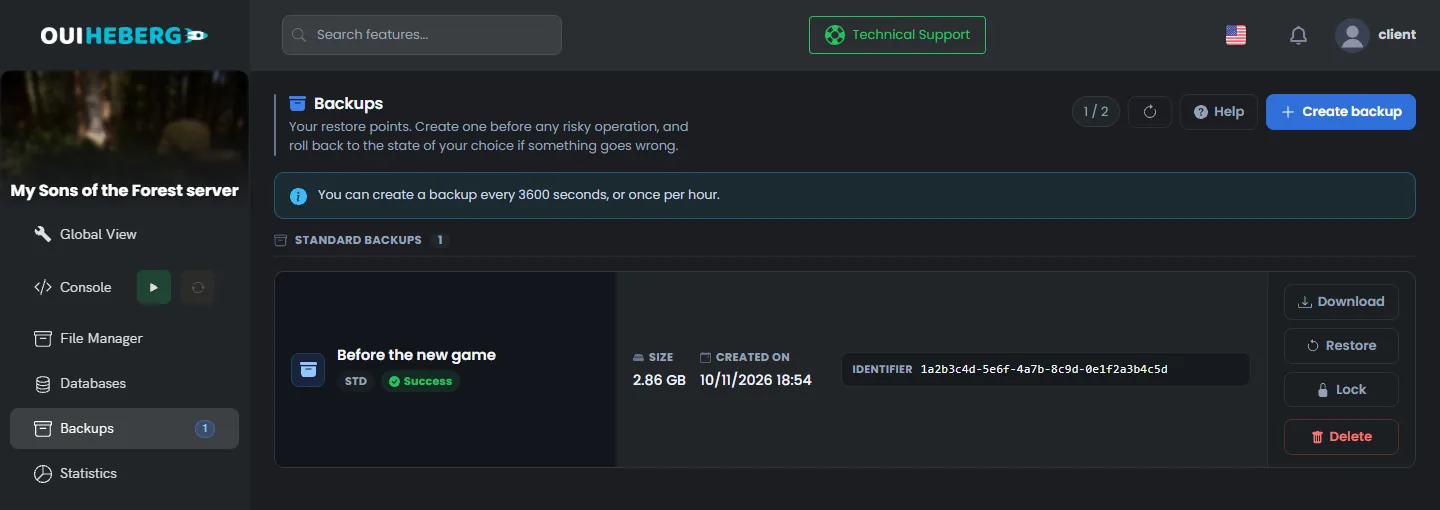
The Backups page of OuiPanel creates a copy of the server with Create backup. It contains your games and your settings, but also the game files, so it takes up space. In our test, Restore brought the game back to its state at the time of the backup. The server then loaded it again. Stop the server before you restore.
You can also copy the serverconfig folder to your computer over SFTP, with the guide How to connect via SFTP with FileZilla.
Update the server
The Automatic update switch is enabled by default. At every start, Steam then checks the game version before the server launches. We saw this check in the console. Endnight rarely releases updates, and none came out during our test.
A running server does not update itself. After a game update, wait for an automatic save, then restart the server from the Console.
To become admin of your server, read the guide Sons of the Forest console commands. To set the number of slots, read the guide How many players can play Sons of the Forest?.
If the server does not start
The OuiPanel console shows the server log. Read its last lines first.
| Symptom | Solution |
|---|---|
The console stays on Testing public accessibility... | Set Skip the network test back to true, then restart |
The console shows dozens of WARNING: Shader lines | This is normal. Wait for the line that ends with server loaded. |
The console shows ERROR: the game is missing | The game was not downloaded. Keep Automatic update enabled, then restart the server |
The console reports configuration file is invalid | The game could not read dedicatedserver.cfg. Check the commas and quotes of your changes |
| The name, the players or the password do not change | These values come from the OuiPanel variables. Change them in Environment Variables |
| The game has disappeared | Check Save slot. Another number loads another game |
Need help?
Open a ticket from Tickets › Open a Ticket, or from the Contact support tile at the bottom of your server's page in the client area. You can also ask your question on the OuiHeberg Discord.
Sons of the Forest server hosting from $9.26/mo, for up to 8 co-op players, with SFTP access, backups and DDoS protection included.
View plans →