
 Client area
How to change your VEIN server settings
A VEIN server is configured in three places. The OuiPanel variables, in the OuiHeberg game panel, set the name, the password and the number of players. The Game.ini file holds the description, the admins and the whitelist. The game rules, such as PvP, XP or the speed of time, go in the [ConsoleVariables] section of the Engine.ini file.
This guide starts from a server ordered from OuiHeberg. The plans are on our VEIN server hosting page. Always edit the files while the server is stopped.
What you set in OuiPanel
The server name, the password, the maximum number of players and publication on Steam are set in Configuration › Server Settings, in the Environment Variables block. The guide How to set up a VEIN dedicated server covers each variable.
On every start, OuiPanel writes these values to Game.ini. We checked this on a test server. So change them in OuiPanel, never in the file.
Also leave the
HTTPPort=18080line of Game.ini and theDefaultBindAddress=127.0.0.1line of Engine.ini as they are. OuiPanel uses them to save the world when the server stops, and puts them back on every start.
Open Game.ini and Engine.ini
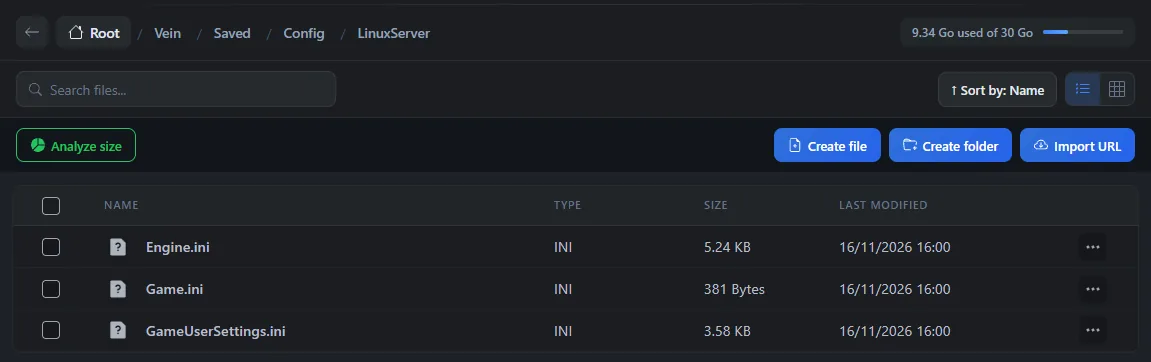
Both files are in the Vein/Saved/Config/LinuxServer folder of your server.
Edit these files while the server is stopped, when the status shows Offline. On a test server, we saw the game rewrite both files on every stop. A change made while the server runs could therefore be lost.
In the Console, click Stop, then wait for the Offline status.
Click File Manager, then open the
Vein,Saved,ConfigandLinuxServerfolders.Click
Game.iniorEngine.ini. An editing window opens, for example "Editing Game.ini".Change the lines you want, then click Save.
In the Console, click Start.
You can also edit these files over SFTP, with the guide How to connect via SFTP with FileZilla.
Set up Game.ini
According to Ramjet's documentation, Game.ini also holds these settings, which OuiPanel does not touch.
ServerDescription, in the[/Script/Vein.VeinGameSession]section, is the text shown when a player selects your server. Ramjet compares it to a message of the day, for your rules for example.SuperAdminSteamIDsandAdminSteamIDs, in the same section, name the admins. The guide VEIN console commands for server admins explains how.WhitelistedPlayers, in the[/Script/Vein.VeinGameStateBase]section, is the whitelist. As soon as it has one entry, only the listed SteamID64 can join.bVACEnabled, in the[OnlineSubsystemSteam]section, turns Steam's VAC on or off. It is 0 on delivery.
[/Script/Vein.VeinGameStateBase]
WhitelistedPlayers=76561190000000001
+WhitelistedPlayers=76561190000000002
As for admins, each extra whitelist entry starts with +. We have not yet checked with a player that the description shows and that the whitelist filters connections.
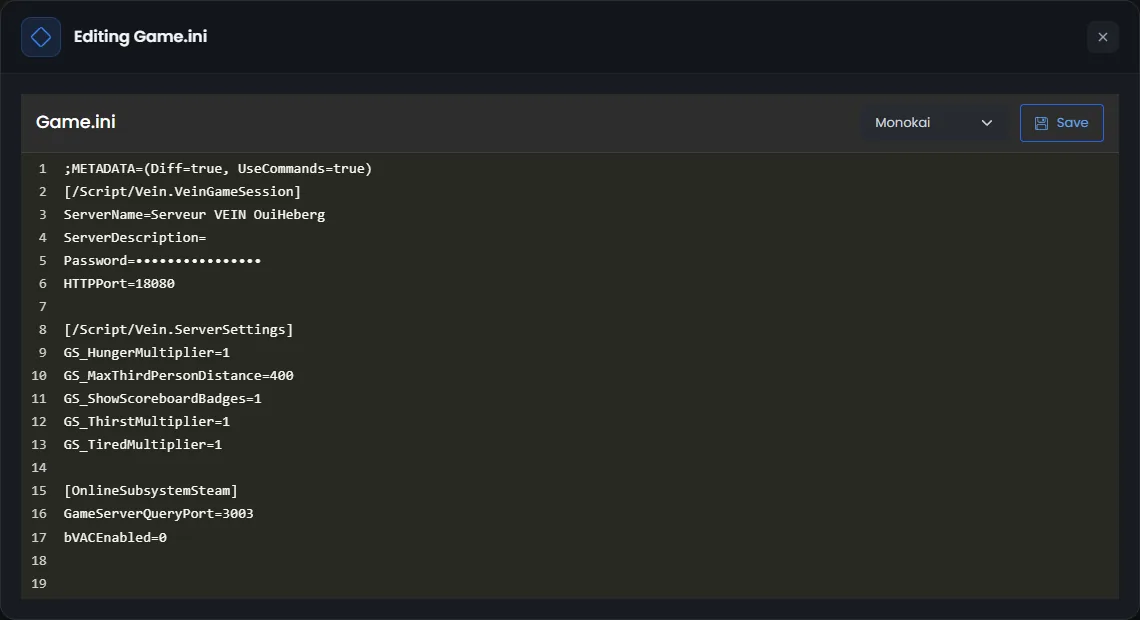
When it stops, the game removes from Game.ini the lines equal to their default value, such as
MaxPlayers=16. This is normal, Ramjet explains it in its documentation. OuiPanel puts its own lines back on the next start.
Change the game rules in Engine.ini
According to Ramjet's documentation, the game rules are set in a [ConsoleVariables] section of the Engine.ini file, to be created if it is missing. Each line holds a variable and its value.
[ConsoleVariables]
vein.PvP=0
vein.Stats.XPMultiplier=2
vein.Scarcity.Difficulty=1
This example turns PvP off, doubles the XP earned and gives more loot. The names come from Ramjet's official list. For a yes or no setting, 1 means yes and 0 means no.
The game rewrites Engine.ini when it stops. Your [ConsoleVariables] lines should be read again on every start, but we have not yet checked this in the game on our servers. Read the file again after a first stop.
What are the best VEIN server settings?
It depends on the style of your server. Here are some ideas taken from Ramjet's list. The default values are in the guide VEIN console commands for server admins.
| Server style | Lines to write |
|---|---|
| PvE server | vein.PvP=0 and vein.BuildObjectPvP=0 |
| More loot | vein.Scarcity.Difficulty=1 |
| Faster progression | vein.Stats.XPMultiplier=2 |
| Harder survival | vein.Scarcity.Difficulty=3 and vein.Zombies.DamageMultiplier=2 |
| Permanent death | vein.Permadeath=1 |
| Longer days | vein.Time.TimeMultiplier=8 |
| A world that lives with no player | vein.Time.ContinueWithNoPlayers=1 |
According to Ramjet, time stops by default when nobody is connected. The value 8 makes time run half as fast as the default setting, 16.
Change settings from inside the game
According to Ramjet, an admin can also change part of the settings in the game. They open the admin menu with the \ key, then its Config section. Ramjet says these changes should last and recommends this method where possible. We have not yet tried it on our servers.
The settings are not stored in the world save. According to Ramjet's patch notes, the server keeps them in its own variables. A world copied to another server therefore takes that server's settings.
If a setting does not stick
| Symptom | Solution |
|---|---|
A line of Game.ini is gone after a stop | It probably had its default value, which the game removes. Otherwise, it was written while the server was running |
| The name, the password or the number of players goes back to the old value | OuiPanel rewrites these lines on every start. Change them in Environment Variables |
An Engine.ini setting has no effect | Check the name in Ramjet's list and the [ConsoleVariables] section. Edit the file while the server is stopped |
| A player can no longer join after an update | According to Ramjet, the server and the player must have the same version. Keep Automatic update enabled and restart the server |
Need help?
Open a ticket from Tickets › Open a Ticket, or from the Contact support tile at the bottom of your server's page in the client area. You can also ask your question on the OuiHeberg Discord.
VEIN server hosting from $9.26/mo, on Ramjet Studios' native Linux dedicated server with 12 GB of RAM or more, SFTP access, backups and DDoS protection included.
View plans →