
 Client area
How to set up a Conan Exiles dedicated server
To set up a Conan Exiles server at OuiHeberg, order a plan with at least 16 GB of memory, then configure it in OuiPanel, the OuiHeberg game panel. The Conan Exiles Enhanced server installs itself, with no Steam account, and it is online a few minutes after it is created. Your players join it through the game's direct connect. Only the PC version of the game on Steam can join it.
This guide assumes a server ordered from OuiHeberg's Conan Exiles server hosting, with four plans from 16 to 48 GB. It covers each step, from the first start to stopping the server.
How much RAM does a Conan Exiles server need?
Plan for at least 16 GB. Based on our measurements, the server uses about 10 GB of memory when empty, with no players. After that, buildings, thralls and mods push memory up more than the number of players.
Funcom publishes no requirements for the server. The 16 GB often quoted elsewhere is what the game asks of a player's PC.
You choose the server's country when you order. After payment, the server is created, installs itself, then starts on its own.
Do you have an OuiBox? A Conan Exiles server needs at least 16 GB of memory there too.
Start the server for the first time
Your server runs the Enhanced version of Funcom's server, natively on Linux. The Legacy version is not offered.
Log in to OuiPanel at dash.ouipanel.com and open your Conan Exiles server.
Open the Console. If the state shows Offline, click Start.
Wait until the state changes to Running.
The server is ready when the console shows the Started SourceServerQueries line. After that, each start loads the saved world again.
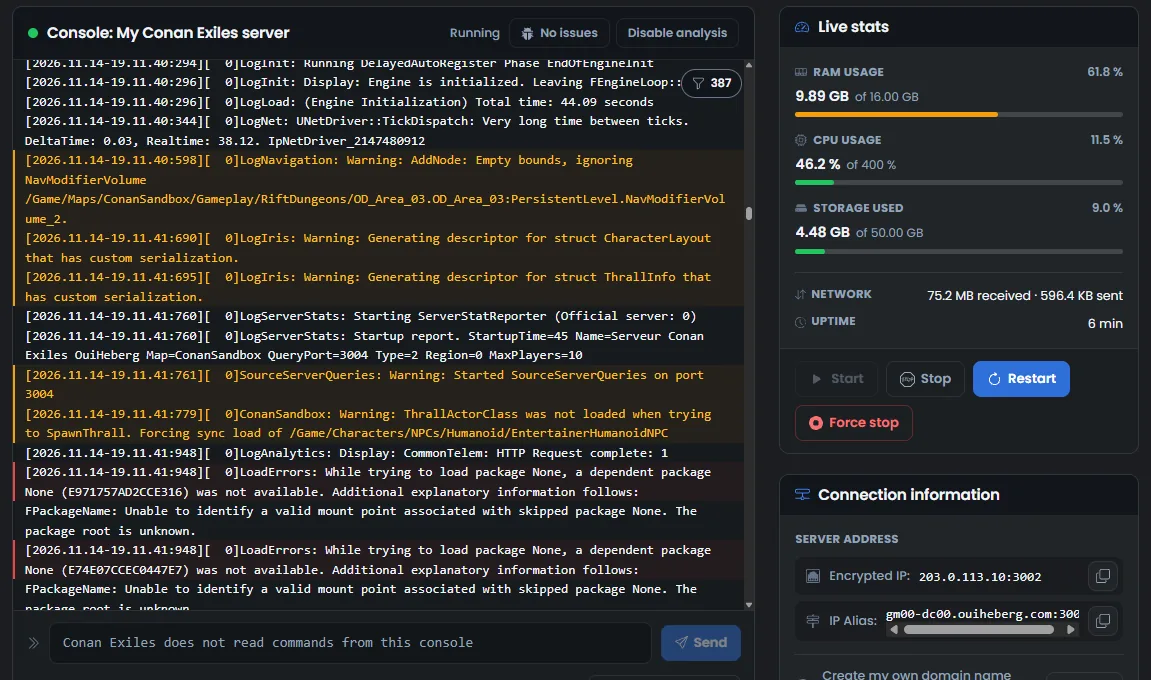
The OuiPanel console is for following the server log, starting the server and stopping it. The Conan Exiles server does not read commands typed there. While the server is running, its command field says so with the message "Conan Exiles does not read commands from this console". Commands go through RCON or the in-game console.
Configure the server in the variables
The everyday settings are in Configuration › Server Settings, in the Environment Variables block. For a field, type the value, then click the check mark on its right. For a switch, your choice is saved at once.
| Variable | Purpose |
|---|---|
| Server name | Name of your server, 100 characters at most. It is delivered as "Serveur Conan Exiles OuiHeberg" |
| Server password | Password to join the server. Empty on delivery, so the server is open to everyone |
| Admin password | Password to become admin in the game, 20 characters at most. It is generated when the server is created |
| Maximum players | Number of players connected at the same time, from 1 to 70. The delivered value is 10 |
| Automatic update | Updates the game through Steam at every start. Enabled on delivery |
| Enable RCON, RCON port and RCON password | Remote administration, off on delivery. The RCON password is generated when the server is created |
| Mod IDs and Automatic mod update | Steam Workshop mods. No mods on delivery |
| Query port | Query port of the server, assigned when it is created. It cannot be changed |
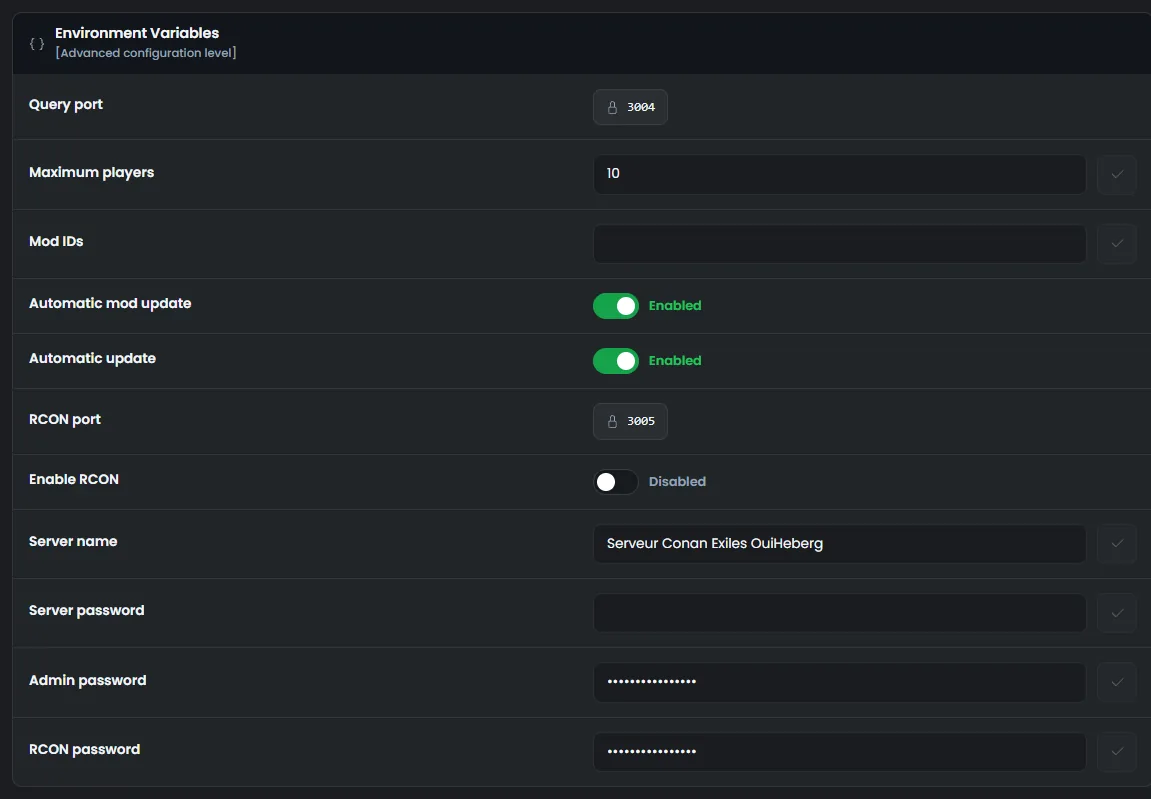
These values apply at the next start. So restart the server after a change. A restart takes about 5 minutes, because stopping alone takes about 4 minutes.
Mods are covered in the guide How to install mods on a Conan Exiles server.
Change the rules in ServerSettings.ini
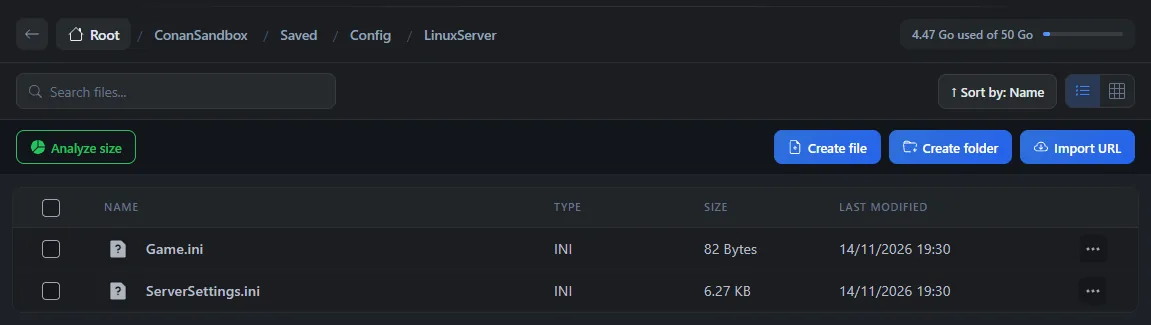
The rules of the world are in the ServerSettings.ini file. On our servers, it is in the ConanSandbox/Saved/Config/LinuxServer folder.
Edit this file while the server is stopped, when the state shows Offline. The game rewrites the file when it stops, and a change made while the server runs would be lost. We checked this on a test server.
In the Console, click Stop, then wait for the Offline state.
Click File Manager, then open the
ConanSandbox,Saved,ConfigandLinuxServerfolders.Click
ServerSettings.ini. The "Editing ServerSettings.ini" window opens.Change the values you want, then click Save.
In the Console, click Start.
Here are a few useful keys from the [ServerSettings] section.
PVPEnabledswitches the server to PvP withTrue. The server starts in PvE by default, withFalse.ClanMaxSizesets the clan size.PlayerXPRateMultipliersets the XP rate.ServerMessageOfTheDayholds the message of the day.
[ServerSettings]
PVPEnabled=True
ClanMaxSize=10
PlayerXPRateMultiplier=1.5
The file may show spaces around the = sign. The game reads both forms. In our test, an XP rate changed while the server was stopped was kept.
Do not change
AdminPasswordin this file. OuiPanel writes it there again at every start, from the Admin password variable.
You can also edit the file over SFTP, with the guide How to connect via SFTP with FileZilla.
How do players join the Conan Exiles server?
Your players join the server through the game's Direct Connect option, with the IP address and the port. This is the method Funcom recommends.
In OuiPanel, open the Global View.
Copy the Main address with the button on its right. It is made of the IP address and the port.
Give this address to your players. In the game, they choose direct connect and type it in.

According to Funcom, the password in Server password is asked of players, and without a password anyone can connect. We have not tried it with a player on our servers yet.
Only the PC version of Conan Exiles on Steam can join this server. The Epic Games Store, Microsoft Store and Game Pass, PS4, PS5 and Xbox versions stay on Legacy and cannot join it.
Become admin of the server
The admin password is read and changed in the Admin password variable. It is generated when the server is created, unique to your server.
According to Funcom, this password is used with the MakeMeAdmin command, in the game console, to open the admin panel. We have not tried it with a player on our servers yet.
The guide Conan Exiles console commands covers the admin commands and RCON.
Stop the server without losing anything
The world is saved in the ConanSandbox/Saved/game_0.db file. A stop from OuiPanel writes it as soon as the stop begins. We checked this on a test server.
In the Console, click Stop.
The state changes to Stopping. The server takes about 4 minutes to stop completely, without showing anything in the console.
Wait for the Offline state before editing a file or restarting.
Do not use the Force stop button during these 4 minutes. It would cut the server off abruptly. Let the stop finish.
Before a big change, also create a backup in the OuiPanel Backups menu. It runs on demand or on a schedule, for example every night.
If the server does not behave as expected
| Problem | Solution |
|---|---|
A change to ServerSettings.ini is gone | It was made while the server was running. Stop the server, wait for the Offline state, then make it again |
| A command typed in the OuiPanel console does nothing | The server does not read that console. Use RCON or the in-game console |
| A player can no longer connect after a game update | According to Funcom, the player's game must have the same version as the server. Check that Automatic update is enabled, then restart the server |
Need help?
Open a ticket from Tickets › Open a Ticket, or from the Contact support tile at the bottom of your server's page in the client area. You can also ask your question on the OuiHeberg Discord.
Conan Exiles server hosting from $11.59/mo, on the Enhanced version with 16 GB of RAM or more, SFTP access, backups and DDoS protection included.
View plans →