
 Client area
Conan Exiles console commands
Conan Exiles console commands and admin commands are typed in the game console, once you are admin with MakeMeAdmin and the admin password, or sent remotely through RCON. On an OuiHeberg server, both passwords are generated when the server is created and can be read in OuiPanel, the OuiHeberg game panel. The OuiPanel console, for its part, passes no command to the game.
This guide assumes a server ordered from OuiHeberg's Conan Exiles server hosting, and started at least once. The guide How to set up a Conan Exiles dedicated server explains that first start.
Where do you type Conan Exiles admin commands?
There are two places, and a third one that is not for commands.
| Place | What it does |
|---|---|
| Game console | Admin commands in the game, once you are admin with MakeMeAdmin |
| RCON | Remote commands, from an RCON client, without launching the game |
| OuiPanel Console | Reading the server log, starting and stopping the server. It passes no command to the game |
Why the OuiPanel console does not answer
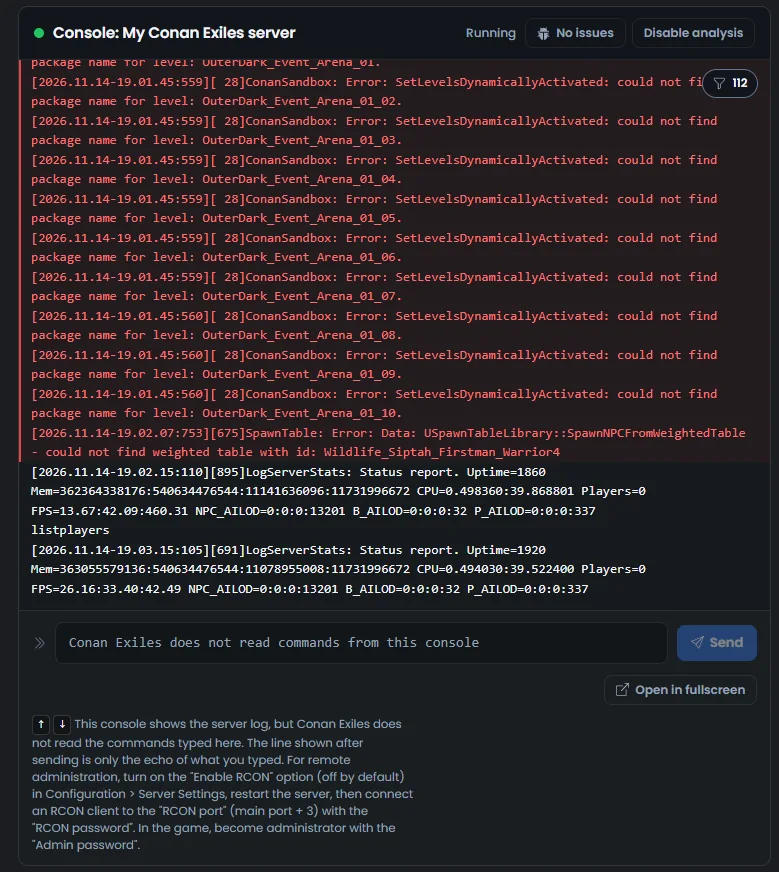
The Conan Exiles server does not read commands typed in the OuiPanel Console. We checked this on a test server, with listplayers and help. The game never answered, and its log held no trace of these commands.
While the server is running, the command field even shows "Conan Exiles does not read commands from this console". Under the bar, a help text points to RCON and to the admin password. If you click Send anyway, the console shows the command you typed. This is not an answer from the game, just an echo.
Find the admin password
The admin password is generated when the server is created, unique to your server.
In OuiPanel, open Configuration › Server Settings.
In the Environment Variables block, read the Admin password variable.
To change it, type a new password of 20 characters at most, click the check mark, then restart the server.
At every start, OuiPanel writes this password into ServerSettings.ini. In our test, the file did hold the password from the variable. So change it in OuiPanel, never in the file.
Become admin in the game with MakeMeAdmin
According to Funcom, the admin password is used with the MakeMeAdmin command, in the game, to open the admin panel.
Join your server from the game.
Open the game console.
Type
MakeMeAdmin, a space, then the admin password, and confirm.
You would then be admin, with access to the admin panel and to the commands of the game console. We have not tried this command with a player on our servers yet.
Enable RCON
RCON lets you send commands to the server from the Internet, without launching the game. It is off on delivery.
In Configuration › Server Settings, Environment Variables block, click the Enable RCON switch. It shows Enabled.
Restart the server from the Console.
Wait for the
Rcon is ready for client connectionsline in the console.
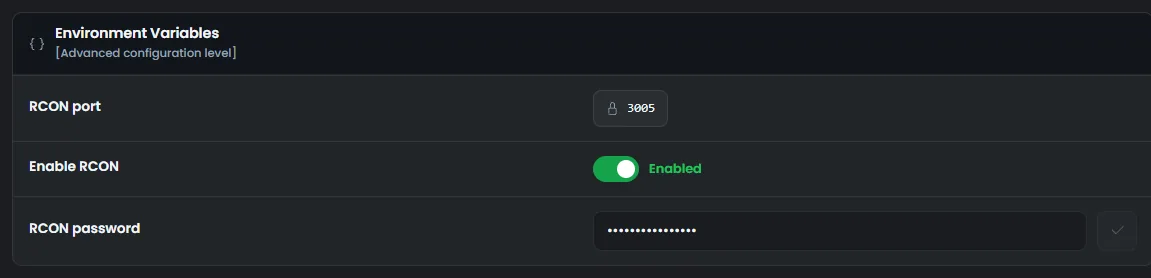
The port is shown in the RCON port variable. It is the server's main port plus 3, assigned when the server is created. The password is in RCON password, generated when the server is created.
Once enabled, RCON can be reached from the Internet. Keep the RCON password secret and never leave it empty.
Send a command through RCON
Use an RCON client, a small program that connects to the server and sends it commands.
In the client, enter the IP address from the Main address in the Global View, then the port from RCON port.
Enter the password from RCON password, then connect.
Type
listplayers. The server sends back the table of connected players.
In our test, a wrong password was refused, and listplayers answered with the right one. According to Funcom, RCON commands can target a player by name, not only by number.
The server confirms the connection with the "Authenticated." message, sometimes with a reply number other than the expected one. A strict RCON client may then think it was refused. If your client shows an error right after this message, try another one.
Which admin commands can you use?
This table lists the commands Funcom mentions, in the guide to its server tool and in its patch notes. It adds listplayers, which we tried through RCON. The others have not been tried on our servers yet.
| Command | Use |
|---|---|
MakeMeAdmin | Makes you admin in the game, followed by the admin password |
listplayers | Lists the connected players. Tried by us through RCON |
Fly and Walk | Flying, then back to walking. The admin panel also has a button for each |
AddUndistributedAttributePoints | Grants attribute points to spend |
According to Funcom's patch notes, the game's admin panel also shows the player list.
If a command does not work
| Problem | Solution |
|---|---|
| The OuiPanel console shows the command, with no answer | This is normal. Use RCON or the game console |
The password changed in ServerSettings.ini does not work | OuiPanel writes this password again at every start. Change it in Admin password |
| The RCON client does not connect | Check that Enable RCON shows Enabled and that the restart is over. Use the port from RCON port, not the main port |
| The RCON client reports an error after "Authenticated." | The connection worked. Try another RCON client |
To configure the server itself, follow the guide How to set up a Conan Exiles dedicated server. For mods, see the guide How to install mods on a Conan Exiles server.
Need help?
Open a ticket from Tickets › Open a Ticket, or from the Contact support tile at the bottom of your server's page in the client area. You can also ask your question on the OuiHeberg Discord.
Conan Exiles server hosting from $11.59/mo, on the Enhanced version with 16 GB of RAM or more, SFTP access, backups and DDoS protection included.
View plans →