
 Client area
How to install mods on a Conan Exiles server
To install mods on a Conan Exiles server at OuiHeberg, paste their Steam Workshop numbers into the Mod IDs variable in OuiPanel, then restart the server. The server then downloads the mods, fills in modlist.txt and loads them on its own. Only mods tagged Enhanced work, and every player needs the same mods as the server.
This guide assumes a server ordered from OuiHeberg's Conan Exiles server hosting, and started at least once. On a test server, we checked adding, loading and removing a mod tagged Enhanced.
Which mods work on a Conan Exiles server?
Only mods for the Enhanced version of the game. On the Steam Workshop, they carry the Enhanced tag. According to Funcom, a mod for the old Legacy version must be rebuilt by its author to work on Enhanced.
A Legacy mod is ignored by the server, according to Funcom.
A game update can break mods. According to Funcom, update 2.2.0 in September 2026 forced every mod to be recompiled.
Mods push memory up. The server already uses about 10 GB when empty, with no players.
Find a mod's number
Open the mod's page on the Conan Exiles Steam Workshop.
Look at the page address. The mod's number is the figure after
id=.
https://steamcommunity.com/sharedfiles/filedetails/?id=123456
In this example, the number is 123456. Note the number of each mod you want.
Add the mods in Mod IDs
In OuiPanel, open Configuration › Server Settings.
In the Environment Variables block, type the numbers in Mod IDs, separated by commas.
Click the check mark on the right of the field.
Check that Automatic mod update shows Enabled. This is the delivered setting.
Restart the server from the Console.
123456,234567

The restart takes about 5 minutes, because stopping alone takes about 4 minutes. Let it finish, without clicking Force stop.
Check that the mod is loaded
At startup, the console shows the download of each mod.
Downloading item 123456 ...
Success. Downloaded item 123456
The server then loads each mod. The console then shows a line with the mod's name and mounted successfully. The server also extracts the mod's Linux files itself. You have nothing more to do.
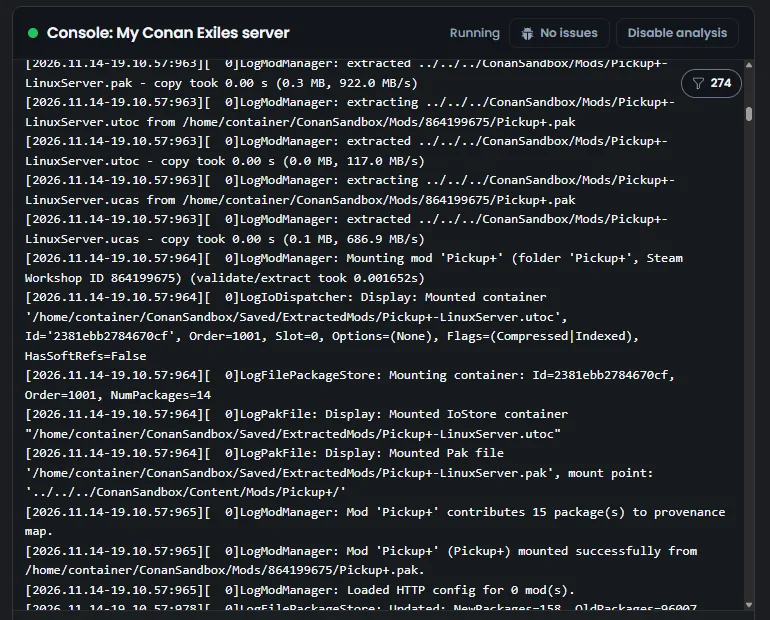
These lines scroll by quickly, because the game writes a lot at startup. They stay in the game log, ConanSandbox/Saved/Logs/ConanSandbox.log, which you can open or download from the File Manager.
What is in the Mods folder?
The server adds each mod to the ConanSandbox/Mods/modlist.txt file, in this form.
*123456/ExampleMod.pak
The folder also holds a small file named after each mod's number. It is a link to the downloaded files.
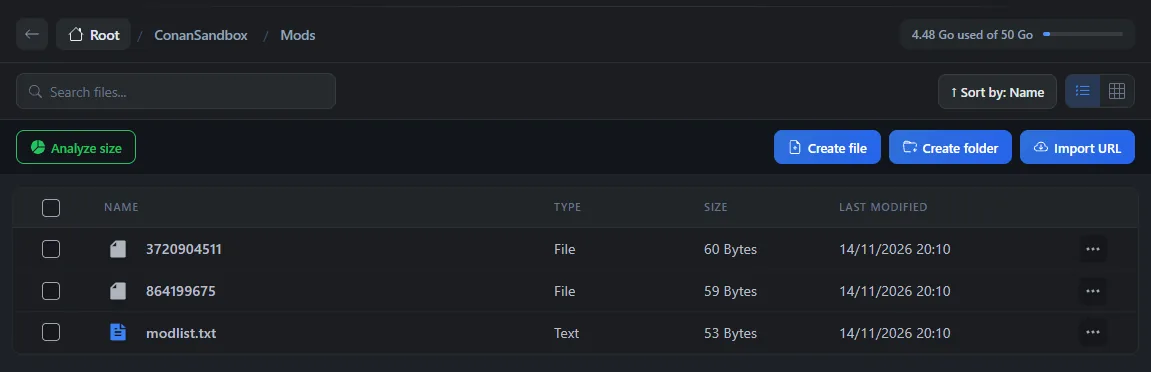
Do not write modlist.txt by hand for a Workshop mod, and do not delete these links. The Mod IDs variable takes care of it.
Update the mods
The Automatic mod update variable decides what happens at startup.
With Enabled, the delivered setting, the server downloads the mods from Mod IDs and updates them.
With Disabled, nothing is downloaded. Installed mods stay at their version, and a mod added to the list is not installed.
After a game update, a mod that its author has not updated yet may not work well. Check the mod's Workshop page in that case.
Remove a mod
Create a backup in the OuiPanel Backups menu.
Remove the mod's number from Mod IDs, then click the check mark.
Restart the server.
At startup, the console shows Removing mod no longer in MOD_IDS followed by the number. The server then deletes the mod's files and clears its line from modlist.txt.
Removing a mod does not remove its data from the world. The data stays in
game_0.db. In our test, the game found it again when the mod was put back. Before removing a mod, follow its author's instructions on its Workshop page.
What your players need to do
According to Funcom, every player needs the same mods as the server. Give them the list of mods, with the link to each Workshop page.
According to Funcom, players on Steam get the mods through the Workshop. We have not yet checked, with a player, joining a server that has mods.
If a mod needs to reach the Internet
Some mods send requests to the Internet, for example to Discord. According to Inflexion, the studio that develops Enhanced with Funcom, a server blocks these requests until you allow them. The mod still loads, but it cannot reach the Internet.
Stop the server and wait for the Offline state.
In the
ConanSandbox/Saved/Config/LinuxServerfolder, open or create theModHttp.inifile.Add a section named after the mod's folder, with one
AllowedOriginline per allowed address, in quotes.Click Save, then start the server.
[MyMod]
AllowedOrigin="https://api.example.com"
According to Inflexion, the game log shows at startup the addresses each mod asks for. We have not needed this file on our servers yet.
If a mod does not load
| Problem | Solution |
|---|---|
The console does not show Downloading item | Check the number, the commas and that Automatic mod update shows Enabled. Wait for the restart to finish |
The mod is downloaded, but the mounted successfully line is missing | Check that the mod carries the Enhanced tag and that it was updated after the last game update |
You wrote modlist.txt by hand | Put the numbers in Mod IDs instead. The server fills in this file itself |
| The server runs short of memory with many mods | Move to a bigger plan. Changing plans keeps your data |
To configure the rest of the server, follow the guide How to set up a Conan Exiles dedicated server. For admin commands and RCON, see the guide Conan Exiles console commands.
Need help?
Open a ticket from Tickets › Open a Ticket, or from the Contact support tile at the bottom of your server's page in the client area. You can also ask your question on the OuiHeberg Discord.
Conan Exiles server hosting from $11.59/mo, on the Enhanced version with 16 GB of RAM or more, SFTP access, backups and DDoS protection included.
View plans →