
 Client area
How to install mods on a Core Keeper server
Core Keeper has official mods, on mod.io and on the Steam Workshop. On a Core Keeper server with OuiHeberg, they do not install on their own. You copy each mod by hand into the game folder, then every player installs the same mods.
We have not yet tried a mod on our servers. The steps follow Pugstorm's modding documentation and feedback from players.
This guide starts from a server that has already been started once. The guide How to set up a Core Keeper dedicated server covers ordering, starting and stopping. If you are looking for Core Keeper server hosting, our four plans range from 2 to 12 GB of memory.
Where to find Core Keeper mods?
Pugstorm has opened the game to mods since 2023, with an official kit. Mods are on mod.io, from the game menu. They are also on the Steam Workshop since the 1.3 update of September 2026.
The Pugstorm modding documentation explains how to install them on a PC.
According to Pugstorm, some script mods can access your files and the Internet. The game warns you before you subscribe. Only install mods you trust.
How do mods work on a server?
The server does not download any mod, neither from mod.io nor from the Workshop. You copy the files yourself.
According to Pugstorm, all players must have the same mods. Also use the same versions as on the server.
The server runs on Linux. A mod that adds items, enemies or blocks should therefore have its Linux version. Without it, this content would be missing on the server. A mod made only for the player can also stop the server from starting.
Prepare the mod on your PC
A mod comes as a folder that contains a ModManifest.json file. According to the modding documentation, a mod installed by hand goes in CoreKeeper_Data\StreamingAssets\Mods, in the game folder. Get this folder from your PC, along with the folders of the mods it depends on.
Check on the mod's page that it works on a server and that it has a Linux version.
Copy the mod to the server
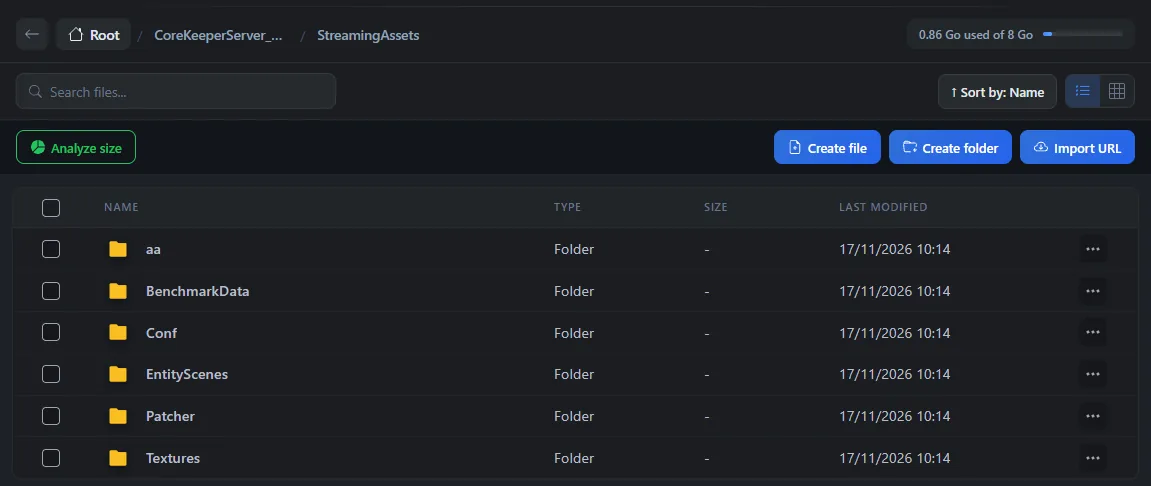
Server mods go in CoreKeeperServer_Data/StreamingAssets/Mods. This Mods folder does not exist on a new server. You create it once.
In the Console, click Stop, then wait for the Offline status.
In the File Manager, open
CoreKeeperServer_Data, thenStreamingAssets.Click Create folder and name it
Mods, with a capital M.Inside
Mods, copy each mod's folder over SFTP. Each mod keeps its own folder, with itsModManifest.json.Start the server, then wait about 5 minutes.
The server should load the mods at this start. We have not yet checked this on our servers.
The guide How to connect via SFTP with FileZilla explains how to connect over SFTP. With an SFTP client, you copy a whole folder at once.
Do not confuse it with the data mods folder
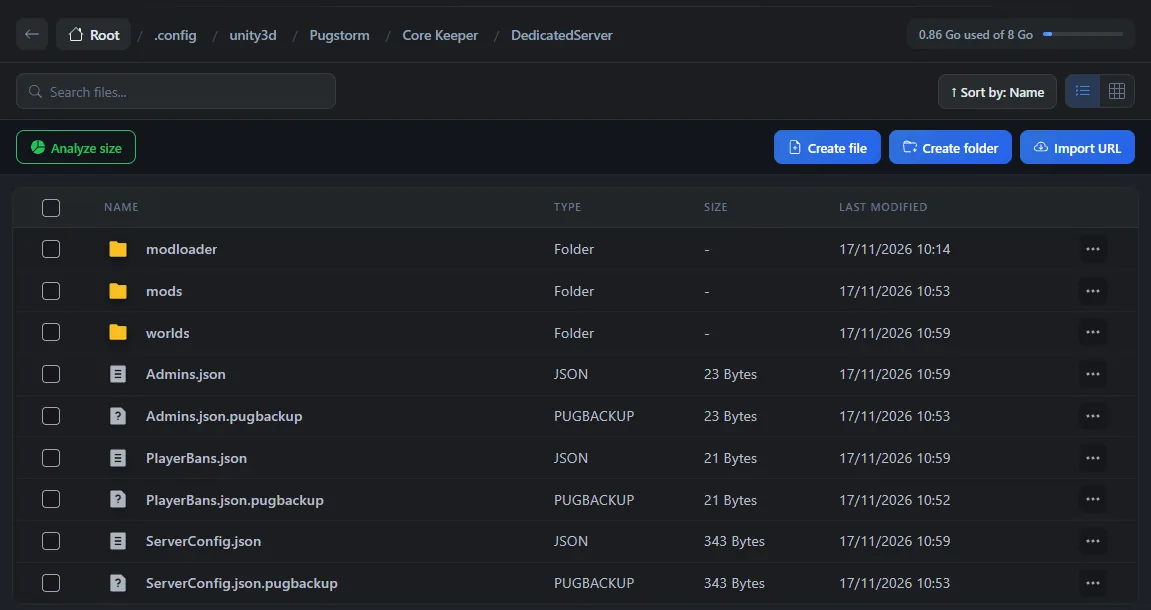
The .config/unity3d/Pugstorm/Core Keeper/DedicatedServer folder also contains a mods folder, in lowercase. The game creates it on its own. Its README.txt file says so. This folder is used for mod settings, not to load mods. Do not copy your mods into it.
Give players the same mods
Every player must have exactly the same mods as the server. The safest way is for everyone to subscribe to the same mods, in the same versions.
You can also compress the server's Mods folder with Compress, then download the archive with Download to share it.
Are you transferring a single-player world that used mods? Also follow the guide How to transfer a Core Keeper world to a dedicated server.
Update or remove a mod
According to the modding documentation, a mod installed by hand is also updated by hand. Replace its folder on the server while the server is stopped, then do the same for every player.
To remove a mod, stop the server and delete its folder in Mods. Make a backup in Backups before each change of mods.
If a mod causes problems
| Symptom | Solution |
|---|---|
| The server no longer starts after adding a mod | Remove the last mod you added. A mod made only for the player can block the start |
| A mod's items are missing on the server | The mod probably has no Linux version. Ask its author for one |
| A player cannot join | Check that they have the same mods as the server, in the same versions |
| The server ignores the mod | Check the CoreKeeperServer_Data/StreamingAssets/Mods path and the capital M of Mods |
Need help?
Open a ticket from Tickets › Open a Ticket, or from the Contact support tile at the bottom of your server's page in the client area. You can also ask your question on the OuiHeberg Discord.
Core Keeper server hosting from $2.30/mo, on Pugstorm's native Linux dedicated server with 2 GB of RAM or more, SFTP access, backups and DDoS protection included.
View plans →